


Overview
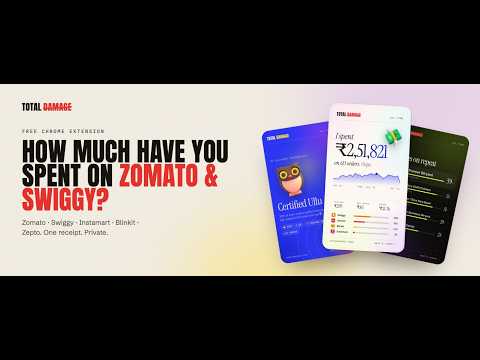
See how much you’ve spent on Zomato, Swiggy, Instamart, Blinkit & Zepto. Every order on one receipt, plus cards to share. Private.
Total Damage adds up every food delivery and quick-commerce order you've ever placed (Zomato, Swiggy, Swiggy Instamart, Blinkit and Zepto) and shows the total on one receipt with 100% accuracy. Then it turns your numbers into a card worth sharing. No sign-up. No server. Your order history never leaves your browser. WHAT YOU GET ━━━━━━━━━━━━━━━━━━━━ 💸 Your total food delivery spend: all time, this month, last month, this year, or any custom date range 🧾 Every app in one place: Zomato, Swiggy, Instamart, Blinkit and Zepto, side by side 📊 Per-app breakdown: tap any app to see what you spent there, your monthly trend and your most-ordered restaurants 🍗 Top dishes and restaurants: the biryani you keep reordering, the place on speed dial 🌙 Late-night orders: how many times you ordered between 12 and 4 AM, your peak hunger hour and busiest day 🛵 Fees, tips and savings: what you paid in delivery fees and what offers saved you 🏝️ "That's the same as…": your spend in iPhones, trips to Bali or months of rent 🦉 Your delivery personality: Certified Ullu, Biryani Paglu, Momo Maharaj and more ✅ Accurate totals: cancelled orders are left out and refunds are taken off ━━━━━━━━━━━━━━━━━━━━ HOW IT WORKS 1. Install Total Damage and click Connect next to Zomato, Swiggy, Blinkit or Zepto. 2. If you're already logged in on that website, that's it. If not, log in on their own website, exactly as you normally would. 3. Total Damage reads your order history, the same list you see in the app, and adds it up right in your browser. Ordered on your phone? That works too. Your orders belong to your account, so the website shows the same full history as the app. ━━━━━━━━━━━━━━━━━━━━ PRIVATE BY DESIGN • Everything runs and is stored on your device • We never see or store your password, OTP or card details • No account, no analytics, no ads, nothing sold • Delete everything any time from the menu, or by removing the extension Supported: Zomato, Swiggy (food delivery + Instamart), Blinkit (beta), Zepto (beta), DoorDash (US, beta). Total Damage is an independent project, not affiliated with Zomato, Swiggy, Blinkit, Zepto or DoorDash. Find out your total damage. It's probably more than you think. 💀
0 out of 5No ratings
Details
- Version1.0.2
- UpdatedOctober 17, 2026
- Size1.46MiB
- LanguagesEnglish
- DeveloperWebsite
Email
vinayjjoshi.310@gmail.com - Non-traderThis developer has not identified itself as a trader. For consumers in the European Union, please note that consumer rights do not apply to contracts between you and this developer.
Privacy

Total Damage – Zomato, Swiggy, Blinkit & Zepto Spend Tracker has disclosed the following information regarding the collection and usage of your data. More detailed information can be found in the developer's privacy policy.
Total Damage – Zomato, Swiggy, Blinkit & Zepto Spend Tracker handles the following:
This developer declares that your data is
- Not being sold to third parties, outside of the approved use cases
- Not being used or transferred for purposes that are unrelated to the item's core functionality
- Not being used or transferred to determine creditworthiness or for lending purposes
Support
For help with questions, suggestions, or problems, visit the developer's support site