

ToolBreezy.com - YouTube Transcript Generator, Downloader & Subtitles
2 ratings
)
Overview
Download or copy any YouTube transcript, subtitles or captions as text, markdown, SRT or VTT. Translate to 100+ languages.
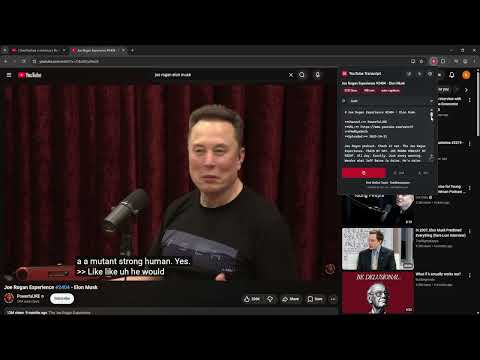
Get the transcript of any YouTube video, in the shape you actually need it. One click gives you the whole thing: clean paragraphs, the video's chapters as headings, and the title, channel and upload date at the top. Copy it, or download it as a Markdown, plain text, SubRip (.srt) or WebVTT (.vtt) file. YOU DECIDE WHAT YOU GET Every part of the output is a setting, because the right answer depends on what you are doing with it. - Clean paragraphs for reading and pasting, or every caption on its own line with its own timing, for lining text up against the video. - Timestamps off, timestamps on the paragraph, or timestamps on every line. Off by default. They can be clickable links that jump straight to that moment. - Choose which of the video's details go at the top: title, channel, URL, upload date, duration, view count, category, and the description in full or just its first paragraph. - Markdown, plain text, YAML front matter for note apps like Obsidian, or a real subtitle file. - Chapter headings on or off. Sound cues like [Music] kept or removed. Sentences capitalised or left exactly as the captions had them. Set it once. It is remembered, and the settings page previews every change on a real transcript as you make it. SUBTITLE FILES, NOT JUST TEXT SubRip (.srt) and WebVTT (.vtt) come out properly timed, one cue per caption, ready for a video editor or a player. A transcript with [12:04] typed into it cannot do that, and rebuilding the timings by hand is not a workflow. A VIDEO IN A LANGUAGE YOU DO NOT SPEAK The language menu lists every caption track the video has, and underneath, everything YouTube will translate it into. On a typical video that is over 150 languages. Pick one and you get the transcript in that language. IT REMEMBERS Every transcript you take is kept on your machine and the history page searches inside all of them, not just the titles. You will find the video where somebody said the thing you half remember. HOW IT READS THE CAPTIONS It does not scrape the transcript panel and it does not build any URL. It asks YouTube's own player for captions the same way the CC button does, and reads the answer. That is why it keeps working: if captions work for the viewer, they work here. WHAT IT DOES NOT DO - No account, no sign-in, no server of ours. Nothing is uploaded anywhere. - It asks for very little: the tab you are on when you click the icon, local storage for your settings and history, and access to YouTube pages only. - No bulk downloading of a whole channel. This is for the video you are watching. - Nothing is behind a payment. There is no paid tier and no upgrade prompt. Free Online Tools - ToolBreezy.com Created by Ken Lee - KenLeeDev.com
5 out of 52 ratings
Details
- Version1.0.0
- UpdatedAugust 9, 2026
- Offered byKenLeeDev.com
- Size68.99KiB
- LanguagesEnglish (United States)
- Developer
Email
KenRLee4@gmail.com - Non-traderThis developer has not identified itself as a trader. For consumers in the European Union, please note that consumer rights do not apply to contracts between you and this developer.
Privacy

This developer declares that your data is
- Not being sold to third parties, outside of the approved use cases
- Not being used or transferred for purposes that are unrelated to the item's core functionality
- Not being used or transferred to determine creditworthiness or for lending purposes
Support
For help with questions, suggestions, or problems, visit the developer's support site