

ToolBreezy.com - Website SEO Checker & On-Page SEO Analyzer
2 ratings
)
Overview
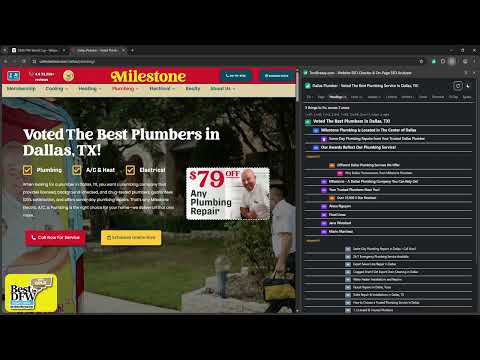
Find every on-page SEO problem and how to fix it. Highlight nofollow links, check schema, hreflang, images. Copy any tab as MD.
Most SEO extensions tell you what is wrong. This one tells you what to change it to, and lets you check anything yourself. One click on the toolbar icon opens the dashboard: eleven tabs of detail, the things you would otherwise install five separate extensions to see. WHAT IT CHECKS, IN ONE CLICK • Title and meta description, with the length a search result actually cuts at — measured in pixels, not characters, because that is how truncation really works • A live search result preview, desktop and mobile • The heading outline, colour-coded by level, with skipped levels flagged • Canonical, robots, meta robots, X-Robots-Tag, indexability • Structured data, in plain English or as raw JSON-LD • The tags that decide how the page looks when somebody shares it, with the image sizes • hreflang, VALIDATED — self-reference, bad region codes, missing x-default, and whether each alternate points back • Word count, readability, and the phrases the page actually repeats WHAT YOU CAN CHECK YOURSELF Every tab is a tool, not a summary. • LINKS — every link with its anchor text, filtered by internal, external, dofollow, nofollow, sponsored, UGC, empty anchor or unsafe target. Highlight them all on the page in colour: green passes link equity, red does not, amber is paid, purple is user-generated. Drag the slider to set how thick the outlines are. • BROKEN LINKS — ask every link whether it still resolves. A link that cannot be reached is reported as unknown, never as broken, because calling a working link dead is worse than not checking. • IMAGES — every image with its alt text, its rendered size, its natural size and its real byte weight. Find the 2400px image sitting in a 400px slot. Highlight them on the page by alt state. • REDIRECTS — how many hops the browser took to reach this page, and what they cost. • FRONT DOORS — fetches the http, https, www and bare versions of your URL and tells you whether they all land on one page. If they do not, your site is splitting its own links four ways. • THE JS GAP — fetches the page the way a crawler first sees it and reports which SEO signals only exist after JavaScript runs. A verdict, not a diff you have to read. • SITEMAPS — starts with robots.txt, then tries the paths that are actually in common use, not just /sitemap.xml. • TECHNICAL — doctype, charset, lang, viewport, favicons, feeds, mixed content, frames, text-to-HTML ratio, every meta tag in the head. • SPEED — loading speed and layout stability, as the browser measured them on this load. BUILT TO PASTE SOMEWHERE • Copy any tab as Markdown — into a notepad, a document, a ticket or an AI • Copy the page's own copy, structure kept, with the navigation, footer and cookie banner left out • Copy the whole audit as one Markdown report, fixes first • Export any table as a CSV that opens correctly in a spreadsheet, every field quoted DESIGN Icon-based, with a plain-English explanation on every control when you hover it. Light and dark mode, both checked for contrast on every screen. No scores. A number out of 100 tells you nothing you can act on, so you get the list of what to fix and how. PRIVACY No account. No tracking. No analytics. Nothing leaves your browser except the requests you ask for by pressing a button — checking links, fetching a sitemap, or testing your front doors — and those go straight to the site you are looking at. Site access is optional and asked for only when a feature needs it. Free, from ToolBreezy.com
5 out of 52 ratings
Details
- Version1.0.1
- UpdatedAugust 18, 2026
- Offered byKenLeeDev.com
- Size183KiB
- LanguagesEnglish (United States)
- Developer
Email
KenRLee4@gmail.com - Non-traderThis developer has not identified itself as a trader. For consumers in the European Union, please note that consumer rights do not apply to contracts between you and this developer.
Privacy

This developer declares that your data is
- Not being sold to third parties, outside of the approved use cases
- Not being used or transferred for purposes that are unrelated to the item's core functionality
- Not being used or transferred to determine creditworthiness or for lending purposes
Support
For help with questions, suggestions, or problems, visit the developer's support site