

ToolBreezy.com - Robots.txt Tester, Sitemap, Nofollow Link & Index Checker
2 ratings
)
Overview
Find out why Google is not showing your page, and see every nofollow link on it. Robots, sitemap and noindex in one answer.
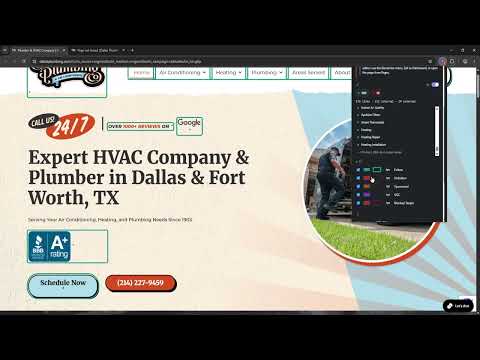
Can Google index this page, and which exact rule is stopping it? Answering that today means checking robots.txt, the meta robots tag, the X-Robots-Tag HTTP header, the canonical and the sitemap across four or five different tools, then working out the answer yourself. This checks all of them at once and gives you one plain sentence. IT TELLS YOU THE SCREEN, NOT JUST THE RULE Every other checker tells you the page says noindex. This one recognises what built the site and tells you where to go and change it. WordPress with Yoast: Edit the page, Yoast SEO box, Advanced, "Allow search engines to show this page?", Yes. The same page on Shopify: the tag is in your theme, in theme.liquid near the top. On Squarespace: robots.txt cannot be edited at all, so use the page-level toggle instead. Whichever SEO plugin you run, it names that plugin's own screen rather than a generic one. It recognises the common site platforms, SEO plugins and page builders, and if it does not recognise yours you still get the general fix. It never invents a settings screen that does not exist. AND IT NAMES THE RULE, NOT JUST THE VERDICT Other checkers compute an "indexable" flag and leave you to find out why. Every blocker here carries the line that produced it: Google can't index this page, robots.txt blocks this URL. ROBOTS.TXT robots.txt blocks this URL the line "Disallow: /staging" matches this path EVERY SIGNAL, INCLUDING THE ONES MOST TOOLS FORGET - HTTP status. A 404 page cannot be indexed, and most checkers never look - robots.txt, fetched and matched against THIS URL, not just shown to you - meta robots, and the Google-specific tag that overrides it - X-Robots-Tag, the HTTP header that is invisible in the page source, read with its user agent so a rule aimed at Bing is not applied to Google - canonical, because pointing elsewhere means that URL gets indexed, not this one - hreflang: the self-reference, the x-default, and duplicate languages - sitemap, looked for where YOUR platform actually puts it, not just /sitemap.xml - redirects, because every check is about where you landed, not where you asked for Plus the directives other tools print raw and never explain: noarchive, nosnippet, noimageindex, notranslate, max-snippet, max-image-preview and unavailable_after. THE ANSWER ON THE TOOLBAR, BEFORE YOU CLICK Once you allow site access, the icon shows the verdict as you browse: a green tick, an amber mark, a red cross. You find the page that quietly went noindex because you walked past it, not because you went looking for it. Without access the badge stays empty. It never shows a tick for a check it was not allowed to run. EVERY LINK, MARKED AND FINDABLE See at a glance how many links are follow, nofollow, sponsored or ugc. Press one of the counts and the list below shows only those. Press a row and the page scrolls to that exact link and flashes it. Switch it on and every link is boxed where it sits, in your own colours, your own line style (solid, dashed, dotted or double) and your own thickness from 1px to 4px. Switch off any state you do not want to see. The box is drawn as an outline, so nothing on the page moves, and switching it off removes every trace. One state no other link highlighter can show you: a link you are FOLLOWING that points at a URL your own robots.txt blocks. Finding that needs a real robots.txt matcher, and this is the tool that already has one. IS IT ACTUALLY IN GOOGLE? One button opens a site: search for the exact URL. Shift-click opens Search Console's URL Inspection. The extension never queries Google itself and never reads a result page. It opens a tab, and you look. A REAL ROBOTS.TXT MATCHER Most of the work went here, because it is where a checker is most likely to be quietly wrong: - Longest match wins, not first match, which is Google's actual rule - Allow breaks an equal-length tie - * and $ are supported, and every other regex character is escaped, so a literal dot in a Disallow does not behave as a wildcard - An empty "Disallow:" matches nothing - Consecutive User-agent lines share the group that follows them - An exact agent match means the * group does NOT also apply, the rule most parsers get wrong COPY THE WHOLE THING One click copies the verdict, the blocking rules, the fix for your platform and every signal, as clean Markdown. Ready for a ticket, a client email, or an AI. PRIVACY Nothing is collected, stored or sent anywhere. No analytics, no account, no tracking, and no servers of ours involved at any point. The extension reads the page you are on when you click it, and fetches robots.txt and the sitemap from that same site. Site access is optional: nothing is granted when you install it, and it asks once, when you press Start. If you never press it you still get the page's own verdict, clearly marked as incomplete so you know what was not read. Granting access also turns on the toolbar badge, which reads each page's crawl directives as you browse so the icon can show the verdict without you opening anything. That is the only part that runs without a click, it reads nothing but those directives, and it keeps nothing. Free, and part of the ToolBreezy set of small tools that each do one thing well.
5 out of 52 ratings
Details
- Version1.0.0
- UpdatedAugust 10, 2026
- Offered byKenLeeDev.com
- Size79.56KiB
- LanguagesEnglish (United States)
- Developer
Email
KenRLee4@gmail.com - Non-traderThis developer has not identified itself as a trader. For consumers in the European Union, please note that consumer rights do not apply to contracts between you and this developer.
Privacy

This developer declares that your data is
- Not being sold to third parties, outside of the approved use cases
- Not being used or transferred for purposes that are unrelated to the item's core functionality
- Not being used or transferred to determine creditworthiness or for lending purposes
Support
For help with questions, suggestions, or problems, visit the developer's support site