

ToolBreezy.com - 1 Click Browser Cleaner & Clear Cache
2 ratings
)
Overview
See your changes immediately without being logged out of everything. Clear one site or the lot, and keep the logins you need.
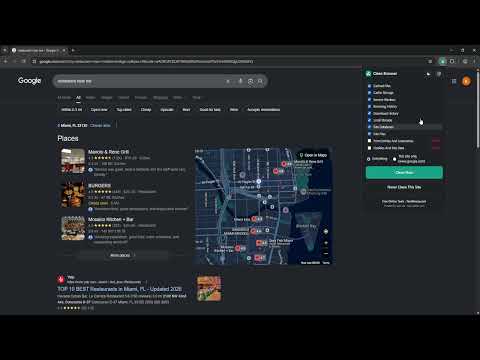
Clear your browser in one click without losing the logins you actually use. Chrome gives you one choice: wipe everything and sign back in to all of it, or wipe nothing. This gives you the middle. CLEAR JUST ONE SITE A page still showing the old version after you changed it? Clear that one site and leave the rest of your browser alone. Cache, service workers, local storage, site databases and cookies for that site only. This is the one Chrome's own dialog cannot do. STAY SIGNED IN WHERE IT MATTERS Add your email, your bank, your work tools to Never Clean This Site. Clean everything else as hard as you like and those stay signed in. SERVICE WORKERS, THE REAL CULPRIT The usual reason a site still looks old after you cleared the cache. Most cleaners skip them. This one does not. NOTHING DESTRUCTIVE BY DEFAULT Cookies and saved form entries start switched off and are marked Careful. One click can never sign you out or lose your autofill unless you asked it to. WHAT IT CLEARS Cached files, cache storage, service workers, browsing history, download history, local storage, site databases, site files, form entries and usernames, cookies and site data. Download history means the list, never your downloaded files. NO ACCOUNT, NO TRACKING, NO DATA COLLECTED Nothing is sent anywhere. Your settings stay on your machine. Free, from ToolBreezy.com.
5 out of 52 ratings
Details
- Version1.0.1
- UpdatedAugust 24, 2026
- Offered byKenLeeDev.com
- Size50.56KiB
- LanguagesEnglish (United States)
- Developer
Email
KenRLee4@gmail.com - Non-traderThis developer has not identified itself as a trader. For consumers in the European Union, please note that consumer rights do not apply to contracts between you and this developer.
Privacy

This developer declares that your data is
- Not being sold to third parties, outside of the approved use cases
- Not being used or transferred for purposes that are unrelated to the item's core functionality
- Not being used or transferred to determine creditworthiness or for lending purposes
Support
For help with questions, suggestions, or problems, visit the developer's support site