


Overview
Record your screen, capture and edit screenshots and PDFs, manage bookmarks and tabs, and more, all from one side panel.
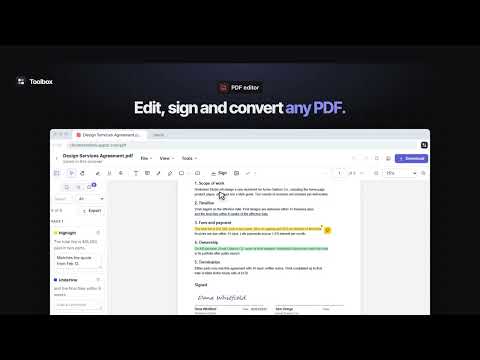
Toolbox is a productivity side panel for working with the web pages you visit. Open it next to any tab to record or capture the page, edit the PDFs you open, mark up and save pages, organize your bookmarks and tabs, and keep your notes, templates and timers at hand. Every tool is free to use with a few limits, and one subscription removes them all. SCREEN RECORDER Record a tab, a window, your whole screen or just your camera, and share it with a link the moment you stop. • Add a camera bubble, record tab or system audio with your microphone, and choose up to source resolution at 30 or 60 fps. • Save the video as MP4 or WebM, or share a link that uploads while you record (Premium), with an optional password and expiry date. • Viewers can comment and react on the timeline, and you can see who watched and how far. • Shared recordings get captions, a searchable transcript and an AI title from what you said. • Trim and cut on a waveform in your online library, upload videos you already have, and turn any frame into a screenshot. SCREENSHOT TOOL AND EDITOR Capture the visible area, a full page, an area you select or a scrolling panel, then mark it up in the built-in editor. • Each capture mode has its own keyboard shortcut. • Full-page screenshots are stitched together for you, with sticky headers shown only once. • Add arrows, text, shapes, highlights and numbered steps, and blur anything private. • Download as PNG, JPG or WebP, or copy straight to the clipboard. • Keep a searchable screenshot library in your browser, or in your Toolbox cloud with a subscription. • With a subscription, share any screenshot as a link that works for a day, a week, a month or for good, with an optional password. Edits show up on the link, and you can turn it off any time. PDF EDITOR Open any PDF from the web in Toolbox to read, annotate, fill in, sign and edit it. • Highlight, underline, comment, add text and draw on any page. • Fill in forms and sign with a drawn, typed or uploaded signature. • Reorder, rotate, delete and insert pages; merge, split, compress and add or remove a password. • Convert PDFs to DOCX, XLSX, PPTX, images or text, and turn images or text into a PDF. • Your files autosave in your browser while you work. BOOKMARK MANAGER Save, organize and clean up your Chrome bookmarks. • Bookmark the current page in one click, straight into the folder its site already uses. • Add tags, notes and page previews, and search with filters by site, folder and date. • Find duplicates, broken links and bookmarks you never open, with regular checks that tell you when a link breaks. • Manage everything in the full manager on the Toolbox website, with drag and drop, bulk actions and undo. • Import bookmarks from other bookmark managers and browsers, with their folders, tags and notes. TAB MANAGER AND SESSIONS Save your open tabs as named sessions, close them to free up memory, and bring them back whenever you need them. • Save one window, every window or just the tabs you pick, keeping pinned tabs and tab groups. • Restore a session in a new window or the current one, and search every tab you've saved. • Your open windows are saved automatically, so you can recover from a crash. • See all open tabs in one list to switch, close, pin, mute or close duplicates. URL SHORTENER AND QR CODES Shorten the page you're on or any link in one click, with the short link copied for you. • Choose a custom alias and change where a link points later. • See clicks over time, referring sites, countries and devices. • Make QR codes in your own size and colors. • Import the short links you already have, with their titles and tags. TEXT EXPANDER AND TEMPLATES Save the replies, signatures and snippets you type again and again, and insert them anywhere. • Type a short shortcut in any text box to insert a template. • Add blanks to fill in, automatic dates and the current page's link. • Templates sync to every browser you sign in to. • Import snippets from popular text expanders, with their shortcuts and folders. VIDEO SPEED CONTROLLER Set one playback speed for every video and audio player, from 0.07× to 16×. • Voices keep their natural pitch, and your speed returns when a site resets it. • Boost the volume up to 600%. • Set a different speed for any site, and control everything with shortcuts you can change. FOCUS MODE AND SITE BLOCKER Get a calm pause before distracting sites, then choose to go back or continue for a set number of minutes. • Block whole sites or just one section of a site, or allow only a list of sites. • Follow a weekly schedule, start strict sessions that can't be skipped, and set daily time limits. • See how often you turned back. • Bring in the block list you already have, in one go. READ LATER AND HIGHLIGHTS Save articles to read later and highlight the parts that matter. • Save any page or link in one click, and Toolbox keeps a clean copy of the text. • Highlight text on any web page in five colors, add notes, and see your highlights when you return. • Read in a distraction-free reader that remembers where you stopped, and export your highlights as Markdown. NOTES Write notes without leaving the page, and see the ones for the page or site you're on. • Clip selected text as a quote with its link. • Organize with pins and tags, and write in Markdown with checklists. • Export your notes, or sync them to your account if you choose. PAGE MARKER Draw, highlight and write on any web page from a floating toolbar. • Pen, highlighter, arrows, shapes, text and a laser pointer for screen sharing. • Your marks are saved per page and come back when you return. • Screenshot the page with your marks in one click. AUTOSCROLL Scroll any page hands-free at the speed you choose, up or down. • Change the speed, pause or stop from the keyboard. • Autoscroll pauses while you scroll by hand, then carries on. • Scroll just one part of a page, such as a chat or a feed. AI WRITER Write, rewrite and reply with AI in any text box, and see the result before it goes in. • Type // and what you need, such as "//a polite follow-up asking for the invoice", in any text box. • Select text to rephrase, shorten, expand, fix spelling and grammar, change its tone or translate it. • Draft replies from the email thread you have open in Gmail. • Write long pieces in an online editor with your history, saved prompts and writing voices. TIME TRACKER Track time on tasks and projects with a timer in your side panel and on the toolbar. • Add projects, clients, tags and billable time. • Idle detection, a Pomodoro timer and reminders to start tracking. • Timesheets, a calendar view and reports, with CSV, XLSX and PDF export. EMAIL TRACKER FOR GMAIL See when the emails you send from Gmail are opened. • A check mark when your email is sent, and two once it's opened. • Get a notification each time someone opens your email. • Track link clicks, and get a reminder when nobody has replied. REMINDERS Type a reminder the way you'd say it, such as "call mom tomorrow at 5pm". • Attach the page you're on, so the reminder takes you back to it. • Repeat reminders daily, weekly, monthly or yearly. • Get a notification with Done and Snooze, even with the side panel closed. • Import tasks from your to-do app, with their due dates. BROWSING DATA CLEANER Clear your history, cache and cookies in one click or with a shortcut. • Keep the sites you trust signed in. • Clear just the site you're on, or clean automatically on a schedule. STOPWATCH AND TIMER A stopwatch with laps and a countdown timer with presets, both of which keep running with the side panel closed. PRICING Every tool is free to use, with a few limits: screenshots of the view or an area, 5-minute recordings, 3 saved PDFs a day, 10 short links, 25 saved tab sessions, 50 notes, 10 templates, saved marks on 10 pages, 100 saved articles, and 10 AI writer requests a day. Sign in with Google or your email to start on the free plan; you stay on it unless you upgrade. Toolbox Premium ($20/month or $200/year, cancel anytime) removes every limit and adds the paid features in each tool, such as full-page captures, recording share links and edits, custom short links, fill-in templates, repeating reminders and reminder emails, per-site video speeds, email link tracking, time reports over a month and billable rates, writing voices and up to 500 AI writer requests a day, and cloud storage for PDFs and screenshots, with share links for screenshots. Toolbox Pro ($30/month or $300/year) has everything in Premium plus signatures, conversions to DOCX, XLSX and PPTX, and the bookmark broken-link check and duplicate cleanup. Both work on up to 5 browsers. One subscription covers every tool, with no per-tool upgrades. PRIVACY • Before anything goes to your account, Toolbox shows you what it keeps and why, and asks you to agree. • Bookmarks, page marks and automatic tab snapshots stay on your computer. PDFs and recordings do too, unless you save or share them to your Toolbox cloud. • Tab sessions you save, templates, short links, tracked time, Read later articles and synced notes are kept in your account, so every browser you sign in to gets them. • The email tracker stores each email's subject, recipients and open times, never the message itself. • The AI writer only sends text when you ask it to write: your request and the text it works on go to the AI model that writes the answer. • If you turn it on, video speed keeps the names of sites where media played and for how long, for your time-saved stats. • If you turn it on, Toolbox counts which tools you use each day, shown on your account page, never what you used them on. • No ads, and no third-party analytics or tracking in the extension. Privacy policy: https://browsertoolbox.appzlr.com/privacy HOW TO USE 1. Pin Toolbox and click its icon to open the side panel. 2. Pick a tool from the list, or search for it. Chrome doesn't let extensions run on its own pages or on the Chrome Web Store. Questions or feedback: tool@appzlr.com
0 out of 5No ratings
Details
- Version1.0.10
- UpdatedOctober 29, 2026
- Size1.75MiB
- Languages7 languages
- DeveloperWebsite
Email
ac10.origin@gmail.com - Non-traderThis developer has not identified itself as a trader. For consumers in the European Union, please note that consumer rights do not apply to contracts between you and this developer.
Privacy

Toolbox: Screen Recorder, Screenshots, PDF Editor & More has disclosed the following information regarding the collection and usage of your data. More detailed information can be found in the developer's privacy policy.
Toolbox: Screen Recorder, Screenshots, PDF Editor & More handles the following:
This developer declares that your data is
- Not being sold to third parties, outside of the approved use cases
- Not being used or transferred for purposes that are unrelated to the item's core functionality
- Not being used or transferred to determine creditworthiness or for lending purposes
Support
For help with questions, suggestions, or problems, visit the developer's support site