

TonalKeys - African Language Keyboard
1 rating
)
Overview
Type in African native languages with ease. Supports Yoruba, Igbo, Hausa, Swahili, Amharic, Tigrinya, Twi, Fon, Zulu, and more.
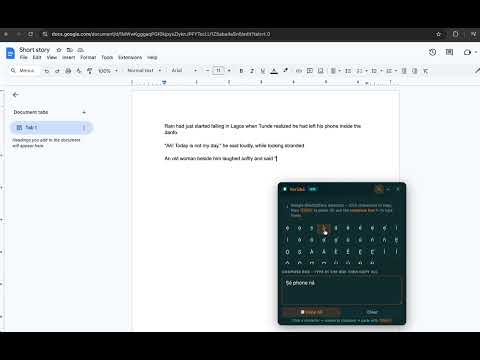
TonalKeys is a free, lightweight Chrome extension that lets you type in African native languages anywhere on the web in emails, documents, social media, messaging apps, and even Google Sheets. It is useful for tonal languages that make use of tone marks and diacritics. 18 Languages Across 5 Regions: •West Africa: Yorùbá, Igbo, Hausa, Fula, Bambara, Twi/Akan, Ewe, Fon, Wolof, •East Africa: Swahili, Amharic, Tigrinya, Luganda •North Africa: Tamazight (Berber) •Southern Africa: Zulu, Xhosa, Shona •Central Africa: Lingala Each keyboard includes the correct special characters that the specific language needs. For example, Yorùbá keys includes characters like ẹ, ọ, ṣ, etc. Igbo gets ị, ọ, ụ, ṅ. Hausa gets ɓ, ɗ, ƙ, ƴ. Twi and Ewe get ɛ and ɔ. And many more. How to Use: After installing the extension, click the TonalKeys icon in your toolbar Turn the toggle ON Select your language from the list Start typing. How Typing Works: Type normally with your computer keyboard as you always do. When you need a special character that isn't on your keyboard, tap it from the floating character bar that appears at the bottom-right of every page. The bar shows the characters for whichever language you've selected Click any character to insert it at your cursor position Drag the bar to reposition it, or collapse/hide it when you don't need it How to Use Compose Box (for Google Docs, Sheets, Notion, etc.): Some apps render text on a canvas, which blocks direct character insertion. On those pages, you can use the compose box Simple tap on the pen (✎) icon on the keyboard and type into it as you normally would, click characters from the palette when you need them, then hit Copy All and paste with Ctrl+V into your target app. Lightweight & Private •No data collection; everything runs locally in your browser •No account required •No internet connection needed after install •Tiny footprint; doesn’t slow down your browsing •Open source; inspect the code yourself If you’ve been copying special characters from random websites, or skipping tone marks when writing in your language, TonalKeys fixes this.
5 out of 51 rating
Details
- Version2.0.0
- UpdatedJune 17, 2026
- Offered byTonative
- Size115KiB
- LanguagesEnglish
- DeveloperTonative Africa Limited
Kisumu West Kisumu 40102 KEEmail
sharonibejih@tonative.org - Non-traderThis developer has not identified itself as a trader. For consumers in the European Union, please note that consumer rights do not apply to contracts between you and this developer.
Privacy

This developer declares that your data is
- Not being sold to third parties, outside of the approved use cases
- Not being used or transferred for purposes that are unrelated to the item's core functionality
- Not being used or transferred to determine creditworthiness or for lending purposes
Support
For help with questions, suggestions, or problems, visit the developer's support site