

Todowing — Nested Sub-tasks & More for Todoist

Overview
Focus sessions, estimates, notes and your Apple Calendar on Today, plus free sub-tasks and palettes. Unofficial Todoist companion.
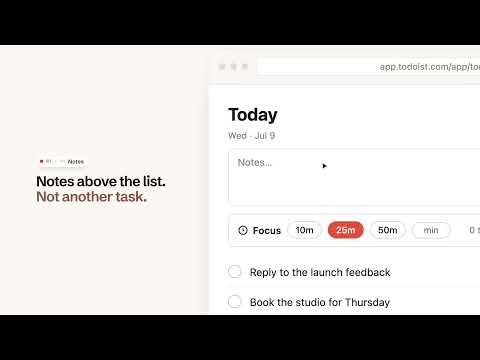
Get through today, not just list it. Todowing is built around the working day: focus sessions on Today's tasks, time estimates that add up, a notes pad, and your Apple Calendar above your list. FOCUS SESSIONS • Pick what you are doing next from Today, choose 10, 25 or 50 minutes (or type your own), and start • A card counts down beside your list, holding your picked tasks and their sub-tasks • Or hide everything else: the session and its tasks fill the screen, each with its description underneath, and Escape brings the app back as you left it • Check things off in the card, add five minutes, pause, or end the session early • A chime when time is up, plus confetti if you finished something • One session at a time, shared across your open tabs, and it survives a reload or a restart • Three sessions a week free, renewed at the start of your week; unlimited with the unlock ESTIMATES THAT ADD UP • Put an estimate on a task and read two totals: what Today holds, and what you picked for this session • The Today total shows only when every task in the list is counted, and says how many are unestimated • If a task already has a duration in Todoist, setting a time from its row changes it there; otherwise the estimate stays in your browser NOTES ON TODAY • Keep a three-line notes pad above your Today list, for the things that never become tasks YOUR APPLE CALENDAR IN TODAY • Paste the link to a published Apple Calendar and the day's events show above your tasks • Up to five calendars, each with the name and colour it has in Apple Calendar • An event with a meeting link gets a Join link. Nothing else is clickable, because a published calendar is read-only • Off until you switch it on, and Todowing asks to reach iCloud only when you add your first calendar SUB-TASKS THAT DO MORE • Every sub-task, at every depth, with its due date, priority and labels, in Today, Upcoming, Boards, Filters and Labels. Free for everyone • Check one off, or undo it, without opening the task • Add a sub-task, rename it, or drag to reorder, from the row itself, which Todoist's own previews don't do • Show one task in two places: file it under a parent in another project, without moving it • Collapse the trees you are not working on, or hide done sub-tasks and a long checklist gets short again • When a recurring task comes back, its checklist reopens with it YOUR LIST, YOUR LOOK • Re-tint a dark theme with one of seven palettes: surfaces, text, dividers and accent, plus row spacing and section styling. Free for everyone • Set your text size anywhere from 85% to 200%, also free • Restyle the app with one of 50 Google Fonts AND MORE ON THE WAY Todowing is a growing set of upgrades. New ones land in this same extension, and the one unlock you buy today covers each paid upgrade we add later. Free and paid: the free tier lets you read every sub-task at every depth with full detail and check them off in place, and gives you three focus sessions a week, the palettes and the text size. A one-time unlock opens unlimited focus sessions, setting estimates, the notes pad, your Apple Calendar in Today, adding, renaming and reordering sub-tasks from the row, showing a task in two places, the font picker and the hide-done toggle. There is no subscription. You buy the unlock on todowing.com, our own site, where we post the current price and the refund policy; we, not Google, are the seller. Private by design: Todowing keeps your API token in your browser and sends it to one place, the official Todoist API, to load and update your own tasks. The extension carries no analytics and no tracking. Pick a custom font and your browser fetches that font from Google Fonts. Add an Apple Calendar and Todowing fetches its published link from Apple. Nothing else leaves your browser. Privacy policy: todowing.com/privacy Todowing needs a Todoist account and an API token (Settings → Integrations → Developer). Setup takes under a minute. Todowing is an unofficial companion extension and is not affiliated with, endorsed by, or made by Doist.
5 out of 51 rating
Details
- Version2.5.0
- UpdatedNovember 5, 2026
- FeaturesOffers in-app purchases
- Size279KiB
- LanguagesEnglish
- Developer
- Non-traderThis developer has not identified itself as a trader. For consumers in the European Union, please note that consumer rights do not apply to contracts between you and this developer.
Privacy

Todowing — Nested Sub-tasks & More for Todoist has disclosed the following information regarding the collection and usage of your data. More detailed information can be found in the developer's privacy policy.
Todowing — Nested Sub-tasks & More for Todoist handles the following:
This developer declares that your data is
- Not being sold to third parties, outside of the approved use cases
- Not being used or transferred for purposes that are unrelated to the item's core functionality
- Not being used or transferred to determine creditworthiness or for lending purposes
Support
For help with questions, suggestions, or problems, please open this page on your desktop browser