


Overview
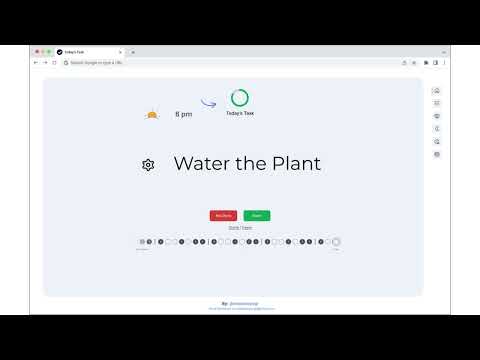
A simple extension that opens a new tab with a daily task to complete.
To-do lists do not work. Reason? Our goal setting abilities are a lot enhanced than our goal completing environments. The conflict between this results in a tension between what we want to do and what we can do. Enter Today's Task! Today's Task chrome extension solves the very particular problem of this conflict. Today's Task will allow you to conquer more projects by focussing on one task per day. Remember - less is more. Today's Task aims to help users conquer more projects through a more focused approach. 🚀 Features: ✅ Today's Task - This page will show you your Today's Task to complete - A task will be randomly picked for you - but you can also shuffle task ✅ Task Chain - Gamify your TODO tasks - Everyday you complete a task the task chain will change the color and increment the counter - This is to encourage you and keep you accountable ✅ Update Tasks - Use this page to add your list of tasks or delete any tasks - You can shuffle your Today's Task from this page too ✅ Progress Review - Track your productivity with weekly stats - See your current streak and monthly completions - Get motivational messages based on performance ✅ Shuffle Tasks: - If you don't like today's task you can use "Shuffle" task to update today's task - If you complete today's task and want to do more you can use this feature for it too ✅ Snooze Tasks - Snooze tasks for 1 week, 1 month, or 3 months - Auto-shuffles to next task after snoozing ✅ Quick Add Shortcut - Press `⌘K` (Mac) or `Ctrl+K` (Windows/Linux) to instantly add tasks from anywhere ✅ Motivational Nudges - Action-oriented subtle motivational quotes on the main page - Easy toggle on/off in settings - Designed to inspire without distracting ✅ Widgets (Right Sidebar) - Real-time date and time display - Current weather conditions (defaults to San Francisco, CA) - Set your own city in settings - Choose temperature unit: °F or °C - Beautiful glassmorphism design - Toggle widgets on/off in settings ✅ Left Sidebar Tools - **Pomodoro Timer**: Dedicated focus timer always accessible - Quick presets: 5m, 15m, 25m, 45m - Visual progress tracking with color coding - Browser notifications when complete - **Quick Notes**: Temporary scratchpad for quick thoughts - Jot down reminders or ideas - Auto-deletes after 24 hours - Shows time remaining - Both default ON, toggle individually in settings ✅ Theme - You can switch between light and dark theme ✅ Disable for 2 hours - Use this option if you want to see normal chrome new tab instead of this extension - This is especially handy when you don't want to show your tasks in meetings Update 1.4.0 release notes: 🌤️ **Date & Weather Widgets** - Real-time clock and weather on right sidebar (defaults to San Francisco, customizable) 📝 **Quick Notes** - Temporary scratchpad that auto-deletes in 24 hours (left sidebar, default ON) 🍅 **Pomodoro Timer** - Focus timer with quick presets: 5m, 15m, 25m, 45m (left sidebar, default ON) ⚙️ **Settings Page** - Customize your experience - toggle all widgets, set weather location, control Pomodoro 💡 **Motivational Nudges** - 50 subtle, rotating quotes to inspire action (toggle on/off in settings) 🎉 **Confetti Celebration** - Animated confetti burst when you complete tasks! 🎨 **Fun Emoji Icons** - 300+ colorful emojis replace boring icons! From 🚀 to 🎉, from 🍕 to 💻, every task gets a personality! Update 1.3.0 release notes: ✨ Weekly Progress Review - Track your productivity with stats, streaks, and motivational messages ⚡ Quick Add Shortcut - Press ⌘K / Ctrl+K from anywhere to instantly add tasks 🎨 Modern UI Redesign - Glassmorphism design, bigger layout, cleaner menu, everything fits on screen 🔧 Bug Fixes - Snooze auto-shuffles, fixed duration bug, improved responsiveness Update 1.2.4 release notes: - Added snooze feature - 1 week, 1 month, 1 year - Added helpful tooltips - Improved shuffle functionality Update 1.2.0 release notes: - Complete UI/UX redesign - And a lot of bug fixes Update 1.1.8 release notes: - All tasks are now recurring - yay! - Some minor bug fixes Update 1.1.6 release notes: - Had to remove sync on multiple devices support due to chrome storage limitations - More storage space now available with local storage (unique data per device) Update 1.1.4 release notes: - You can now conveniently shuffle tasks directly from the Today Task page. - In addition to marking today's tasks as done, you can now mark any task as completed and receive credit for your achievements. - Export all your tasks and task-chain for your reference - Various bug fixes
5 out of 52 ratings
Details
- Version1.4.0
- UpdatedNovember 25, 2025
- Offered bysleeplessyogi
- Size139KiB
- LanguagesEnglish (United States)
- Developer
Email
ask.sleeplessyogi@gmail.com - Non-traderThis developer has not identified itself as a trader. For consumers in the European Union, please note that consumer rights do not apply to contracts between you and this developer.
Privacy

This developer declares that your data is
- Not being sold to third parties, outside of the approved use cases
- Not being used or transferred for purposes that are unrelated to the item's core functionality
- Not being used or transferred to determine creditworthiness or for lending purposes
Support
For help with questions, suggestions, or problems, visit the developer's support site