

To-Do List & Task Manager for Chrome

Overview
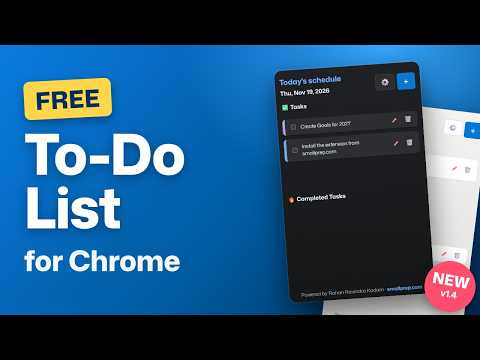
Simple to-do list and task manager: color-coded categories, recurring tasks, badge count, and JSON/CSV backup. Private, no account.
Keep your day under control with a fast, clean to-do list that lives in your Chrome toolbar. Add a task in seconds, check it off, and see how many are still pending at a glance. 🔥 WHY PEOPLE LIKE IT ➡️ Open the popup, tap +, type, done – no sign-up, no setup ➡️ Badge on the toolbar icon shows how many tasks are still pending ➡️ Color-coded categories: Food, Workout, Work, Education and Other ➡️ Separate Tasks and Completed lists, so finished work never clutters your day ➡️Recurring tasks: repeat daily, weekly or monthly. Finished tasks come back automatically when they are due ➡️Edit tasks in place, and undo an accidental delete ➡️ Light and dark mode, switchable in Settings ➡️Your data is safe: export a backup to JSON or CSV any time, and import it on another computer or browser profile 🔥 PRIVATE BY DESIGN ➡️Everything is stored locally in your browser ➡️ No account, no ads, no tracking, no analytics ➡️Only two permissions: storage and alarms. No access to the sites you visit 🔥 PERFECT FOR 1️⃣ Daily planning and checklists 2️⃣ Study schedules and assignments 3️⃣ Workout and meal routines 4️⃣ Habits and chores that repeat 5️⃣ Anyone who wants a simple task manager without a heavy app 🔥HOW TO USE 1️⃣. Click the extension icon in the toolbar (pin it for the badge). 2️⃣. Tap +, type a task title, pick a category and, if you like, a repeat setting. 3️⃣. Check a task to move it to Completed. Tap the bin to delete. 4️⃣. Open ⚙️ Settings to switch light/dark mode, export to JSON or CSV, or import a backup (import opens in a tab, then merges without duplicates). 🔥 FAQ ➡️ Does it need an account? No. ➡️ Where are my tasks stored? On your device, in Chrome's local extension storage. ➡️ Do tasks sync between computers? Not automatically. Use Export and Import to move them. ➡️ How do recurring tasks work? When you complete one, it moves to Completed and returns to your list on its next date. Is it free? Yes. ➡️ Have an idea or found a bug? Tell us in the Support tab and it will be looked at.
5 out of 53 ratings
Details
- Version1.4.1
- UpdatedNovember 22, 2026
- Size30.38KiB
- LanguagesEnglish
- DeveloperWebsite
Email
rohankadam2596@gmail.com - Non-traderThis developer has not identified itself as a trader. For consumers in the European Union, please note that consumer rights do not apply to contracts between you and this developer.
Privacy

This developer declares that your data is
- Not being sold to third parties, outside of the approved use cases
- Not being used or transferred for purposes that are unrelated to the item's core functionality
- Not being used or transferred to determine creditworthiness or for lending purposes
Support
For help with questions, suggestions, or problems, visit the developer's support site