

TMADE Vest Account Hub and Copy Trader

Overview
Community-built, not an official Vest product. Copy trades across your Vest accounts in groups, track P&L, request payouts.
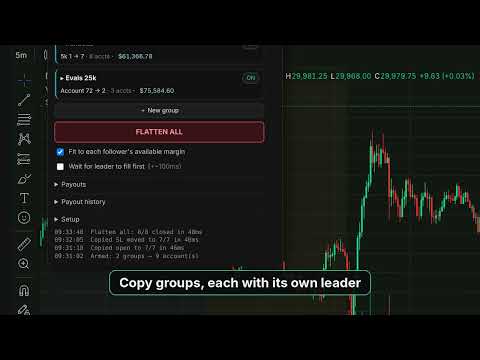
Manage your Vest accounts locally inside Google Chrome. Video Tutorial HERE: https://youtu.be/hkIboAfeExI Capabilities: -Copy Trading (Market & Limit Only) -Copy Trading Groups -Bulk Payout Requests (100% Only + option of a buffer to keep) -One-click Payout button next to your account name when a payout is ready -Payout history (All-Time) -PNL per Account -Lock out features from trading + spending -Visualized BE lines -MAX LOSS LIMIT line on the chart: shows exactly where the account hits its drawdown floor, counting your profit -Flatten group / Flatten all: close every position and cancel every order in one click -Locks also cover the Place Order button, with a live countdown Trading tools: -TradingView-style order panel: Buy / Sell switch on top, one Place Order button -Your order drawn on the chart as clean TradingView-style lines: Limit entry, TP +$ and SL −$ -Drag the lines to set your limit price, TP and SL. The order panel updates with you. -Built-in safety: a buy limit above price (or sell limit below) is blocked so it can’t fill as a market order by accident -Chart + button sets a limit at that price -Drag your open limit orders, TP and SL up and down on the chart -Thicker, easier-to-see order lines -TP/SL always on in $ by default, with your own $ and % presets -TP / SL $ amounts update live as you drag -Moving your limit keeps TP and SL where you put them -Prices auto-round to each market’s tick size -New orders start at your chosen size (15% by default), so TP / SL always show -Place Order only counts once Vest actually sends the order, and it tells you if Vest didn’t Tradermade Indicators (in the chart’s Indicators menu): -Boxes [TMADE]: Initial Balance / opening range with session shortcuts, extensions and VWAPs -Core [TMADE]: Midnight Open, previous day / week / month levels, VWAPs, NY POC, Asia / London / NY sessions, and 80/20 zones. Levels are pulled from the higher timeframes so they’re correct on any timeframe. -Lunch Box [TMADE]: the OG lunch box indicator that marks out the highs + lows, + the purple line (vwap)! -MTF FVG [TMADE]: multi-timeframe fair value gaps -VP [TMADE] and VD [TMADE]: volume and delta profiles -TMADE Bubbles **Your TMADE indicators follow you when you switch markets **Levels are saved per market, so switching is fast Also: -12 languages -Settings backup / restore Press the “?” icon at the top and read all of it before using it. Do not rush without first doing this. There are many community-built tools for Vest. I made one for myself and figured I would make it FREE and shareable. Made by @DroobyTrades from TraderMade Use code DROOBY or TMADE on all new accounts for a discount!
0 out of 5No ratings
Details
- Version1.43.3
- UpdatedNovember 25, 2026
- Size437KiB
- LanguagesEnglish
- Developer
Email
droobytrades@gmail.com - Non-traderThis developer has not identified itself as a trader. For consumers in the European Union, please note that consumer rights do not apply to contracts between you and this developer.
Privacy

TMADE Vest Account Hub and Copy Trader has disclosed the following information regarding the collection and usage of your data. More detailed information can be found in the developer's privacy policy.
TMADE Vest Account Hub and Copy Trader handles the following:
This developer declares that your data is
- Not being sold to third parties, outside of the approved use cases
- Not being used or transferred for purposes that are unrelated to the item's core functionality
- Not being used or transferred to determine creditworthiness or for lending purposes
Support
For help with questions, suggestions, or problems, visit the developer's support site