Item logo image for Title Picker

Title Picker

Item media 2 (screenshot) for Title Picker
Item video thumbnail
Item media 2 (screenshot) for Title Picker
Item video thumbnail
Item media 2 (screenshot) for Title Picker

Overview

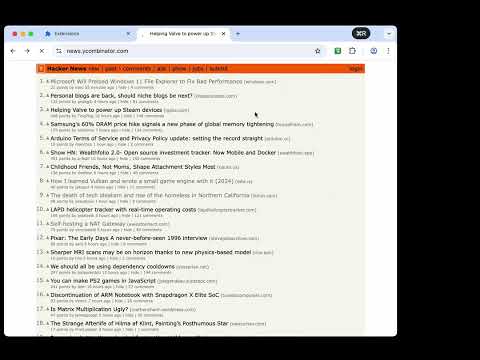
Select page elements as tab title

Lightweight Chrome MV3 extension to set custom tab titles. Save titles by selecting page elements or entering text, and enable auto-restore on a per-URL whitelist.

Details

  • Version
    0.0.2
  • Updated
    November 29, 2025
  • Size
    33.29KiB
  • Languages
    中文(中国)
  • Developer
    Email
    luckypeak.dev@gmail.com
  • Non-trader
    This developer has not identified itself as a trader. For consumers in the European Union, please note that consumer rights do not apply to contracts between you and this developer.

Privacy

Manage extensions and learn how they're being used in your organization
The developer has disclosed that it will not collect or use your data. To learn more, see the developer’s privacy policy.

This developer declares that your data is

  • Not being sold to third parties, outside of the approved use cases
  • Not being used or transferred for purposes that are unrelated to the item's core functionality
  • Not being used or transferred to determine creditworthiness or for lending purposes

Related

Copy Tabs Title URL

0.0

Copy the title and URL from a Chrome tabs

Retabtile

5.0

Retabtile - set the title of your browser tabs.

Copy Titled Link

5.0

Copies the title and URL of the current page to the clipboard

Simple Element Remover

5.0

Remove elements from the page

Rename Tab Title

4.1

Renames the Tab Title

Custom Tab Title

4.3

Change and maintain custom tab titles

CSS Selector Tester

5.0

Highlight the elements matching a given CSS selector.

Copy As Hyperlink

3.7

Copy page title or selected text as a pasteable hyperlink

Tab ReTitle+

5.0

Rename browser tab titles with powerful persistence options

Copy Title and Url as Markdown Style

4.8

Copy the title and url of the page as Markdown style

New Tab Custom Colour Blank Page

4.4

New Tab opens with a (user chosen) colour blank page

Custom Tab Name

3.0

Customize browser tab titles manually or automatically.

Copy Tabs Title URL

0.0

Copy the title and URL from a Chrome tabs

Retabtile

5.0

Retabtile - set the title of your browser tabs.

Copy Titled Link

5.0

Copies the title and URL of the current page to the clipboard

Simple Element Remover

5.0

Remove elements from the page

Rename Tab Title

4.1

Renames the Tab Title

Custom Tab Title

4.3

Change and maintain custom tab titles

CSS Selector Tester

5.0

Highlight the elements matching a given CSS selector.

Copy As Hyperlink

3.7

Copy page title or selected text as a pasteable hyperlink

Google apps