


Overview
Practice typing directly on any webpage while reading real content. Improve your typing speed and accuracy on your favorite sites.
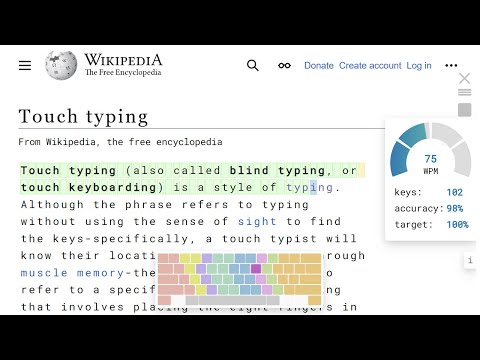
With just a click, you can turn any page into a typing practice session. Master touch typing while reading your favorite sites. Track your progress, compete with others on the leaderboard. - Practice on real content Anything you read can become a typing practice text. Click the extension button (T) and start typing. The extension will automatically select the text near the top of the page, or you can choose the text by clicking the paragraph you want to type. You can also navigate using the arrow keys on the keyboard. Use Tab, Space, or Enter to skip text. Click the stop button to end your session. - Touch typing TipType includes an on-screen keyboard with virtual hands, showing the finger-to-key position. Place your fingers on the home row, sit straight, and avoid looking at your keyboard. Follow these simple rules and master touch typing. Remember, only practice will make you a better typist. - Typing as a brain exercise Build up muscle memory while improving typing speed and accuracy. Typing will help you memorize text and exercise your brain. Practicing typing as a morning routine will help you gain focus. - Track your stats During typing, you can track your WPM, accuracy, and daily target. At the end of the session, you will earn stars and points. The stars represent your typing quality based on your typing speed, accuracy, and text difficulty. The better your typing, the more points you'll get. For better stats, you can retype any paragraph multiple times. Your best effort will be included in the page score. The overall score will show the sum of your page scores and the average of your WPM and accuracy. Join the challenge by competing with others on the leaderboard. - Fit your preferences You can easily switch between WPM and CPM. Apply text formatting for better visibility. Hide the virtual keyboard and panels to clear your screen. We designed TipType to be easy and adjustable. - TipType is ideal for Students learning touch typing; Writers and coders who want to improve their speed; Anyone who enjoys turning everyday tasks into games. - Support ❕ Works on most of the pages we tested. If it doesnt work right for you feel free to report the issue on support@tiptype.com.
4.2 out of 58 ratings
Details
- Version1.12
- UpdatedFebruary 17, 2026
- Size210KiB
- LanguagesEnglish
- DeveloperTipType OÜWebsite
Sepapaja tn 6 Tallinn, Harju Maakond 15551 EEEmail
contact@tiptype.comPhone
+389 78 227 500 - TraderThis developer has identified itself as a trader per the definition from the European Union and committed to only offer products or services that comply with EU laws.
- D-U-N-S987975433
Privacy

Practice typing with TipType has disclosed the following information regarding the collection and usage of your data. More detailed information can be found in the developer's privacy policy.
Practice typing with TipType handles the following:
This developer declares that your data is
- Not being sold to third parties, outside of the approved use cases
- Not being used or transferred for purposes that are unrelated to the item's core functionality
- Not being used or transferred to determine creditworthiness or for lending purposes
Support
For help with questions, suggestions, or problems, please open this page on your desktop browser