

Colors for Google Calendar - Tint Calendar
1 rating
)
Overview
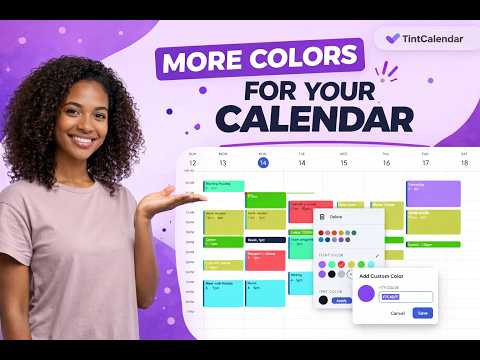
More colors for Google Calendar events and text. Custom color for Google Calendar.
Сhange colors on Google Calendar with Tint Calendar and use the additional color and text color palette to add more custom colors and apply them to your events. Tint Calendar is a lightweight Google Calendar extension that helps you customize your calendar, improve event readability, and make your schedule easier to scan at a glance. It adds more color options, lets you change text colors independently, and works directly inside Google Calendar with no complicated setup. 🌟 KEY FEATURES 🎨 Add more colors to Google Calendar events 🖌️ Customize your Google Calendar with a cleaner and more flexible color palette ✏️ Change text color separately from event color 👀 Improve readability and contrast for busy schedules ⚡ Lightweight and fast 🔒 Privacy-friendly — no data collection, no tracking, everything runs locally in your browser WHY USE TINT CALENDAR • Make Google Calendar easier to read • Add more visual clarity to your daily schedule • Customize event colors and text colors in a more flexible way • Reduce visual clutter in work, study, and personal planning • Use a more custom Google Calendar experience without changing your workflow HOW TO USE 1. Install the Tint Calendar extension 2. Open Google Calendar in your browser 3. Refresh Google Calendar if it is already open 4. Right-click on an event — you will see additional colors menu for events and text 5. Click the new colors button, add a new color, then apply it 6. Click on the text colors palette, choose the text color, and click apply 7. Enjoy! NOTE Tint Calendar depends on the current Google Calendar layout. If Google changes the Calendar interface, some features may temporarily stop working. If that happens, please contact support at tintcalendar.support@gmail.com. PRIVACY Tint Calendar does not collect, store, or transmit personal data. Everything works locally in your browser. WEBSITE & SUPPORT https://ant0kr.github.io/tintcalendar/ tintcalendar.support@gmail.com
5 out of 51 rating
Details
- Version1.1.0
- UpdatedJune 2, 2026
- Offered bytint.calendar.team
- Size136KiB
- LanguagesEnglish
- Developer
Email
tintcalendar.support@gmail.com - Non-traderThis developer has not identified itself as a trader. For consumers in the European Union, please note that consumer rights do not apply to contracts between you and this developer.
Privacy

This developer declares that your data is
- Not being sold to third parties, outside of the approved use cases
- Not being used or transferred for purposes that are unrelated to the item's core functionality
- Not being used or transferred to determine creditworthiness or for lending purposes
Support
For help with questions, suggestions, or problems, visit the developer's support site