


概述
Auto-track Jira worklog. Export CSV/JSON. Track time spent on Jira tickets. On any Atlassian URL. Local-first Chrome extension.
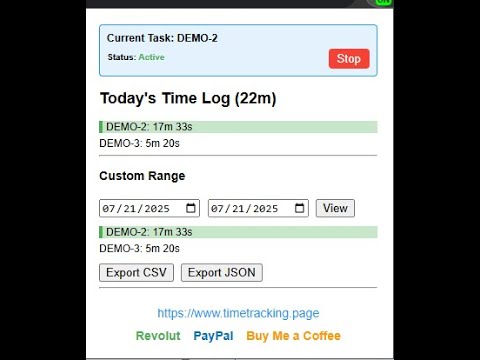
📌 Automate Your Jira Time Tracking — Effortlessly Jira Auto Time Tracker is a privacy-first Chrome extension that automatically tracks the time you spend on Jira issues — without any setup, logins, or cloud sync. Just keep working and let the timer follow your active Jira tab. ✅ Key Features 🧠 Automatic Ticket Detection Tracks time based on the last opened Jira ticket — works with any Atlassian Jira instance. ⏱️ Smart Start/Stop Control Automatically starts and pauses tracking based on idle state. 📅 Daily & Range Reports View logs for today or any custom date range right in the popup. 📤 Easy Export (CSV & JSON) Export your worklogs by date and ticket for time reports or billing. 🔒 100% Local Data No logins, no cloud — all data stays in your browser storage. 🧹 Quick Cleanup Use the right-click menu to clear all tracked records instantly. 📦 Lightweight & Open by Design Built for performance and transparency. 💡 Use Cases Procrastinators: Have easy visibility on time spent. Freelancers: Track Jira work without relying on manual timers or external apps. Agile Teams: Get an overview of where your time is going — automatically. Consultants: Export clean reports for client billing in seconds. 🛠️ Compatibility Works with all *.atlassian.net Jira URLs No API keys or setup required Chrome, Brave, and Edge support
5 星(5 星制)5 个评分
详情
隐私权
该开发者已声明,您的数据:
- 不会因未获批准的用途出售给第三方
- 不会为实现与产品核心功能无关的目的而使用或转移
- 不会为确定信用度或放贷目的而使用或转移
支持
若有任何疑问、建议或问题,请在桌面浏览器中打开此页面