

TimeTrack
7 ratings
)
Overview
Track focused work sessions directly from your Chrome toolbar.
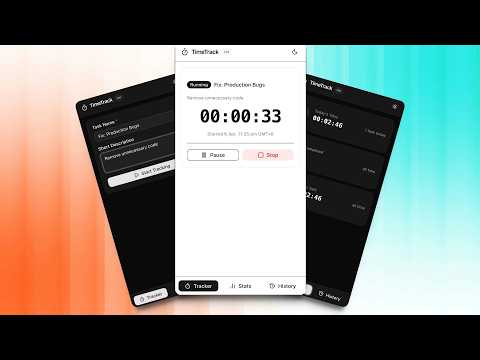
Track your work instantly. Stay focused. Never lose progress. TimeTrack is a fast, lightweight Chrome extension that lets you track focused work sessions directly from your browser toolbar — without interrupting your workflow. No complicated dashboards. No context switching. Just simple, powerful time tracking built for how you actually work. 🚀 Why TimeTrack? • Two ways to start: jump in instantly or plan your tasks first • One-click time tracking from your Chrome toolbar • Sync your data across all your devices automatically • Resume tasks exactly where you left off • Export your work sessions to CSV for reporting & analysis • Clean, distraction-free interface • View session history and productivity stats instantly • Works seamlessly while you browse or work ⚡ How It Works 1. Click the extension icon 2. Choose Quick Start or create a Todo Task 3. Pause or resume anytime 4. Review your sessions and productivity stats That's it — no setup, no friction. 🔥 Key Features ⏱️ Instant Time Tracking Start, pause, resume, and stop tasks in seconds — directly from your Chrome toolbar. ✅ Todo Task Mode (New in v2.5.0) Create a list of tasks before you start. Add a title, an optional description, then kick them off one by one. Each todo card shows its created time and gives you a Start or Delete action. When a task finishes, it's automatically removed from your list. ⚡ Quick Start Mode Skip the planning. Start tracking immediately with no extra steps — same familiar flow as always. 🔄 Cross-Device Sync Your data automatically syncs via Chrome Sync. Access your full history from any device. ▶️ Smart Task Resume Pick up any task right where you left off — no resets, no lost time. 📊 CSV Export Download your session history and analyze it in Excel, Google Sheets, or Numbers. 📈 History & Insights Track your daily activity and understand exactly where your time goes. 🧹 One-Click Reset Clear your entire history anytime with a built-in safety confirmation. 🛠️ Polished Experience • Consistent popup size (400×600) • Smooth light & dark theme support • Dedicated tabs for Stats and History • Sticky header & navigation for better usability • Clean, scroll-friendly layout 🎯 Perfect For Developers • Freelancers • Students • Remote Workers Anyone who wants to stay focused and accountable without overcomplicating things.
5 out of 57 ratings
Details
- Version2.5.0
- UpdatedApril 18, 2026
- Offered byBinTofajjal
- Size212KiB
- LanguagesEnglish (United States)
- Developer
Email
dev@bintofajjal.com - Non-traderThis developer has not identified itself as a trader. For consumers in the European Union, please note that consumer rights do not apply to contracts between you and this developer.
Privacy

This developer declares that your data is
- Not being sold to third parties, outside of the approved use cases
- Not being used or transferred for purposes that are unrelated to the item's core functionality
- Not being used or transferred to determine creditworthiness or for lending purposes
Support
For help with questions, suggestions, or problems, please open this page on your desktop browser