

Présentation
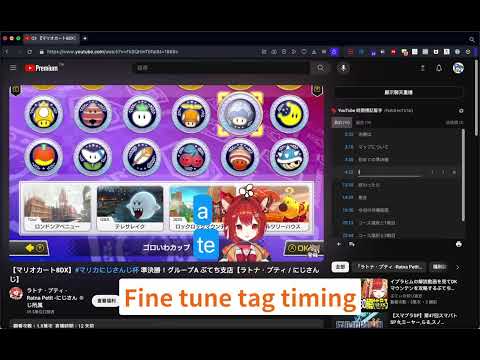
Create YouTube time tags with simple keyboard shortcuts
TimeTags for Youtube is a tool designed to simplify the task of tagging specific moments in YouTube videos. Say goodbye to manually writing timestamps in a separate text editor. With yt-timetag, you can conveniently add and adjust tags within the YouTube interface using your keyboard. The extension provides precise and accurate timestamps, enhancing your experience when tagging longer videos. # Usage Browse to any YouTube video, click the icon of the extension in browser bar to activate it. ## Shortcuts - [delete, backspace] remove tag (affects active tag) - [left] backward 5 seconds (affects active tag) - [alt+left] backward 1 second (affects active tag) - [right] forward 5 seconds (affects active tag) - [alt+right] forward 1 second (affects active tag) - [space] play/pause - [a] add a tag at current time - [d] edit the description of active tag - [esc] cancel active tag Shortcuts won't work when YouTube's bulit-in shortcuts is active (which means your focus is currently on the video element). # Changelog ## 1.6.3 - Fix: Icons color for YouTube dark mode ## 1.6.2 - Fix: "Reset to default" button in shortcuts settings not working ## 1.6.1 - Fix: export as markdown doesn't work as expected ## 1.6.0 - Fix: mouse wheel behavior in tag/comment list - Add "Trash" tab for temporarily holding removed tags - Add options page - Explorer - Custom shortcuts - Data import/export - Standalone Explorer is also available at https://cloud.pymaster.tw/yt-timetag-explorer/ ## 1.5.0 - Add "CHAPTERS" tab - Fix: seek-to-time operation sometimes doesn't work ## 1.4.5 - Remove unnecessary site `permissions` specified for Firefox support in Chrome build ## 1.4.4 - Fix "sync" feature recent videos ordering bug - Optimize sync compression performance (UX) - Refine tag description display in different container widths ## 1.4.3 - Add `chrome.storage.local` as primary storage option - "Sync" feature of Chrome - Now syncs recently updated 100 videos only - Compress `chrome.storage.sync` data to better utilize the quota (100kB max) - Store video id, video title information for upcoming features ## 1.4.2 - Firefox support ## 1.4.0 - Export in Markdown format - CommentList UI: add time tags in comments to your collection ## 1.3.2 - Fix youtube player retrieve issue ## 1.3.1 - Fix spacebar shortcut issue ## 1.3.0 - Fix time tag display issue - Support Dark Mode ## 1.2.0 - Remove "tabs" permission - Default to sync storage of Chrome - Add shortcut for "remove" - Update for new YouTube design component change ## 1.1.0 - Support new YouTube design - Tag list will become scrollable when it feels overwhemled - Add keyboard shortcut `d` for editing active tag description, due to `/` is already used by the new YouTube ## 1.0.0 Add "import" function. ## 0.0.1 First release.
4,5 sur 558 avis
Détails
- Version1.6.3
- Dernière mise à jour24 février 2026
- Proposé parChih-Hsuan Fan
- Taille358KiB
- Langues2 langues
- Développeur
E-mail
pc035860@gmail.com - Non-professionnelCe développeur ne s'est pas identifié comme professionnel. Pour les consommateurs de l'Union européenne, veuillez noter qu'il est possible que les droits des consommateurs ne s'appliquent pas aux contrats entre vous et ce développeur.
Confidentialité

Ce développeur déclare que vos données :
- Ne seront pas vendues à des tiers en dehors des cas d'utilisation approuvés.
- Ne seront ni utilisées ni transférées à des fins sans rapport avec la fonctionnalité de base de l'article.
- Ne seront ni utilisées ni transférées pour déterminer votre solvabilité ou en vue de vous proposer un prêt.
Assistance
Pour obtenir de l'aide concernant des questions, des suggestions ou des problèmes, veuillez ouvrir cette page dans votre navigateur pour ordinateur