

ClipChase — Search YouTube Transcripts

Overview
Search any phrase across a YouTube channel's transcripts. Get every video that mentions it with clickable timestamps.
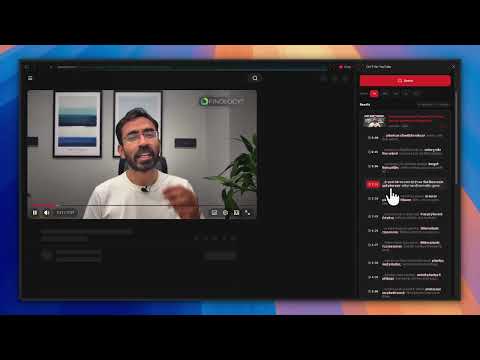
Find every moment a phrase was said on YouTube. ClipChase searches across all videos on a YouTube channel and returns the exact timestamps where any keyword or phrase is spoken. Click a timestamp and jump straight to that second in the video. No more rewatching, no more scrubbing. WHAT IT DOES Type a channel name or paste a URL. Type a phrase. ClipChase fetches the transcripts, finds every match, and shows you a list of videos with clickable timestamps. Each result links directly to the moment the phrase was spoken. WHO IT IS FOR Researchers tracking how an idea evolves across a creator's videos. Students looking for a specific point a lecturer made weeks ago. Journalists fact checking quotes. Power users who watch hundreds of hours of YouTube and need to find one moment. Anyone who has ever said "wait, which video was that in?" FEATURES Channel wide search across every public video. Not just titles. Full transcripts. Clickable timestamps that open the video at the exact second. Time range filters: 7 days, 30 days, 6 months, 1 year, or all time. Mention frequency ranking so videos with more hits surface first. Sort by recency or by hit count, whichever you need. Phrase matching that handles caption boundaries (a phrase split across two caption lines still matches). Hindi and English support, including Hinglish loanwords (search "startup" and find videos that say "स्टार्टअप"). Hybrid indexed search: previously searched channels return results faster on subsequent runs. Side panel UI so you can keep watching while you search. Works on any public channel. No sign in. No API key needed from you. HOW IT WORKS ClipChase pulls public captions through YouTube's standard caption endpoints, then matches your keyword against the transcript text on the server. Results stream into the side panel as they arrive. The first time you search a channel, it indexes the transcripts so the next search on that channel is faster. PRIVACY ClipChase only collects anonymous usage analytics: counts of searches, success and failure rates, and latency. No personal information, no transcript content, no browsing history. A random ID per Chrome profile distinguishes one install from another. Nothing is sold or shared with third parties. See our privacy policy at clipchase.xyz/privacy for details. FREE ClipChase is free on basic. No account required. Install, open the side panel, search. FEEDBACK Built by a solo developer who got tired of rewatching videos to find one moment. If something does not work, or you wish it did something it does not, the feedback link inside the extension goes straight to the maker. clipchase.xyz
0 out of 5No ratings
Details
- Version1.2.8
- UpdatedJune 12, 2026
- Size215KiB
- LanguagesEnglish
- Developer
Email
pradyumnkhanchandani27@gmail.com - Non-traderThis developer has not identified itself as a trader. For consumers in the European Union, please note that consumer rights do not apply to contracts between you and this developer.
Privacy

ClipChase — Search YouTube Transcripts has disclosed the following information regarding the collection and usage of your data. More detailed information can be found in the developer's privacy policy.
ClipChase — Search YouTube Transcripts handles the following:
This developer declares that your data is
- Not being sold to third parties, outside of the approved use cases
- Not being used or transferred for purposes that are unrelated to the item's core functionality
- Not being used or transferred to determine creditworthiness or for lending purposes