


總覽
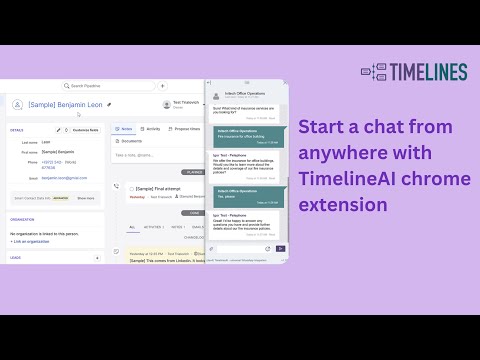
TimelinesAI Chrome Extension allows to start or continue a chat from any CRM or site (TimelinesAI account is required).
Our Universal Chrome Extension allows you to instantly start or continue a chat in TimelinesAI from any CRM or web page by selecting a detected phone number. Enjoy embedded conversation right in the context of your work! You can dock, resize and collapse the extension display to adjust it neatly to the interface of your CRM. TimelinesAI account is required to use our Chrome Extension. Install the extension and sign-up for a FREE Trial to start sending messages from your CRM. Setup takes just 2 minutes, no credit card is required! For a limited time, Chrome Extension is available on all plans! Send messages and start new chats from: HubSpot, Pipedrive, Salesforce, Zoho, Monday or any other CRM.
4.2 分 (滿分 5 分)14 個評分
詳細資料
隱私權

「TimelinesAI - universal integration」已揭露下列關於收集及使用資料的資訊。 如需更多詳細資訊,請參閱開發人員的《privacy policy》。
TimelinesAI - universal integration 會處理下列資料:
這位開發者就你的資料做出下列聲明:
- 除經核准的用途外,不會將你的資料販售給第三方
- 不會基於與商品核心功能無關的目的,使用或轉移資料
- 不會為了確認信用度或基於貸款目的,使用或轉移資料
支援
如有疑問或建議,請使用電腦版瀏覽器開啟這個頁面