

TimeGuard – Daily Limits
1 rating
)
Overview
Set daily time limits for websites and block them safely.
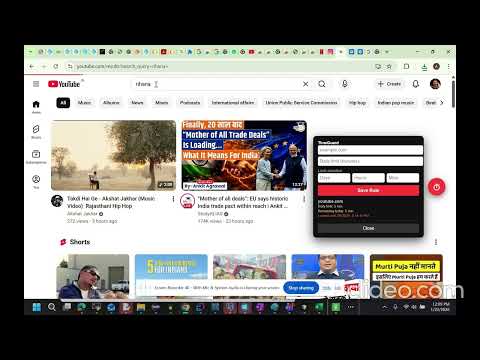
TimeGuard – Daily Limits is a smart productivity and digital well-being Chrome extension developed by Rohit Ash Choudhary to help users take control of their browsing habits. With TimeGuard, you can set custom daily time limits for any website and track your usage in real time. When you are about to reach your limit, the extension provides a 5-minute warning so you can finish your work. Once the limit is reached, the website is automatically blocked to reduce distractions and prevent overuse. To avoid impulsive changes, you can lock your rules for a chosen duration (minutes, hours, or days). All limits reset automatically at midnight, giving you a fresh and fair start every day. How to use TimeGuard – Daily Limits 1.First, add the TimeGuard extension to your Chrome browser. 2.Click the TimeGuard icon on the right side of the browser. 3.Add the website you want to control (for example: Netflix). 4.Set the daily time limit in minutes and choose how many days you want this goal. 5.Click Save — the website is added to your list. If you set Netflix for 45 minutes, once the 45 minutes are over, the website will be blocked for the rest of the day. The next day, after 12:00 AM, the website is automatically unlocked and the timer resets. if you face any issues; you can reach out to me at ashhh.choudhary@gmail.com
5 out of 51 rating
Details
- Version1.1.0
- UpdatedJanuary 23, 2026
- Size27.9KiB
- LanguagesEnglish
- Developer
Email
ashhh.choudhary@gmail.com - Non-traderThis developer has not identified itself as a trader. For consumers in the European Union, please note that consumer rights do not apply to contracts between you and this developer.
Privacy

This developer declares that your data is
- Not being sold to third parties, outside of the approved use cases
- Not being used or transferred for purposes that are unrelated to the item's core functionality
- Not being used or transferred to determine creditworthiness or for lending purposes