Item logo image for TimeDay - Focus Pomodoro Timer and Countdown

TimeDay - Focus Pomodoro Timer and Countdown

4.0(

8 ratings

)
Item media 4 (screenshot) for TimeDay - Focus Pomodoro Timer and Countdown
Item media 5 (screenshot) for TimeDay - Focus Pomodoro Timer and Countdown
Item video thumbnail
Item media 2 (screenshot) for TimeDay - Focus Pomodoro Timer and Countdown
Item media 3 (screenshot) for TimeDay - Focus Pomodoro Timer and Countdown
Item media 4 (screenshot) for TimeDay - Focus Pomodoro Timer and Countdown
Item media 5 (screenshot) for TimeDay - Focus Pomodoro Timer and Countdown
Item video thumbnail
Item media 2 (screenshot) for TimeDay - Focus Pomodoro Timer and Countdown
Item video thumbnail
Item media 2 (screenshot) for TimeDay - Focus Pomodoro Timer and Countdown
Item media 3 (screenshot) for TimeDay - Focus Pomodoro Timer and Countdown
Item media 4 (screenshot) for TimeDay - Focus Pomodoro Timer and Countdown
Item media 5 (screenshot) for TimeDay - Focus Pomodoro Timer and Countdown

Overview

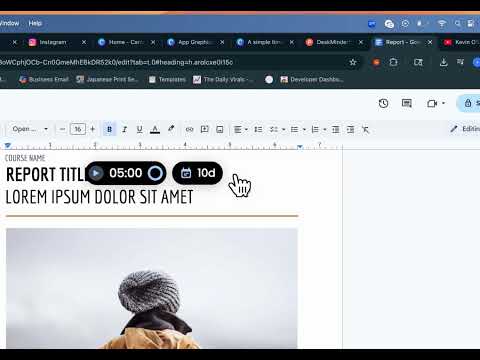
TimeDay is a simple Chrome Extension that helps you stay focused with a visual timer and countdown.

⏱️ Visual Timer ✅ Countdown for Events 🔔 Distraction-Free Focus 📅 Built-in Reminders TimeDay is a lightweight Extension designed to help you see time as it passes. You can stay focused, reduce procrastination, and never lose track of what matters. It combines a quick-set visual timer with a persistent event countdown, all inside your browser. No switching tabs, no picking up your phone. Perfect for those who want to stay locked in. It’s the ultimate in-browser tool for managing your time, boosting focus, and keeping meaningful deadlines top of mind. 🔧 How it works: 1) Click the timer pill and type how long you want to focus. 2) Click Enter. TimeDay shows your time visually progressing. 3) On the right, set a custom event with a countdown — always in view. 🔑 Key Features: ⏱ Focus Timer – Stay aware of time, effortlessly. 📅 Countdown - Keep important dates in sight. Add a custom event name (e.g., “Launch Day” or “Midterm Exam”) 💻 Auto-syncs across all open tabs. No switching tabs or breaking your flow 🎨 Color Customization - Customize the colors of your timer so it fits your vibe. 👍 Hide Countdowns or Timers – For users who prefer a cleaner interface, there's now an option to hide the countdown pill or the timer Pomodoro ™ and Pomodoro Technique ® are registered trademarks of Francesco Cirillo. This app is not affiliated with Francesco Cirillo.

Details

  • Version
    1.3
  • Updated
    July 12, 2025
  • Offered by
    jackybusiness.co
  • Size
    38.2KiB
  • Languages
    English
  • Developer
    Jacky Zhi Hao Zheng
    238 Manor Ter Lexington, MA 02420-2339 US
    Email
    jackybusiness.co@gmail.com
    Phone
    +1 617-416-2853
  • Trader
    This developer has identified itself as a trader per the definition from the European Union and committed to only offer products or services that comply with EU laws.

Privacy

The developer has disclosed that it will not collect or use your data.

This developer declares that your data is

  • Not being sold to third parties, outside of the approved use cases
  • Not being used or transferred for purposes that are unrelated to the item's core functionality
  • Not being used or transferred to determine creditworthiness or for lending purposes

Support

Related

Timer for Google Chrome™

3.9

Useful timers for all your needs

Zumie - Screen recordings made beautiful

4.1

Screen recordings made beautiful

Tiny Timer

4.5

The Cutest Study Timer in the West

Timer Countdown

4.9

An easy-to-use interface for the Countdown clock Timer—to manage time! After all, you'll be redirected to the last active tab.

Floating Countdown Timer

5.0

Displays a floating countdown timer (with ms) on any page for event registrations.

PopClock - Floating Time & Timer

3.2

A beautiful floating clock with time format options and timer functionality.

CountDown Timer

4.6

Use to count the number of days,hours,sec remaining

Focus Timer

5.0

Use Focus Timer to build deep work habits with structured pomodoro sessions, distraction-free workflow, and smart breaks

Minimalist Focus Timer

4.9

A Clean and Concise Timer Using the Pomodoro Technique

Aliasto

5.0

Create personal short links to your favorite websites, stored locally in your browser.

Pomodoro Focus Timer

4.5

Get more done with Pomodoro Focus Timer: focused work and friendly break reminders!

Alarm, Timer and Stopwatch

4.4

A powerful alarm extension that supports multiple timers and stopwatches with five to ten-minute snooze.

Timer for Google Chrome™

3.9

Useful timers for all your needs

Zumie - Screen recordings made beautiful

4.1

Screen recordings made beautiful

Tiny Timer

4.5

The Cutest Study Timer in the West

Timer Countdown

4.9

An easy-to-use interface for the Countdown clock Timer—to manage time! After all, you'll be redirected to the last active tab.

Floating Countdown Timer

5.0

Displays a floating countdown timer (with ms) on any page for event registrations.

PopClock - Floating Time & Timer

3.2

A beautiful floating clock with time format options and timer functionality.

CountDown Timer

4.6

Use to count the number of days,hours,sec remaining

Focus Timer

5.0

Use Focus Timer to build deep work habits with structured pomodoro sessions, distraction-free workflow, and smart breaks

Google apps