

Time Scrubber for Google Maps

Overview
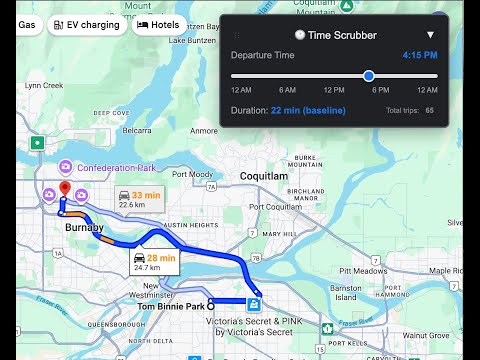
See how traffic affects travel time throughout the day. Drag the slider to see how your route duration changes in real-time.
Time Scrubber adds an interactive time slider to Google Maps, showing you how traffic affects your travel time throughout the day. Simply drag the slider from morning to evening and watch your route duration change in real-time. 🎯 PERFECT FOR: • Planning around rush hour traffic • Scheduling appointments with precise timing • Parents coordinating school pickups and activities • Commuters optimizing their daily routes • Anyone who values punctuality ⚡ HOW IT WORKS: 1. Navigate to Google Maps and get directions as usual 2. Time Scrubber automatically appears with a time slider 3. Drag the slider to different times (6 AM, 8 AM, 6 PM, etc.) 4. See realistic traffic simulations affect your travel duration 5. Find the perfect departure time for your schedule ✨ KEY FEATURES: • Interactive time slider with realistic traffic simulation • Works immediately - no setup or API keys required • Optional: Add your Google Maps API key for real-time traffic data • Clean, intuitive design that integrates seamlessly • Elegant glassmorphic settings modal • Draggable, collapsible widget that stays out of your way • Privacy-focused - all data stays on your device • Lightning-fast performance 📊 TWO MODES: **Simulated Mode (No setup required)** • Works immediately out of the box • Realistic traffic patterns based on time of day • Rush hours (7-9 AM, 5-7 PM) show longer durations • Off-peak hours show faster travel times • Perfect for quick planning **Real Traffic Mode (Optional)** • Add your Google Maps API key for actual predictions • Get real-time Google Maps traffic data • Live traffic predictions for any route • Click the 📊 icon to easily add your key 💡 BUILT FOR REAL LIFE: Created by a busy Dad who got tired of only seeing Google Maps info for right now, and needing to plan ahead to drop off kids at activities. Whether you're a busy parent juggling multiple schedules or a professional who can't afford to be late, Time Scrubber helps you plan like a pro. The realistic traffic simulation shows longer travel times during rush hours and shorter times during off-peak hours, helping you make informed departure decisions. 🔒 PRIVACY & SECURITY: • No personal data collected or transmitted • No account registration required • All functionality works locally in your browser • API key stored securely in your browser only • No external servers except Google Maps API (if you add a key) • See full privacy policy for details 👉 Start planning smarter trips today with Time Scrubber! Get started in seconds - no setup required. Optional: Add your Google Maps API key for real Google Maps traffic predictions.
0 out of 5No ratings
Details
- Version1.1.0
- UpdatedJanuary 24, 2026
- Offered byKahlil Ashanti
- Size41.03KiB
- LanguagesEnglish
- DeveloperKahlil Ashanti
4648 Albert Street Burnaby, BC V5C 2G8 CAEmail
kahlil.ashanti@gmail.comPhone
+1 778-997-4188 - TraderThis developer has identified itself as a trader per the definition from the European Union and committed to only offer products or services that comply with EU laws.
Privacy

Time Scrubber for Google Maps has disclosed the following information regarding the collection and usage of your data. More detailed information can be found in the developer's privacy policy.
Time Scrubber for Google Maps handles the following:
This developer declares that your data is
- Not being sold to third parties, outside of the approved use cases
- Not being used or transferred for purposes that are unrelated to the item's core functionality
- Not being used or transferred to determine creditworthiness or for lending purposes
Support
For help with questions, suggestions, or problems, please open this page on your desktop browser