


Overview
Post TikToks in full quality: optimize videos, add sounds without re-encoding, and see real resolution, FPS and bitrate live.
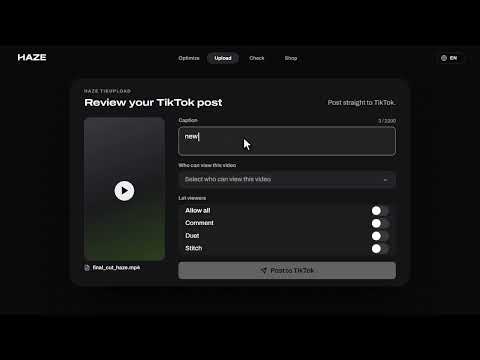
TikHaze helps your TikToks stay as sharp as you made them, and shows you the quality TikTok actually delivers. OPTIMIZE BEFORE YOU POST Open the side panel, drop in a video and pick an engine: • Classic: works with the most exports and plays normally in your phone's gallery • Max: built for HDR and Dolby Vision • Lite: same credits as Classic; TikTok plays Lite videos at up to 720p 60fps Then press Post to TikTok. TikHaze opens TikTok Studio with your video already in the upload box, and you finish the post there. Results stay in Recent for 3 days so you can download them again. ADD A SOUND WITHOUT LOSING QUALITY Normally, picking a TikTok sound in TikTok Studio makes TikTok re-render your whole video to mix the sound in. With TikHaze, TikTok attaches the sound instead, so your video isn't re-rendered just to add it. Your caption, privacy, trims and sound stay exactly as you set them. HAZE SIGNAL: LIVE QUALITY ON EVERY TIKTOK A small HUD appears on TikTok's feed and video pages: • Live frame rate and dropped frames • Resolution, codec and HDR • Bitrate estimate, connection latency and playback health • Tap "Check video" to analyze the video you're watching Drag it anywhere, or minimize it to a compact bar. HAZE CHECK: SEE WHAT TIKTOK REALLY SERVES Paste a TikTok link, or use the video in your current tab, and get a report in seconds: true resolution and frame rate, average bitrate and stream size, a Haze verdict, views, likes, comments and shares. Download the checked video as an MP4. CREDITS AND PREMIUM Sign in with Discord or Google to optimize. Each run costs Haze Credits (shown before you confirm), and a run that fails is refunded. Haze Plus and Premium are available in the Shop tab; Premium includes a 3-day free trial for eligible accounts. Checkout is handled by Whop. PRIVATE BY DESIGN • Haze Signal only reads playback; it never sends what you watch anywhere • The sound feature changes only your own publish request, in your browser, when you press Post. Nothing from it is sent to Haze • Haze Check sends only the public TikTok link you check, never your cookies, TikTok account or browsing history • No ads or trackers. All scripts and fonts are bundled in the extension Privacy policy: https://tikhaze.com/extension-privacy TikHaze is an independent tool and is not affiliated with or endorsed by TikTok.
5 out of 511 ratings
Details
- Version2.3
- UpdatedNovember 14, 2026
- FeaturesOffers in-app purchases
- Size9.93MiB
- LanguagesEnglish
- DeveloperWebsite
Email
haze@hazemethod.xyz - Non-traderThis developer has not identified itself as a trader. For consumers in the European Union, please note that consumer rights do not apply to contracts between you and this developer.
Privacy

TikHaze - TikTok Quality Optimizer has disclosed the following information regarding the collection and usage of your data. More detailed information can be found in the developer's privacy policy.
TikHaze - TikTok Quality Optimizer handles the following:
This developer declares that your data is
- Not being sold to third parties, outside of the approved use cases
- Not being used or transferred for purposes that are unrelated to the item's core functionality
- Not being used or transferred to determine creditworthiness or for lending purposes
Support
For help with questions, suggestions, or problems, visit the developer's support site