


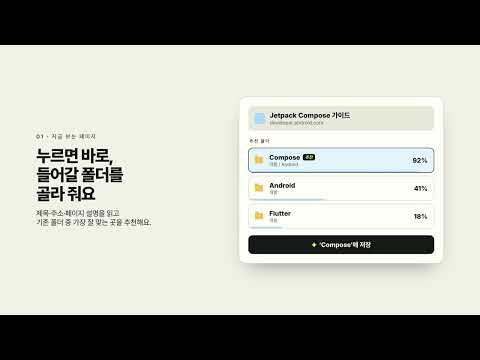
Overview
Save the page you're on to the right bookmark folder, and tidy up years of bookmarks in one pass.
Tidymark files every bookmark where it belongs, so you can find it again. ■ Save the page you're on in one click Click the toolbar button and Tidymark reads the page's title, address and description, then ranks your existing folders by how well they fit, with a confidence score for each. Tap one and it's saved. When nothing fits well, it doesn't force it: it suggests a new folder named after the site, placed next to the closest match. Already saved that address? It moves the existing bookmark instead of making a duplicate. ■ Sort years of bookmarks in one pass: four ways A. Into new folders: pick categories and Tidymark builds the structure and files your bookmarks into it. B. Into your folders: keep the structure you have and move stray bookmarks to the best match. C. By usage: split by the last time you opened each bookmark into Active, Occasional, Someday and Archive. Plain rules, no AI. D. Into projects: finds bookmarks saved in bursts, like a week of trip planning, and groups them into folders such as "2026-04 · Kitchen remodel". ■ Checkup: find what to delete or put away • Broken links (404/410 or a vanished domain) • Duplicates (ignoring utm tags, trailing slashes and www.) • Empty folders • Stale folders you haven't touched in months or years ■ Interest report See which topics your bookmarks cover and how much of your library each takes up, then get a folder structure built around them. ■ Safe by design • Nothing changes until you press Apply. You get a move plan grouped by destination and can change or untick any row. • Low-confidence items are flagged "Needs review" and left unticked. • The last tidy can be undone, including deleted bookmarks. • Browsing history access is optional and history never leaves your browser. ■ Privacy To classify pages, Tidymark sends each bookmark's title, address and page description to the Tidymark server. Nothing is saved to disk on the server (page info is only cached briefly in memory), there are no accounts, ads or analytics, and data is never sold. You can also run your own server and point the extension at it in Settings. Privacy policy: https://tidy.tmtt.link/privacypolicy
5 out of 51 rating
Details
- Version0.3.2
- UpdatedSeptember 27, 2026
- Size1010KiB
- Languages2 languages
- DeveloperWebsite
Email
mark.choi@tangibleidea.net - Non-traderThis developer has not identified itself as a trader. For consumers in the European Union, please note that consumer rights do not apply to contracts between you and this developer.
Privacy

Tidymark has disclosed the following information regarding the collection and usage of your data. More detailed information can be found in the developer's privacy policy.
Tidymark handles the following:
This developer declares that your data is
- Not being sold to third parties, outside of the approved use cases
- Not being used or transferred for purposes that are unrelated to the item's core functionality
- Not being used or transferred to determine creditworthiness or for lending purposes
Support
For help with questions, suggestions, or problems, visit the developer's support site