


Overview
Scan Gmail & Google Drive for sensitive data. Encrypt files in your private Vault. 100% local — your data never leaves your device.
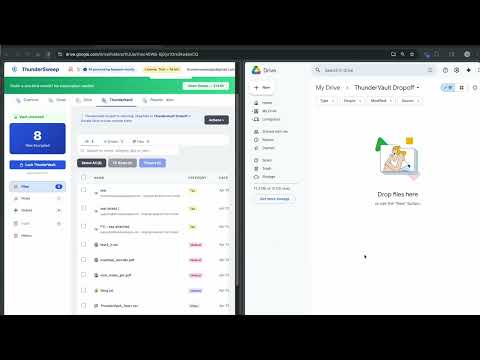
ThunderSweep — Gmail & Google Drive Security Scanner THE HIDDEN RISK IN YOUR INBOX AND DRIVE Think about how long you have had your Google account. Over the years, you have likely received or sent tax returns, bank statements, medical records, and legal contracts — and saved files directly to your Google Drive. Most of us read these once and forget about them. But they do not disappear. They sit in your Gmail and Google Drive forever, creating a massive security risk. If a hacker gains access to your account — or if an old connected app gets breached — they instantly have access to your entire financial and personal digital life. TAKE BACK CONTROL OF YOUR DATA ThunderSweep is designed to find those forgotten, sensitive documents hiding in your Gmail attachments and Google Drive files so you can proactively delete them or lock them away in an encrypted private Vault. It acts as a dedicated security scanner for your entire Google account, bringing years of buried files to the surface — then helping you organize, protect, and share them securely. NEW IN v2.0: GOOGLE DRIVE + ENCRYPTED VAULT + SECURE SHARING ThunderSweep now scans both Gmail and Google Drive in a single pass. Found something you want to keep safe instead of deleting? Move it to your ThunderSweep Vault — encrypted directly inside your own Google Drive using AES-256-GCM encryption. Your vault password never leaves your device. Not even we can open your files. The Vault is now a full secure document manager: • Vault emails with one click from Gmail's inbox using the ⚡ Vault button — no need to open each email • Search your vault by name, category, tag, or year • Rename files, set expiry reminders, and organize by category • Bulk-select files to delete, restore, or export in one action • Create encrypted Secure Notes for account numbers, PINs, policy details, and anything else worth protecting • Package vault files into a password-protected ZIP (TSxport) to share securely with anyone — no ThunderSweep required • Transfer files directly to another ThunderSweep user's vault via TS Share — end-to-end encrypted, no plaintext ever touches our servers • Smart seasonal reminders alert you when key documents are missing (W-2, 1099, passport) and notify you 30 and 7 days before stored documents expire 100% PRIVATE AND LOCAL PROCESSING Your privacy is our absolute priority. Unlike other apps that upload your data to their servers, ThunderSweep runs entirely inside your browser. Your emails and Drive files never leave your computer — we use zero cloud processing. We do not collect, store, or sell any of your data. All scanning happens locally, ensuring your information remains strictly yours. ThunderSweep complies with Google's API Services User Data Policy including the Limited Use requirements. HOW THUNDERSWEEP FINDS WHAT OTHERS MISS Gmail's built-in search only looks at plain text of emails and file names. ThunderSweep goes much deeper. Our advanced local engine extracts and parses the actual text inside your attachments and Drive files — including PDFs, Word documents (.docx), spreadsheets, and even compressed ZIP files — regardless of what the file is named. You can also filter results instantly by sender category: Tax/IRS, Payroll, Banking, Medical, or Mortgage. Our scanner identifies the exact data patterns that identity thieves look for: • Tax documents (W-2s, 1099s, returns) • Financial records (bank statements, account numbers) • Social Security numbers • Medical records and health information • Legal documents (contracts, agreements) • Employment documents (offer letters, pay stubs) • Business documents (EINs, formation papers) Once the scan finishes, ThunderSweep generates a detailed, categorized report right in your browser dashboard, showing you exactly where your exposures are — across both Gmail and Google Drive. TRY IT RISK-FREE FOR 7 DAYS Every new account receives a free 7-day trial of our premium Shield features, with absolutely no credit card required. During your trial, you get unlimited scans of Gmail and Google Drive, continuous monitoring, full Vault access, and full results without restriction. FLEXIBLE PRICING TO FIT YOUR NEEDS If you only need a quick check-up, our Free Plan allows you to run 2 scans per week and view up to 3 results per scan. To perform a complete cleanup, our Clean Sweep plan is a one-time payment of $14.99. This unlocks all results from a single scan, allowing you to bulk download files for safekeeping, permanently delete sensitive emails, and export a full CSV audit report. For ongoing protection, our Shield plan ($4.99/month or $54.98/year) offers unlimited scanning of Gmail and Google Drive, continuous real-time monitoring of both your inbox and Drive that alerts you to new sensitive documents, outbound email protection that warns you before you accidentally send sensitive information, full Vault access including encrypted notes, smart document reminders, expiry alerts, TSxport, and TS Share secure transfers. Have a family to protect? The Family plan ($11.99/month or $130.98/year) provides full Shield protection for up to 5 different Google accounts. Choosing an annual plan saves you about a month's cost each year. HOW IT WORKS Getting started is fast and secure. Simply install the extension and connect your Google account using Google's secure OAuth system. Click Scan, and ThunderSweep will locally process your Gmail and Google Drive. Within moments, your customized security report appears so you can start reviewing, deleting, or vaulting sensitive files. For ongoing protection, enable monitoring and ThunderSweep quietly watches for new exposures in the background — across both Gmail and Drive. SUPPORT AND CONTACT Have questions or need help? Email us at support@thundersweep.com or visit https://thundersweep.com to learn more. Get started today and secure your entire digital footprint.
5 out of 53 ratings
Details
- Version2.0.6
- UpdatedSeptember 28, 2026
- FeaturesOffers in-app purchases
- Size814KiB
- LanguagesEnglish (United States)
- DeveloperThunderSecurity LLCWebsite
9560 Queens Blvd Unit #2073 Rego Park, NY 11374-1136 USEmail
support@thundersweep.comPhone
+1 347-688-5349 - TraderThis developer has identified itself as a trader per the definition from the European Union and committed to only offer products or services that comply with EU laws.
Privacy

ThunderSweep has disclosed the following information regarding the collection and usage of your data. More detailed information can be found in the developer's privacy policy.
ThunderSweep handles the following:
This developer declares that your data is
- Not being sold to third parties, outside of the approved use cases
- Not being used or transferred for purposes that are unrelated to the item's core functionality
- Not being used or transferred to determine creditworthiness or for lending purposes
Support
For help with questions, suggestions, or problems, visit the developer's support site