

Three Slicer — 3D printing slicer

Overview
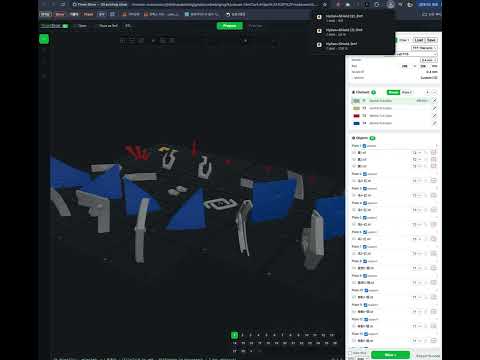
Open STL, 3MF, OBJ, STEP and G-code files in a full 3D printing slicer that runs in the browser. Nothing is uploaded.
# Store listing The text the Chrome Web Store and Firefox Add-ons listings take. The name and the short description are the manifest's (`manifest.json`); the rest is entered in the developer dashboard. ## Category Developer Tools (Chrome) · Other (Firefox) ## Detailed description Three Slicer turns the browser into a 3D printing slicer. Open an STL, 3MF, OBJ, STEP or G-code file from a link, a download or the toolbar button, and slice it to G-code without installing anything. - Open any model link with the right-click menu "Open in Three Slicer". - Downloaded models open in a slicer tab by themselves, from any site (can be turned off in the options). Allow the extension to read file URLs and it opens the file exactly as saved, including downloads a site makes inside the page. - A linked ZIP of parts opens with every model inside it. - An "Open in Three Slicer" button beside each model file on Thingiverse. The slicer is a WebAssembly build of the OrcaSlicer kernel, so it has OrcaSlicer's walls, infill, tree and grid supports, multi-material with a prime tower, and the vendor printer and filament profiles. Resin printers slice to an `.sl1` archive. Slicing runs on your machine, multithreaded; nothing is uploaded. Open source (AGPL-3.0-or-later): https://github.com/kimgh06/Three_Slicer ## Single purpose (Chrome) Open 3D printing model files from the web in a slicer that runs in the browser. ## Permission justifications (Chrome) - `downloads`: to open a downloaded model file in a slicer tab, decided by the file name the browser saves it under. - `contextMenus`: the "Open in Three Slicer" item on links to model files. - `storage`: one user setting (open downloads automatically) and the ids of downloads already opened. - Host permission (all sites): model files are hosted on any site; the slicer tab fetches the file the user opened from its own address, without cookies. The content script runs only on thingiverse.com. - Remote code: none. The WebAssembly kernel ships in the package. ## Assets - Icon: `icons/icon-128.png` - Screenshots (1280x800): `store/screenshot-prepare.png`, `store/screenshot-preview.png`, regenerated with `node store/screenshots.mjs` after a build. - Privacy policy: `store/PRIVACY.md`
0 out of 5No ratings
Details
- Version0.1.0
- UpdatedOctober 30, 2026
- Offered bykkh061101@gmail.com
- Size7.63MiB
- LanguagesEnglish
- Developer
Email
kkh061101@gmail.com - Non-traderThis developer has not identified itself as a trader. For consumers in the European Union, please note that consumer rights do not apply to contracts between you and this developer.
Privacy

This developer declares that your data is
- Not being sold to third parties, outside of the approved use cases
- Not being used or transferred for purposes that are unrelated to the item's core functionality
- Not being used or transferred to determine creditworthiness or for lending purposes