

ThreatStrike Shield

Overview
Local-first phishing & scam protection: hover warnings, bad-site blocking, login-form and ClickFix clipboard guards. No telemetry.
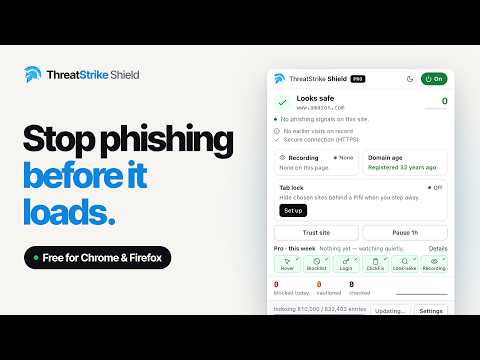
ThreatStrike Shield is a local-first phishing and scam blocker. It rates links when you hover them, blocks known-bad sites before they load, steps in on risky login forms, and stops “ClickFix” clipboard attacks. Every check runs inside your browser, so your browsing history never leaves your computer. FREE PROTECTION Hover warnings: hover any link and a small chip rates it safe, caution or danger. An offline scoring engine looks for look-alike and punycode domains, typosquats, brand names hidden in subdomains, the @ decoy trick, raw-IP addresses, open-redirect traps, credentials in URLs, and insecure or cross-site login forms. Personal look-alike detection: Shield learns the sites you actually use, on your device only, and warns when a new domain imitates one of them. Brand impersonation: on login pages, flags a page dressed up as a well-known brand on a domain that doesn’t belong to that brand. Known-bad site blocking: an offline blocklist of more than 800,000 phishing and malware sites, built from public threat feeds and refreshed every 6 hours. Confirmed hits are blocked before the page loads, with a page explaining why. Sites that only look suspicious get a warning, not a block. Flagged links on the page: the popup lists risky links on the current page, names the blocklist that flagged each one, shows the full link and where it really goes, and can scroll to it on the page with one click. ClickFix protection: stops fake “verify you’re human” pages that secretly copy a malicious command and tell you to paste it into Run (Win+R) or Terminal. Shield blocks the hidden copy and warns you. On a page it recognizes as a ClickFix lure, it locks the clipboard: the page can’t copy anything, and anything it already copied is replaced with a harmless warning. Normal sites, install guides and copy buttons are not affected. One-click Report: blocks the site on your device right away and, unless you turn community reporting off, sends that one URL to Netcraft’s takedown service. Right-click scan: check any link or page with Shield’s full engine without visiting it. Add your own free VirusTotal API key to also see results from 70+ antivirus engines (optional; Shield works fully without it). Session-recording detection: shows when a site is running a session recorder that can capture your clicks and typing. SHIELD PRO (OPTIONAL, $1.99 ONE-TIME) Behavior Guard: watches what a page does and stops fake virus lock screens, crypto miners, wallet drainers (risky signing requests wait for your approval), keyloggers and card skimmers, fake sign-in pop-ups, “click Allow” notification bait and fake browser updates. Session-recorder blocking, with a per-site “Allow here”. Link reveal: shows where links really go. Email link wrappers and common redirect wrappers are decoded on your device; short links are resolved by ThreatStrike’s server, which follows only the shortener’s redirect and never visits the destination. Domain age: shows how old the site you’re on is, and warns when a page asking for a password or card number is on a domain registered less than a week ago. Download guard: holds files whose names lie (invoice.pdf.exe) and risky downloads from look-alike or brand-new sites until you choose Keep or Delete. Tab lock: put the sites you choose behind a PIN. A locked site stays locked until you unlock it, and an unlocked site stays open until you lock it again (Alt+Shift+L). Auto-lock after idle time is optional. A weekly summary of what Pro stopped. Pay once by card or crypto. No account and no subscription. Pro turns on by itself in the browser you bought it in, and the emailed key works in up to 5 browsers. The extension never sees your card or wallet. Refund terms: https://www.threatstrike.ai/eula.html PRIVACY No account, no analytics, no telemetry. The free extension sends nothing to ThreatStrike. It only contacts the outside world to download blocklists, to send a Report you choose to send, and to run a VirusTotal scan you start. Shield Pro also sends a random install ID and your license key for license checks, a short link you hover (link reveal), and the domain name of a login or checkout page, or of the site you’re on when you open the popup (domain age). Each Pro feature can be switched off. Full details: https://www.threatstrike.ai/privacy-policy.html
0 out of 5No ratings
Details
- Version0.7.2
- UpdatedNovember 9, 2026
- Offered bysecurity
- Size231KiB
- LanguagesEnglish (United States)
- Developer
Email
security@threatstrike.ai - Non-traderThis developer has not identified itself as a trader. For consumers in the European Union, please note that consumer rights do not apply to contracts between you and this developer.
Privacy

ThreatStrike Shield has disclosed the following information regarding the collection and usage of your data. More detailed information can be found in the developer's privacy policy.
ThreatStrike Shield handles the following:
This developer declares that your data is
- Not being sold to third parties, outside of the approved use cases
- Not being used or transferred for purposes that are unrelated to the item's core functionality
- Not being used or transferred to determine creditworthiness or for lending purposes
Support
For help with questions, suggestions, or problems, visit the developer's support site