

Threat Intel Search

Overview
Right-click an IP, domain, or hash for a compact OSINT panel: one-click lookups, plus an optional score from your own API keys.
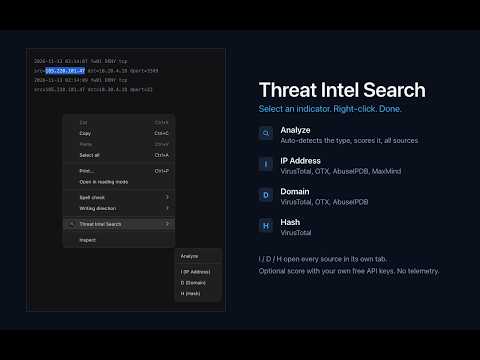
🔎 Threat Intel Search is for analysts who are tired of opening five tabs to check one indicator. Select an IP address, domain, or file hash on any page, right-click, and pick "Analyze" (auto-detects the type) for the lookup panel, or "I (IP Address)", "D (Domain)", or "H (Hash)" to open the standard reputation lookups straight in new tabs. The selection is cleaned up first: quotes and URL schemes are stripped, URLs are reduced to their host, and defanged indicators like evil[.]com or hxxp:// are refanged. 🧭 Analyze opens a small panel with: - 📋 the indicator, copyable, with its type and a context line (network owner, country, file type) once lookups answer - 🎯 a score circle - 🔗 one button per source, each opening that single lookup: reputation, abuse reports, geolocation, internet scan data, certificate transparency, WHOIS, and malware sandboxes, depending on the indicator type - 🚀 an "Open all" button that opens every source for the type at once 📊 Optional score: add your own free API keys for up to three supported reputation services in settings and the circle fills in (likely clean / suspicious / malicious) with a confidence level and one row per service showing what it found, why, and how hard it pushed the score. Evidence is combined so a strong detection isn't diluted by a service that has never seen the indicator, allowlisted and very popular domains count toward clean, and a single weak signal is capped at "suspicious". It is a convenience heuristic, not a verdict. Without keys everything else works exactly the same. 🧾 Select a whole log line and every indicator in it is one click away. ⌨️ Keyboard shortcuts: 1-9 open a source, O opens them all, C copies the indicator, D copies it defanged, R refreshes the score. 🛡️ Built for SOC analysts, incident responders, and threat hunters triaging alerts. 🔒 Privacy: the extension collects nothing and has no servers, analytics, or telemetry. Keys and a 30-minute result cache stay in local extension storage. Indicators are only sent to the services you chose, only when you look one up, straight from your browser. 💻 Open source (MIT), with the full list of supported sources in the README: https://github.com/canmenzo/ThreatIntelSearch 🦊 Also available for Firefox.
0 out of 5No ratings
Details
- Version2.1.0
- UpdatedNovember 18, 2026
- Offered bycanmenzo
- Size50.3KiB
- LanguagesEnglish
- Developer
Email
d4rkstarofficial@gmail.com - Non-traderThis developer has not identified itself as a trader. For consumers in the European Union, please note that consumer rights do not apply to contracts between you and this developer.
Privacy

Threat Intel Search has disclosed the following information regarding the collection and usage of your data. More detailed information can be found in the developer's privacy policy.
Threat Intel Search handles the following:
This developer declares that your data is
- Not being sold to third parties, outside of the approved use cases
- Not being used or transferred for purposes that are unrelated to the item's core functionality
- Not being used or transferred to determine creditworthiness or for lending purposes