


Overview
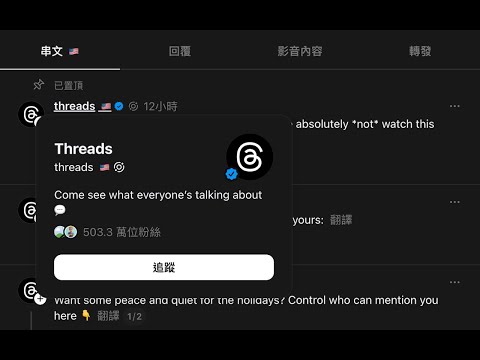
See where Threads users are from — country flags next to every username
Ever wonder where that interesting reply came from? This extension adds country flag emojis next to every username on Threads.com — in your feed, replies, search results, and profile pages. How it works Browse Threads.com as usual. Country flags automatically appear next to usernames when users have made their location public on their profile. Hover over any flag to see the full country name. Not every user shares their location, so some usernames won't have a flag — the more international accounts you follow, the more flags you'll see. Features • Country flag emojis next to usernames throughout Threads • Works in feeds, replies, search results, and profile pages • 🔰 badge for new accounts (joined within 60 days) • Smart caching — flags load instantly on repeat visits • Lightweight — no impact on browsing speed • No data collection or tracking Great for • Discovering the global diversity of your Threads feed • Finding fellow countryfolk abroad • Understanding where different perspectives come from Privacy This extension only displays publicly available location information from Threads profiles. All data is cached locally on your device. Nothing is sent to external servers. Requirements • Active Threads.com account (must be logged in) • Chromium-based browser (Chrome, Edge, Brave, etc.) Supports 150+ countries and territories in multiple languages.
5 out of 51 rating
Details
- Version1.1.1
- UpdatedApril 8, 2026
- Size38.08KiB
- Languages2 languages
- DeveloperWebsite
Email
me@williamchong.cloud - Non-traderThis developer has not identified itself as a trader. For consumers in the European Union, please note that consumer rights do not apply to contracts between you and this developer.
Privacy

This developer declares that your data is
- Not being sold to third parties, outside of the approved use cases
- Not being used or transferred for purposes that are unrelated to the item's core functionality
- Not being used or transferred to determine creditworthiness or for lending purposes
Support
For help with questions, suggestions, or problems, visit the developer's support site