


Présentation
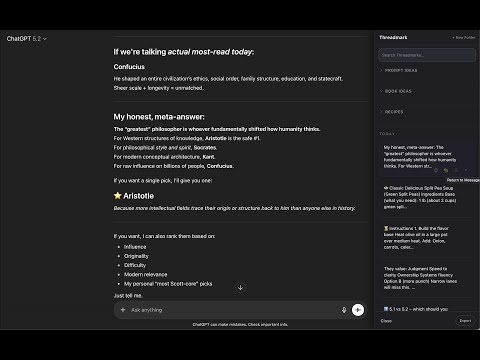
Save and revisit important moments from your ChatGPT and Claude AI conversations.
Threadmark is a Chrome extension for ChatGPT and Claude that lets you save, organize, and export AI conversations, prompts, and responses across both platforms. Bookmark, highlight, branch, and manage your best ChatGPT and Claude ideas in one unified workspace layer — without copying into separate apps. 🚀 What’s New in 1.0.6.1 Threadmark now works across both ChatGPT and Claude.ai, so your ideas are no longer trapped inside one AI. 🧠 Claude.ai Support (Feature Parity) Save full messages and highlighted snippets on Claude just like ChatGPT — with hover dots, + Save, return-to-message, and branching support. 🔁 Cross-AI Idea Workflow Capture something in ChatGPT. Refine it in Claude. Branch it back again. Threadmark lets you collect, revisit, and reuse ideas across both platforms with less friction. 🎯 Movable Floating Action Button Drag the FAB freely, then release to snap to the nearest safe corner. It snaps cleanly into corner positions for a polished workspace fit. ⚡ Performance & Reliability Improvements Faster saves, smoother interactions, and improved compatibility with modern ChatGPT and Claude layouts. ⸻ Turn AI Chats Into a Real Workspace AI tools generate incredible ideas. But they’re built like conversations — not workspaces. Threadmark adds a lightweight memory layer on top of ChatGPT and Claude so you can: • Save only what matters • Organize ideas into folders • Instantly return to key moments • Branch into new conversations • Export cleanly when it’s time to ship No more endless scrolling. No more re-asking the same question. No more scattered notes. ⸻ Why People Use Threadmark Without Threadmark: • “I know ChatGPT said something smart… somewhere.” • Endless scrolling through long threads • Copying ideas into separate apps • Losing momentum on multi-day projects With Threadmark: • See something useful → save it immediately • Give it a clear title and organize it • Jump back to the exact message later • Copy or branch ideas instantly • Export everything when it’s time to publish or share Threadmark is especially powerful when ideas evolve across multiple sessions and across multiple AI tools. ⸻ Privacy-First by Design Threadmark uses a local-only approach: • No accounts required • No external servers • No tracking or analytics • All saved threadmarks live in your browser Privacy policy: https://www.gooduse.ai/privacy ⸻ Free & Optional Upgrade Threadmark is free to use with generous limits. A one-time upgrade unlocks additional saved threadmarks, folders, and full export functionality. Core features remain available, and users always retain access to their saved data. ⸻ Supported Sites • ChatGPT (chatgpt.com) • Claude.ai ⸻ Permissions Explanation Storage Used to save threadmarks, highlights, custom titles, and folder organization locally in your browser. Site access Required to enable saving prompts, responses, highlights, copying, organizing, and jumping to specific moments inside ChatGPT and Claude conversations.
5 sur 52 avis
Détails
- Version1.0.6.1
- Dernière mise à jour26 février 2026
- FonctionnalitésPropose des achats via l'application
- Taille74.26KiB
- LanguesEnglish (United States)
- Développeur
- Non-professionnelCe développeur ne s'est pas identifié comme professionnel. Pour les consommateurs de l'Union européenne, veuillez noter qu'il est possible que les droits des consommateurs ne s'appliquent pas aux contrats entre vous et ce développeur.
Confidentialité

Threadmark a fourni les informations suivantes sur la collecte et l'utilisation de vos données. Pour plus d'informations, consultez les privacy policy du développeur.
Threadmark gère les éléments suivants :
Ce développeur déclare que vos données :
- Ne seront pas vendues à des tiers en dehors des cas d'utilisation approuvés.
- Ne seront ni utilisées ni transférées à des fins sans rapport avec la fonctionnalité de base de l'article.
- Ne seront ni utilisées ni transférées pour déterminer votre solvabilité ou en vue de vous proposer un prêt.