


Overview
Keyboard-first navigation for Reddit, Hacker News, and Stack Overflow threads.
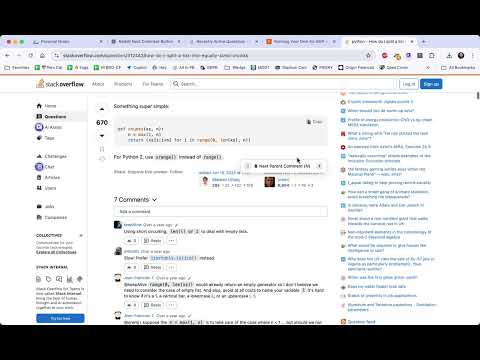
Thread Jumper is a lightweight Chrome extension that adds fast, keyboard-first navigation to comment threads on Reddit, Hacker News, and Stack Overflow (plus the Stack Exchange network). 🧵 If you read long discussions on those sites, you’ve probably spent too much time scrolling, losing your place, or trying to move between parent comments, replies, and answers. Thread Jumper helps you move through threads quickly and intentionally using simple, intuitive keyboard shortcuts. 🎉 With Thread Jumper, you can jump between parent comments or answers, step through replies or comments within a thread, move backward if you skip too far, or instantly return to the top of the page, all without taking your hands off the keyboard. The extension runs quietly in the background and does not change the layout or behavior of the sites it supports. Supported sites: - Reddit - Hacker News (news.ycombinator.com) - ✨ NEW! - Stack Overflow and Stack Exchange sites (including Superuser, Server Fault, Ask Ubuntu, and more) - ✨ NEW! 🔒 Thread Jumper stays minimal by design. It requires no accounts, includes no tracking, and has nothing to configure. It simply gives you better control over how you navigate internet conversations, making long threads easier and more enjoyable to read. 🚀 How to use Thread Jumper After installing Thread Jumper, open any Reddit post with comments and start reading. The extension activates automatically. A small floating button appears on the page, which you can drag anywhere you like. Click and drag the handle to reposition it, and Thread Jumper will remember its position. Thread Jumper works best with the keyboard. Use these single-key shortcuts while reading: ⏭️ N: Jump to the next parent comment ➡️ M: Move through replies in the current parent thread ⬅️ B: Go back to the previous parent comment ⏫ T: Return to the top of the page 🚀 I: Toggle instant scroll on or off - ✨ NEW! You can also click the “Next Parent Comment (N)” button if you prefer using the mouse. A small “?” icon shows a quick keyboard cheat sheet when hovered. 🤩 Thread Jumper is ideal for power readers, keyboard-focused users, and anyone who wants a faster, more focused way to read Reddit. 🔒 Privacy First Thread Jumper collects no data and includes no tracking. It runs locally on Reddit pages only, requires no accounts, and never sends information anywhere. Your reading stays private. ☕ Support Thread Jumper I built Thread Jumper myself because I wanted a better way to read Reddit and long threads, and I’m sharing it as a free tool for anyone who finds it useful. If Thread Jumper saves you time or makes reading long threads more enjoyable, and you’re able to support it financially, I’d really appreciate it. You can buy me a coffee here: https://buymeacoffee.com/threadjumper Your support helps me maintain the extension and continue improving it. Thanks for using Thread Jumper. Update Notes: 1.1 - released Feb 8, 2026 - Added keyboard shortcut on hover, instant scrolling mode, added support for Hacker News and Stack Overflow, including the Stack Exchange network, and general stability and performance improvements 1.0 - released Dec 26, 2025 - Release
0 out of 5No ratings
Details
- Version1.1.0
- UpdatedFebruary 9, 2026
- Size20.35KiB
- LanguagesEnglish
- Developer
- Non-traderThis developer has not identified itself as a trader. For consumers in the European Union, please note that consumer rights do not apply to contracts between you and this developer.
Privacy

This developer declares that your data is
- Not being sold to third parties, outside of the approved use cases
- Not being used or transferred for purposes that are unrelated to the item's core functionality
- Not being used or transferred to determine creditworthiness or for lending purposes
Support
For help with questions, suggestions, or problems, visit the developer's support site