


Overview
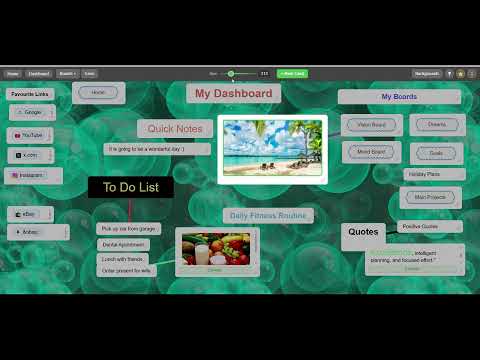
Your new tab becomes your fixed visual whiteboard. Clip links, highlights, images and notes from any page. Start with 5 boards.
📌 Thoughtogram: Your Visual Workspace New Tab Transform your new tab into a distraction-free, fixed whiteboard. Organize your thoughts, research, and web discoveries on a perfectly framed, always-in-focus canvas. No infinite scrolling, no zooming. Just your most important ideas exactly where you left them, naturally limited by your screen size to keep you focused. 🎨 Rich Media & Smart Organization Go beyond basic text links. Your new tab is a fully interactive workspace: Rich Embeds: Paste YouTube links and watch them directly on your board. Visual Organization: Add images, resize them, and drag them freely. Card Stacking: Running out of flat space? Stack cards on top of each other to keep related ideas grouped together. Expandable Cards: Short cards stay glanceable. Click to expand any card into a full-screen view for long-form notes and articles. Seamless Clipping: Save text highlights, links, and notes directly from any webpage using the built-in Web Clipper, via popup or right-click menu. ✨ NEW, Select Mode: Tick or drag-select several cards at once and clear them away in one sweep. Tidying a busy board takes seconds. 🔗 Build a Visual Wiki Type [brackets] around any word on a card to instantly create and link to a new board for that topic. Connect any board to any board, with no hierarchy and no folders, and grow a spatial network of your ideas. Every tier includes linked boards. ✅ Great For: ✔️ Quick notes and to-dos that stay visible every time you open a tab. ✔️ Organizing bookmarks visually instead of burying them in folders. ✔️ Research projects: collect quotes, links, and screenshots in one canvas. ✔️ Reading lists and watch-later YouTube queues. ✔️ Project planning, mood boards, and visual brainstorming. ✔️ A personal wiki of linked topic boards. 🏷️ Clear, Upfront Pricing 🎁 Instant start (before you even sign up): Install and you have 5 boards right away, including your Home Board, with every feature above: rich media, clipping, stacking, linking, and Select mode. 💡 Free account: Doubles your space to 10 boards, keeps them safely tied to your account so you can reinstall or switch machines without losing anything, and unlocks quick capture from the mobile companion web app. 💎 Thoughtogram Pro ($5/month): Unlimited boards. Build your visual wiki as big as your ideas. And if you ever stop subscribing, nothing is deleted: boards over your limit simply become read-only until you return. 📥 Your Data, Your Rules Export any card to your clipboard or any board to a Markdown file at any time. Your notes work in Obsidian, Notion, or anywhere else. Traffic is encrypted in transit (HTTPS) and your data is protected with server-side encryption on our servers. Note: This extension replaces your browser's new tab page. That is the whole point! Your whiteboard greets you every time you open a tab.
5 out of 51 rating
Details
- Version3.8
- UpdatedJuly 18, 2026
- Size180KiB
- LanguagesEnglish (United Kingdom)
- DeveloperJames BartonWebsite
60 Arbour Close Rugby CV22 6EH GBEmail
jamesjbartonx@gmail.comPhone
+44 7931 972234 - TraderThis developer has identified itself as a trader per the definition from the European Union and committed to only offer products or services that comply with EU laws.
Privacy

Thoughtogram New Tab has disclosed the following information regarding the collection and usage of your data. More detailed information can be found in the developer's privacy policy.
Thoughtogram New Tab handles the following:
This developer declares that your data is
- Not being sold to third parties, outside of the approved use cases
- Not being used or transferred for purposes that are unrelated to the item's core functionality
- Not being used or transferred to determine creditworthiness or for lending purposes
Support
For help with questions, suggestions, or problems, please open this page on your desktop browser