

ThomLingo - Live Translation & Language Learning
1 rating
)
Overview
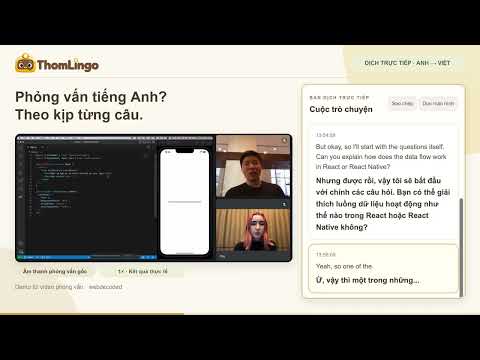
Live translation in Chrome. Look up and save words or phrases. Learn English with YouTube on the ThomLingo website.
ThomLingo helps you understand conversations, translate words in context and keep learning English. Use live translation and quick lookup in Chrome, then learn from YouTube videos on the ThomLingo website. 1. LIVE TRANSLATION - IN THE CHROME EXTENSION • Follow international meetings, client calls, job interviews and educational videos. • Choose the spoken language and the language you want to read. • View the original speech and translation side by side in the Chrome side panel. • Turn on floating captions to read translations directly over your current tab. • Save a transcript only when you choose to enable transcript saving. 2. QUICK LOOKUP, HOVER TRANSLATION & VOCABULARY Hover over a word for a quick translation, or select a word or phrase to open a lookup card. Listen to pronunciation and save useful word-translation pairs to your ThomLingo vocabulary book. Hover translation can be switched off at any time. 3. LEARN ENGLISH WITH YOUTUBE - ON THE WEBSITE Open a YouTube video with available captions to follow the transcript, replay individual sentences, translate a sentence and save vocabulary with its video timestamp. Paste a YouTube link on https://thomlingo.com/listening to start. This feature runs on the ThomLingo website, not inside the extension, and requires available English captions. YOUR LANGUAGE, YOUR WORKFLOW Choose Automatic, English or Vietnamese for the extension interface. Your interface language is separate from the languages you translate between. Saved vocabulary remains associated with its original language pair. GETTING STARTED 1. Sign in to your ThomLingo account. 2. Open Live Translation and choose your languages. 3. Select a tab or window and share its audio when Chrome prompts you. 4. Start translating and enable floating captions if you prefer to read on the tab. PLANS AND REQUIREMENTS New accounts include a one-time 5-minute live translation trial. Continued Soniox-powered live translation requires your own Soniox API key and is subject to your ThomLingo plan's limits. Soniox usage fees are paid separately. View current plans at https://thomlingo.com/wallet. Audio capture depends on Chrome, the operating system and the audio source. Some pages do not allow floating captions. Translation accuracy and latency vary with audio quality, language, speech and connectivity. ThomLingo provides translated text; it does not replace the speaker's voice. PRIVACY AND CONTROL Shared audio is sent to Soniox for live transcription and translation. Transcript saving is off by default and starts only when you enable it. Hovered words or selected text are sent for translation when you use those features. Words are added to your vocabulary only when you choose to save them. Website: https://thomlingo.com Privacy: https://thomlingo.com/privacy Support: nphuocnguyen.dev@gmail.com
5 out of 51 rating
Details
- Version0.11.18
- UpdatedOctober 25, 2026
- FeaturesOffers in-app purchases
- Offered bynphuocnguyen.dev
- Size275KiB
- Languages2 languages
- Developer
Email
nphuocnguyen.dev@gmail.com - Non-traderThis developer has not identified itself as a trader. For consumers in the European Union, please note that consumer rights do not apply to contracts between you and this developer.
Privacy

ThomLingo - Live Translation & Language Learning has disclosed the following information regarding the collection and usage of your data. More detailed information can be found in the developer's privacy policy.
ThomLingo - Live Translation & Language Learning handles the following:
This developer declares that your data is
- Not being sold to third parties, outside of the approved use cases
- Not being used or transferred for purposes that are unrelated to the item's core functionality
- Not being used or transferred to determine creditworthiness or for lending purposes
Support
For help with questions, suggestions, or problems, visit the developer's support site