

ThinkTrail

Overview
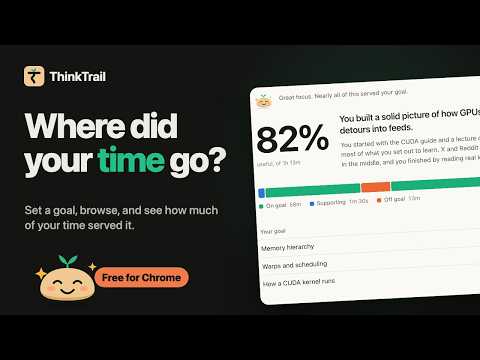
Say what a browsing session is for, press Record, and see how much of your time served that goal.
Say what a browsing session is for, press Record, and browse. When you stop, ThinkTrail shows how much of your time served that goal, what pulled you away, and study notes from what you read. HOW IT WORKS • Press Ctrl+Shift+K (⌘⇧K on Mac) and write your goal, like "Learn how GPUs schedule warps". Or leave it blank to just see where your time goes. • Browse normally. Step away and the session pauses by itself. • Stop, and your report is there at once. AI then adds a written summary and notes. WHAT YOU GET • One number: how much of your time served your goal, the moment you stop, even with no AI. • A timeline of on-goal, supporting and off-goal time, and every activity labeled. Change a label and the numbers update. • Study notes from the pages that served your goal: key takeaways, terms and open questions, downloadable as Markdown. • No goal? See your time by theme, and how much was focused work, admin or leisure. • History: a calendar colored by how focused each day was, what you learned most, and where the time went. • Pick up where you left off: continue a session and its report grows, with only the new pages analyzed. • Import a day from your Chrome history to see where it went, without recording first. • Trail, a little sprout in your toolbar, meditates while you're on goal and gets cross when you drift. Spend too long on distracting sites and Trail pops up on the page to bring you back. PRIVATE BY DESIGN • Records only while you're recording. • Sessions stay in your browser. No account. • Sessions are analyzed automatically with free credits (15 a month), on a server that keeps none of your browsing, only a count of sessions used. Or choose your own computer with Chrome's built-in AI (Gemini Nano), your own Claude, OpenAI or Gemini key, or analysis only when you press Analyze. • Asks for site access only when you first press Record. • Never stores what you type, and never reads pages with a password field. Chrome's built-in AI needs Chrome 138 or later and a capable computer. COMING SOON: THINKTRAIL PRO Notes sent to Obsidian, Logseq or Notion by themselves, flashcards from your notes, Claude Code, and more AI analysis each month.
0 out of 5No ratings
Details
- Version1.4.0
- UpdatedNovember 14, 2026
- Offered bylabsoddball@gmail.com
- Size488KiB
- LanguagesEnglish
- DeveloperSirish Sekhar
33, 29th B Cross, Balaji Layout, Kaggadasapura, CV Raman Nagar Bengaluru, Karnataka 560093 INEmail
labsoddball@gmail.comPhone
+91 73493 59536 - TraderThis developer has identified itself as a trader per the definition from the European Union and committed to only offer products or services that comply with EU laws.
Privacy

ThinkTrail has disclosed the following information regarding the collection and usage of your data. More detailed information can be found in the developer's privacy policy.
ThinkTrail handles the following:
This developer declares that your data is
- Not being sold to third parties, outside of the approved use cases
- Not being used or transferred for purposes that are unrelated to the item's core functionality
- Not being used or transferred to determine creditworthiness or for lending purposes
Support
For help with questions, suggestions, or problems, please open this page on your desktop browser