

TheUrlInsights – Broken Link Checker & SEO Audit

Overview
Check broken links, redirects, images, and page resources. Run on-page SEO checks with this link checker and website audit tool.
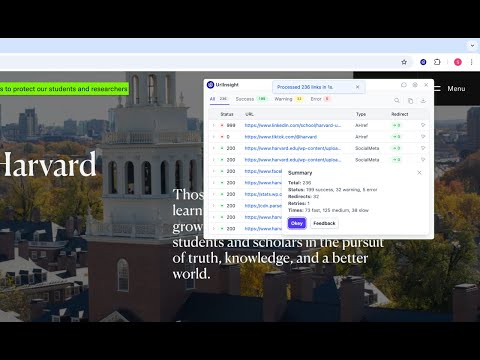
TheUrlInsights checks the links and SEO of any web page, right in Chrome. Open it on a page to find broken links and redirects, then audit how well the page can be found in search. When you're ready, scan the whole site. Nothing is installed on the website, and you don't need access to its server. 🔗 CHECK EVERY LINK ON THE PAGE Click the toolbar icon and a panel opens on top of the page. It reads every link and resource on the page and checks each one from your browser. • See which links work, which redirect and which are broken, with each link's status code. • Catch the hard cases too: "not found" pages that still answer 200, anchors that point nowhere, and insecure content that Chrome blocks. • Follow each redirect hop by hop, including chains and loops. • Images, scripts and other resources are checked as well as links. You decide which types to include. • Links are outlined on the page in green, amber or red, so problems stand out where they are. • Open any link for its full details, including its redirect chain, response headers and what robots.txt says about it. Locate takes you straight to it on the page, and its XPath is one click to copy. • Filter, search and sort the results, then export them to CSV or copy them as JSON. When the check ends, a short summary tells you how many links need attention and why, with one click to see them. 📈 AUDIT THE PAGE'S SEO The SEO tab runs 15 checks in three groups. Each one gives a plain answer, explains why it matters, and says how to fix it. • Indexing: whether search engines can crawl and index the page. It reads robots.txt, the meta robots tag and the X-Robots-Tag header, and shows the exact rule that decides. • Canonical and hreflang tags: whether they point to pages that work and agree with each other. • Sitemap: whether the page is listed in its XML sitemap. • AI crawlers: whether robots.txt lets AI crawlers read the page. Set your own policy and get a warning when robots.txt goes against it. • Content: the title, meta description and headings, with lengths you can set. Images missing alt text are flagged too. • Markup: social sharing tags and structured data, checked for mistakes. 🚦 A TOOLBAR ICON THAT WARNS YOU As each page loads, the icon turns green, amber or red depending on whether the page can be indexed. A small badge shows the main reason, such as a 404 error, a noindex tag or blocked AI crawlers. Hover over the icon to read every reason. You can turn the badges off in Settings. 🌐 SCAN A WHOLE WEBSITE The Full site scan reads every page of a site and checks every link on it. • Choose how far it goes: one domain, its subdomains, or a single folder. • Leave out the parts you don't need with simple rules, and respect robots.txt if you want. • Pages built with JavaScript are read in a browser frame, so their links aren't missed. • See a health score and the issues to fix first, then open any problem to see every page it's on. After a fix, check the link again in one click. • Download the results as a CSV, or as a PDF report ready to share, either a one-page summary or the full list of issues. • While it runs, the scan warns you early if a site starts refusing requests or your computer runs low on memory. • Your recent scans stay in History, so you can open or repeat them later. 💼 FOR AGENCIES The Agency plan adds a place to keep each client's websites and their scan settings. It also adds PDF reports with your own logo and colours, and access for a team of up to 5. ⚙️ SETTINGS AND SHORTCUTS Choose how fast links are checked and which user agent is sent, and add a polite delay for busy sites. You can skip parts of a page or certain addresses entirely. Shortcuts: Alt+Shift+U opens the panel, Alt+Shift+S starts a Full site scan, and Alt+Shift+O opens Settings. You can also right-click any page and choose Audit Page or Audit Full Site. 💳 PLANS The link check, the SEO audit and the toolbar icon are free on every page. Plans only change how much the Full site scan can do. • Free: 3 site scans a month, up to 100 pages each. • Pro: 30 site scans a month, up to 10,000 pages each, with full PDF reports. New accounts start with a 14-day Pro trial. • Agency: 100 site scans a month, plus client sites, branded reports and a team. • Lifetime Pro: the Pro plan, paid once. Prices are on https://theurlinsights.com/pricing/ 🔒 PRIVACY You sign in with your Google account, and the account is free. Links are checked from your own browser, without sending your cookies. Usage statistics never include the addresses you check, and you can turn them off. Read the full policy at https://theurlinsights.com/privacy/ Find what's broken on your pages and fix it before your visitors notice. Install TheUrlInsights and check your first page for free. Website: https://theurlinsights.com/ Support: https://theurlinsights.com/support/
5 out of 52 ratings
Details
- Version2.2.0
- UpdatedNovember 2, 2026
- Size1.39MiB
- LanguagesEnglish
- DeveloperSULOKCHANAWebsite
NO 15, MAIN ROAD MARAI MALAI NAGAR, KORUKANTHANGAL, KATTANKULATHUR KACHEEPURAM, Tamil Nadu 603203 INEmail
sivaraj@theurlinsights.com - Non-traderThis developer has not identified itself as a trader. For consumers in the European Union, please note that consumer rights do not apply to contracts between you and this developer.
Privacy

TheUrlInsights – Broken Link Checker & SEO Audit has disclosed the following information regarding the collection and usage of your data. More detailed information can be found in the developer's privacy policy.
TheUrlInsights – Broken Link Checker & SEO Audit handles the following:
This developer declares that your data is
- Not being sold to third parties, outside of the approved use cases
- Not being used or transferred for purposes that are unrelated to the item's core functionality
- Not being used or transferred to determine creditworthiness or for lending purposes
Support
For help with questions, suggestions, or problems, please open this page on your desktop browser