

ThemeCraft
3 ratings
)
Overview
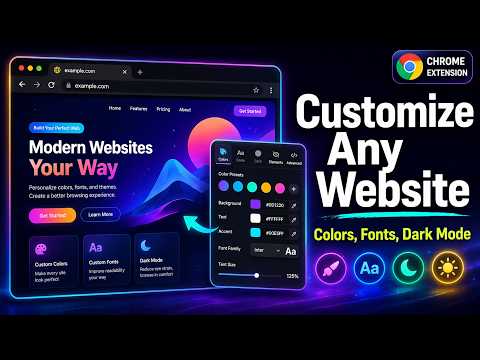
ThemeCraft — Customize any website's colors, fonts, dark mode, and more. Hide elements, save per-site themes, and craft your web.
ThemeCraft gives you full control over how any website looks. Change colors, fonts, text sizes, enable smart dark mode, hide distracting elements, and save your custom themes per website — all from a clean, modern popup. Whether you want to reduce eye strain with dark mode, increase readability by changing fonts and text sizes, remove annoying page elements, or just make a site look the way you want — ThemeCraft does it all. COLOR CUSTOMIZATION Change background color, text color, link color, and button/accent color on any website Enter colors by name (e.g., "navy", "coral", "tomato") or by hex code (e.g., #1a1a2e) Built-in color picker for visual selection Supports all 148 CSS named colors Clear button to instantly reset any color back to default Changes apply in real-time as you type or pick COLOR SPECIFIC ELEMENTS Pick any element on the page and change its text color individually Choose your color first, then click the element you want to apply it to Build a list of element-specific color overrides Enable or disable each color change individually with a toggle switch Remove any color override permanently with one click TYPOGRAPHY CONTROL Change the font family across the entire page — choose from Sans-Serif, Serif, Monospace, and Display fonts Adjust text size from 50% to 200% using a smooth slider Fine-tune line height for better readability Adjust letter spacing for tighter or looser text Uses browser zoom for reliable scaling that works on every website regardless of how the site sets its font sizes SMART DARK MODE One-click dark mode toggle that works on any website Uses intelligent color inversion that preserves images, photos, and videos in their original colors Profile pictures, logos, thumbnails, and media all display correctly Emojis are preserved in their original colors — no more blue smiley faces SVG icons remain crisp and clearly visible with enhanced contrast Adjustable intensity slider: from subtle dimming (20%) to full dark (100%) Option to toggle image preservation on or off Works reliably on complex, modern websites like Fiverr, Amazon, YouTube, Reddit, and more HIDE ANY ELEMENT Click the "Pick Element to Hide" button, then click any element on the page to hide it Visual highlighter shows exactly which element you are targeting before you click Floating label displays the element selector as you hover Press ESC at any time to cancel picking All hidden elements are listed with their CSS selectors Enable or disable each hidden element individually with a toggle — temporarily bring it back without removing the rule Remove any hidden element permanently with the X button Hidden elements persist across page reloads when auto-save is enabled PER-SITE SETTINGS Save your customizations for each website automatically Settings are stored by domain name (e.g., fiverr.com, github.com) Themes auto-apply when you revisit a saved website — no need to re-configure every time Toggle auto-apply on or off per site Master enable/disable switch to quickly turn all customizations on or off without losing your saved settings BUILT-IN PRESETS Apply professionally designed themes with one click: Sepia — Warm, paper-like reading mode with Georgia font. Easy on the eyes for long reading sessions High Contrast — Pure black background with white text and yellow links. Ideal for accessibility and low-vision users Blue Light Filter — Reduces blue light emission with a warm sepia overlay. Great for evening browsing Night Owl — Soft, muted dark theme with calming blue and purple accents. Comfortable for extended night use CUSTOM PRESETS Save your current configuration as a custom preset with any name Apply your saved presets to any website instantly Delete custom presets you no longer need Built-in presets cannot be deleted CUSTOM CSS INJECTION Write your own CSS rules in the built-in code editor Apply advanced styling that goes beyond the built-in controls Full CSS support with syntax-highlighted textarea Great for power users who want pixel-perfect control IMPORT AND EXPORT Export all your settings (every saved site, every custom preset) as a single JSON file Import settings from a previously exported file to restore your themes Transfer your themes between computers or share them with others Backup your customizations before reinstalling the browser INDIVIDUAL ITEM CONTROL Every hidden element has its own on/off toggle switch Every element color override has its own on/off toggle switch Temporarily disable any change without removing it Disabled items appear dimmed in the list so you can see what is active and what is paused Re-enable at any time with one click CLEAN, MODERN INTERFACE Dark-themed popup designed for comfortable use Organized into 5 clean tabs: Colors, Typography, Dark Mode, Elements, and Advanced Smooth animations and transitions throughout Compact layout that does not take up excessive screen space Toast notifications confirm your actions Undo button to reset everything back to defaults LIGHTWEIGHT AND FAST No external libraries or frameworks — built with pure vanilla JavaScript Minimal permissions: only requests activeTab, storage, scripting, and tabs Does not collect any user data or analytics Does not make any network requests All processing happens locally in your browser No account required WORKS EVERYWHERE Compatible with virtually every website on the internet Handles complex, modern single-page applications Works on dynamically loaded content (chat messages, infinite scroll, etc.) Automatically detects and skips restricted pages (chrome:// URLs, extension pages)
5 out of 53 ratings
Details
- Version1.5.0
- UpdatedJune 22, 2026
- Offered byFarhad Zafar
- Size42.1KiB
- LanguagesEnglish
- Developer
Email
qualittyservices@gmail.com - Non-traderThis developer has not identified itself as a trader. For consumers in the European Union, please note that consumer rights do not apply to contracts between you and this developer.
Privacy

This developer declares that your data is
- Not being sold to third parties, outside of the approved use cases
- Not being used or transferred for purposes that are unrelated to the item's core functionality
- Not being used or transferred to determine creditworthiness or for lending purposes