

Theme Studio for ChatGPT - Dark Mode, Themes & Anime Backgrounds
2 ratings
)
Overview
Theme ChatGPT with dark mode, anime backgrounds and Diwali, Sakura, Royal, Frost, Midnight, Ocean, Aurora and Ember themes.
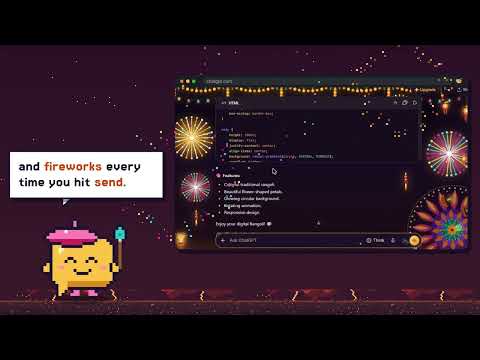
ChatGPT, styled like a place you want to stay. Theme Studio restyles chatgpt.com the moment you pick a look. Dark nights, soft daylight, festival colour, pixel worlds, and full-bleed anime walls. Your messages, code, and menus stay readable. The art stays behind the words. Pick a theme. It applies instantly. Choose Off any time to bring back the original ChatGPT, including your own light or dark setting. SIXTEEN THEMES Anime Studio. You are the protagonist. A scene fills the page, with a glass sidebar and composer so the chat stays clear. Pixel Art. Four 16-bit worlds: Meadow, Night, Ember, and Neon. A small hero walks the landscape behind your chat, jumps when you send, and levels up as you go. Classic, clean, crisp, and light. Midnight. Night sky and brass. Grid. A dark drafting table. Vintage Paper. Kraft paper, ink, and a book face. Diwali. Festival night, with marigolds, diyas, and live fireworks. Rangoli. The same festive craft, in warm daylight. Sakura. Soft blossom pink. Royal, violet, and gold. Frost. A cool Nordic night. Mono. Pure graphite, high contrast. Latte. Warm coffee-house daylight. Ocean. Deep teal. Aurora, the Northern Lights. Ember. Charcoal and copper. ANIME BACKGROUNDS Open Anime Studio for 27 scenes, including Moonlit Shrine, Neon Rain, Sakura Dusk, Train Window, Torii Forest, and Starfield. You can also drop in a picture of your own. Credits for the included scenes are shown in the popup. DIWALI On the Diwali and Rangoli themes, Live Fataka plays behind the chat: rockets, fountains, sparklers, lamps, and marigolds. Hit send, and the night celebrates. When a reply finishes, the sky answers. Set the intensity to Calm, Normal, Festive, or Wild, or turn the layer off. It also follows your reduced-motion setting. Preview the sounds from the popup before you commit. WHAT CHANGES ON THE PAGE? The sidebar and the active chat. The header and model picker. Your bubbles and the reply. Headings, lists, links, quotes, and tables. Code blocks, with colours matched to the theme. The composer and its buttons. Menus, settings, toasts, scrollbars, and the focus ring. STUDIO CONTROLS Moments. A short beat when you send it and when a reply is ready. Sound. A soft send, a bigger reply, and a Diwali bomb. You set the volume, and you can preview each sound. Ambient motion. Petals, lights, and fireworks. Glass blur. A frosted sidebar and composer. Focus glow. A ring while you type. Quiet sidebar. Softer chrome, so the page recedes. Wider chat. More room for long replies. Compact. Tighter spacing. Comfortable read. Larger type and taller lines. Reply cards. A soft card behind each answer. Hide disclaimer. Hides the “ChatGPT can make mistakes” line. PRIVATE BY DESIGN Theme Studio runs only on chatgpt.com and chat.openai.com. Your theme and settings stay in Chrome storage on your device. There is no account, no ad network, and no analytics. Sound is generated on your computer. Theme Studio is an independent extension. It is not made by, or affiliated with, OpenAI. HOW TO START 1. Install Theme Studio and pin it. 2. Open chatgpt.com. 3. Open the popup and pick a theme. If a ChatGPT update leaves something looking off, report it from the popup. That opens a message to @sahilrakhaiya on X. Made for long chats, late nights, and the days you want the screen to feel like yours.
5 out of 52 ratings
Details
- Version1.0.0
- UpdatedNovember 6, 2026
- Offered byViceBuddy
- Size10.08MiB
- LanguagesEnglish
- Developer
Email
sahilrakhaiya05@gmail.com - Non-traderThis developer has not identified itself as a trader. For consumers in the European Union, please note that consumer rights do not apply to contracts between you and this developer.
Privacy

This developer declares that your data is
- Not being sold to third parties, outside of the approved use cases
- Not being used or transferred for purposes that are unrelated to the item's core functionality
- Not being used or transferred to determine creditworthiness or for lending purposes
Support
For help with questions, suggestions, or problems, visit the developer's support site