

The Experimenteurs Toolkit - Pre/Post test statistics, estimated impact

Overview
Quickly & simply calculate MDE, sample size, run time, experiment performance and experiment impact
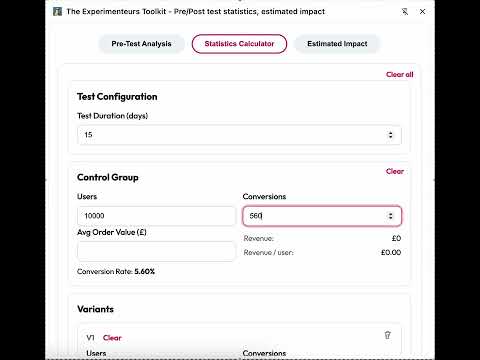
**🆕 New for v3!** • Hypothesis builder — document your experiment hypothesis directly on saved projects • "Go to projects" quick link after saving an analysis • Pages & Audiences — save page configs with instant run time and MDE reference tables for any target uplift • CSV export for all saved projects • Pre-test usability nudge — highlights missing fields when you try to calculate run time • Bonferroni correction toggle on pre-test calculations (4+ variants) • Refreshed UI with inline clear controls, trash icons, and polished project cards --- **The Experimenteurs Toolkit** is a lightweight side panel calculator for anyone running A/B tests. No sign-ups, no data sent anywhere — everything runs locally in your browser. **Pre-Test Planning** Calculate the three numbers you need before launching any experiment: • Minimum Detectable Effect (MDE) — know the smallest uplift your test can reliably detect • Sample size per variant — based on your baseline conversion rate, target uplift, and significance level • Estimated run time — enter your daily visitors and see how long the test needs to run Supports custom significance levels (90%, 95%, 99%, or any value) and automatically adjusts for multiple variants. Bonferroni correction available when running 4+ variants. **Post-Test Analysis** Enter your control and variant data to get: • Frequentist results — conversion uplift, 95% confidence intervals, p-values, and significance • Bayesian results — chance to beat control via Monte Carlo simulation, credible intervals • Revenue projections — estimated incremental revenue per month with confidence intervals • Visual comparison charts — conversion rate bars with CI overlays, chance-to-win bars Add as many variants as you need. Each gets full statistical treatment. **Estimated Impact** Quantify what a successful experiment could be worth: • Monthly and annual revenue projections based on your traffic, conversion rate, and expected uplift • Helps prioritise which experiments to run first **Saved Projects** Track your experiments from planning through to results: • Save pre-test analyses as named projects • Add post-test data later — results are auto-inferred from your frequentist table • Record outcomes (won/lost/inconclusive), actual uplift, significance, and incremental revenue • Add a structured hypothesis to sharpen your thinking before you run • Export everything to CSV **Pages & Audiences** Save your key pages and audiences with their traffic and conversion data: • Instant reference tables showing run time, sample size, and MDE for 5%, 10%, 15% uplift targets • Custom uplift row — type any percentage and see results live • MDE pills showing what you can detect in 7, 14, and 28 days • Optional AOV for revenue projections **Privacy** All data is stored locally on your machine using Chrome's built-in storage. Nothing is sent to any server. No accounts, no tracking, no analytics.
0 out of 5No ratings
Details
- Version3.0.0
- UpdatedMarch 16, 2026
- Offered byproductgrowthlabs
- Size96.84KiB
- LanguagesEnglish (United Kingdom)
- Developer
Email
productgrowthlabs@gmail.com - Non-traderThis developer has not identified itself as a trader. For consumers in the European Union, please note that consumer rights do not apply to contracts between you and this developer.
Privacy

This developer declares that your data is
- Not being sold to third parties, outside of the approved use cases
- Not being used or transferred for purposes that are unrelated to the item's core functionality
- Not being used or transferred to determine creditworthiness or for lending purposes