


Overview
Instantly check the page's SEO status, whether it's on server-side or client-side rendering.
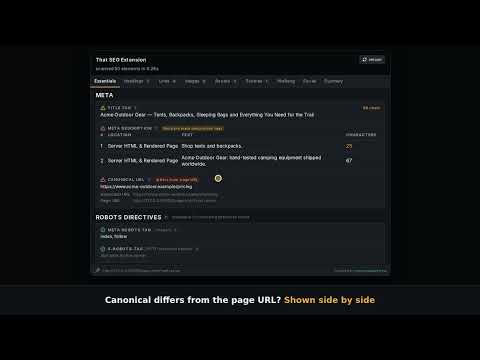
AI crawlers CANNOT read JavaScript-created content. Use That SEO Extension to view the page with JavaScript disabled to see what an AI crawler sees on the page. That SEO Extension scans the page you're viewing and shows what's right, what's wrong, and how to fix it: titles, meta tags, headings, links, images, structured data, hreflang, and social sharing. No account, no setup, no switching between tools. HOW IT WORKS Click the toolbar icon on any page. Results appear instantly in the popup, organized into tabs. A button in the top bar re-opens the page in a new tab with JavaScript turned off, so you can see what a crawler that doesn't run scripts sees. WHAT IT CHECKS Essentials - Title tag and meta description, with length checks - Canonical URL: flags a canonical that points to a different page, an invalid URL, a missing href, or an empty href - Duplicate tags: when a title, description, canonical, or robots tag appears more than once, every occurrence is listed, compared between the server HTML and the rendered page - Canonical and meta robots tags that sit outside <head> and would be ignored by search engines - "Changed after rendering" badges that show when JavaScript changes a tag's value from what the server sent - Meta robots and X-Robots-Tag directives, robots.txt, XML sitemaps, viewport, language, word count, and HTML page size - URL parameters that change the page's content Headings - Full H1–H6 outline - Missing or duplicate H1s, hidden headings, empty headings, and headings with no real text (such as an image-only heading) - Click any heading to jump to it on the page, highlighted - Export to CSV; when JavaScript changes the headings, the export marks each row as "server HTML" or "rendered" Links - Internal, external, nofollow, hidden, no-anchor-text, no-href, and invalid-URL links, up to 1,500 listed with a notice if a page has more - Reachability checking: the first 30 links are checked automatically, the rest on demand; redirected URLs are flagged as "Redirected" rather than counted as OK - Click a link to find it on the page, and export to CSV (with the same server HTML / rendered marking when JavaScript changes the links) Images - Missing and empty alt text, missing or invalid src - Thumbnail previews on hover, and CSV export (with server HTML / rendered marking) Assets - JS and CSS files the page loads, whether each is reachable, and whether robots.txt blocks it Schema - JSON-LD types and validity, a copy button for each block, plus microdata and RDFa counts Hreflang - Alternate-language tags from the HTML, HTTP headers, and XML sitemaps, compared side by side - Reachability and reciprocal-link checks, including targets that link back with a different hreflang value - Flags each target that is redirected, canonicalized to another URL, blocked by robots.txt, set to noindex, or whose <html lang> doesn't match its hreflang, with a filter chip for each - Flags hreflang tags that sit outside <head> Social - Open Graph and Twitter Card tags, with a preview of how the page looks when shared on Facebook and LinkedIn JAVASCRIPT-DISABLED VIEW The "JS disabled in new tab" button opens the current page in a new tab with JavaScript blocked for that tab only (side by side with the current tab in browsers that support split view). The tab is marked with a "noJS" badge on the toolbar icon, and the extension skips server-versus-rendered comparisons there, since both are the same. Pages that load through a service worker can't be blocked this way. The extension tells you instead of showing a page that still runs JavaScript. SUMMARY TAB Every issue the extension finds, from every tab, in one list ranked High, Medium, and Low priority. Each one shows exactly where the problem is and a plain-English recommendation for fixing it. Around 50 issue types are covered, including duplicate tags, hreflang inconsistencies, and HTML language mismatches. PRIVACY Everything runs in your browser. The extension does not collect, store, or send any data about you or the pages you visit, and it has no server of its own. To check whether links, images, assets, and hreflang targets are reachable, it makes requests from your browser to the same URLs the page already references, and nothing else. PERMISSIONS - Active tab and scripting: used to read the page you're on when you open the extension - Access to all sites: used only to check whether URLs the page references (links, images, assets, hreflang targets, sitemaps) are reachable, since they're often on other domains - Declarative net request (with host access): used only by the "JS disabled in new tab" button, to block scripts in the one tab it opens. It affects no other tab, blocks and redirects nothing, and the rule is removed when the browser closes Built for SEO specialists, developers, content teams, site owners, and non-SEO who want a fast first-pass audit without leaving the page. ## WHATS NEW IN VERSION 0.0.2 New Features - "JS disabled in new tab" button. A new button in the middle of the top bar opens the page you're looking at in a new tab with JavaScript turned off, so you can see what a crawler that doesn't run scripts sees. In browsers that support it (Chrome 155 and later), the new tab opens side by side with the original in a split view. Elsewhere it opens as a normal new tab next to the current one. * The new tab is marked with an amber noJS badge on the toolbar icon and a JavaScript disabled in this tab label in the popup. * On that tab the extension skips the server-HTML-versus-rendered comparisons, since both are the same there. * Some pages can't be handled, mainly sites that load through a service worker (YouTube is one). Rather than show you a page that still runs JavaScript, the extension closes the new tab and shows a red ! on the toolbar icon of the original tab. Hover over it to see why. * The button needs one extra permission, "declarative net request (with host access)". It is used only to block scripts in the one tab the button opens. It doesn't affect other tabs and doesn't block or redirect anything. - More hreflang checks. When you run the status check on the Hreflang tab, each target now also gets these tags, each with its own filter chip: * canonicalized: the target's canonical points to a different URL. * blocked by robots.txt * has noindex * HTML lang mismatch: the page's <html lang> doesn't match its own hreflang value. This is checked for the page you're on as well as the targets, and the tooltip mentions when JavaScript changed the language after the server sent the page. * Inconsistent hreflang between target: the target links back to your page using a different hreflang value than your page uses for itself. - New Summary issues: * "Mismatched hreflang value between the page and the target's link-back" * "HTML lang mismatch" (Medium priority, Hreflang) - CSV exports show where each item was found. If the Headings, Links, or Images tab shows Changed after rendering, the exported CSV gains a Location column marking every row as "server HTML" or "rendered". - Tags outside <head> are now caught. Search engines ignore a canonical, meta robots, or meta description tag that ends up in the page body, which usually happens when something earlier in <head> closes it early. These now show a Not in <head> tag on the Essentials tab and appear in the Summary tab as: * "Canonical tag outside head" (High priority) * "Meta robots tag outside head" (High priority) * "Meta description tag outside head" (Low priority) Improvements - Redirects are no longer counted as OK. A link, asset, sitemap, or hreflang target that redirects is now flagged Redirected instead of showing the status of wherever it ends up. A redirected hreflang target is also treated as unreachable, and the link-back check is skipped for it. - Hreflang link-back check reads every source. A target now counts as Linking back if it links to your page in its HTML tags, its HTTP Link header, or its XML sitemap. Before, only HTML tags counted, so targets that link back another way were wrongly reported as "Not linking back". The same applies to the Summary issue "Hreflang targets not linking back". - Links tab lists up to 1,500 links (it was 400), with a notice when a page has more than that. - Duplicate-tag issues in the Summary tab are now tables with the columns #, Location, and Tag, covering duplicate title, meta description, meta robots, and canonical tags. When the server HTML and the rendered page have the same tags, they're shown as one list without the Location column. - Hreflang labels are clearer: "Inconsistent across sources" is now "Inconsistent URL across sources". - Slightly larger row labels and spacing in the duplicate-tag tables on the Essentials tab.
0 out of 5No ratings
Details
- Version0.0.2
- UpdatedOctober 23, 2026
- Size397KiB
- LanguagesEnglish (United States)
- DeveloperWebsite
Email
contact@marcuslawrenzo.com - Non-traderThis developer has not identified itself as a trader. For consumers in the European Union, please note that consumer rights do not apply to contracts between you and this developer.
Privacy

This developer declares that your data is
- Not being sold to third parties, outside of the approved use cases
- Not being used or transferred for purposes that are unrelated to the item's core functionality
- Not being used or transferred to determine creditworthiness or for lending purposes