


Overview
Save web pages and articles to Thanote directly from your browser
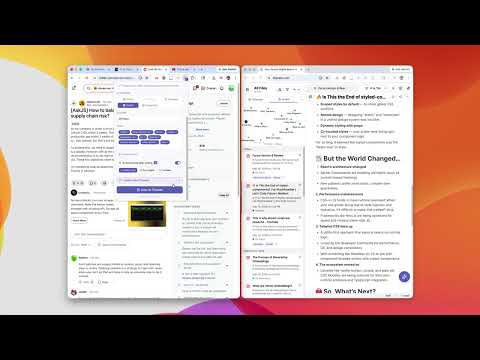
Turn anything you read into structured knowledge - instantly. Thanote Web Clipper helps you capture ideas from anywhere on the web and save them into your personal second brain. Whether it's an article, a highlighted paragraph, a screenshot, or a quick thought - everything is organized and instantly searchable inside Thanote. Key Features Save Web Pages Clip full pages or reader-friendly article content and store them as clean, structured notes - with one click. Highlight & Capture Select any text on a webpage and send it directly to Thanote. Supports plain text, code snippets, and rich content. Screenshot Selection Draw a region on any page to capture exactly what you need as a visual note — with precision resize handles and a live preview. Keyboard Quick Capture Press Cmd+Shift+S (Mac) or Ctrl+Shift+S (Windows/Linux) to clip the current page instantly - no popup required. Your last-used folder and tags are applied automatically. AI Summarize on Save Let AI process your clip the moment it's saved. Choose from: - Bullet points: concise summary of main ideas - Key insights: the 5 most important takeaways - Translate: convert content into any language Powered by your own AI provider (OpenAI, Gemini, Claude, or Cloudflare) configured inside Thanote. Smart Related Notes When you visit a webpage, the extension automatically detects notes you've already saved on the same topic - and shows them in the popup so you can quickly append new content instead of creating duplicates. Side Panel Mode Pin the Web Clipper as a side panel that stays open while you browse. Clip, review, and organize without interrupting your reading flow. Note Types Tag each clip as a Note, Code snippet, or Diagram - so it lands in the right context inside your workspace. Seamless Sync with Thanote Your clips sync to your Thanote workspace automatically. If you're offline, they queue locally and sync the moment the app is open. Why Thanote? Thanote is more than a note-taking tool - it's your AI-powered second brain. This extension makes it effortless to: - Collect knowledge while browsing - Summarize and translate content with AI - Surface related ideas you've already captured - Build a personal knowledge base that grows smarter over time Use Cases - Save and summarize research articles instantly - Capture code snippets with proper syntax highlighting - Translate foreign-language content on the fly - Clip inspiration and connect it to existing notes - Build a personal knowledge system without leaving the browser Privacy First Your data is yours. This extension only communicates with your Thanote instance and does not collect, track, or sell any data. AI processing uses your own API keys stored encrypted in your account. Get Started 1. Install the extension 2. Open any webpage 3. Press Cmd+Shift+S for instant capture - or open the popup to clip, summarize, and organize 4. Find related notes, append ideas, and build your second brain
0 out of 5No ratings
Details
- Version1.1.1
- UpdatedMay 19, 2026
- Size105KiB
- LanguagesEnglish
- DeveloperWebsite
Email
supasan.game@gmail.com - Non-traderThis developer has not identified itself as a trader. For consumers in the European Union, please note that consumer rights do not apply to contracts between you and this developer.
Privacy

This developer declares that your data is
- Not being sold to third parties, outside of the approved use cases
- Not being used or transferred for purposes that are unrelated to the item's core functionality
- Not being used or transferred to determine creditworthiness or for lending purposes
Support
For help with questions, suggestions, or problems, visit the developer's support site