

TG Video Downloader | Download Private Media

Overview
Save Telegram videos, files and images — even private channels and download-disabled messages. Supports batch and large files.
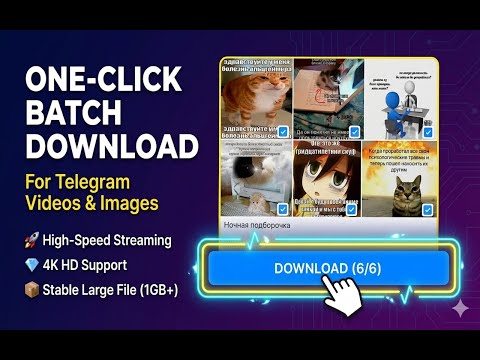
TG Video Downloader | Download Private Media — Telegram Media Downloader for Chrome A Chrome extension for Telegram Web users who need a reliable save path when the native download button fails, with chunked downloads that avoid loading large files fully into memory. WHAT IT IS TG Video Downloader | Download Private Media is a Chrome extension for Telegram Web (web.telegram.org and webk.telegram.org). It helps you save photos, videos, documents, and voice notes from channels, groups, and chats that you already have access to through your own Telegram account. This is not a Telegram client, not a bot, and not a standalone downloader. It runs entirely inside your existing Telegram Web session and only works on content that session can already open. WHO THIS IS FOR You have probably landed on this page because you hit one of the following situations on Telegram Web: 1. Download disabled on a message The native save button is missing or greyed out, even though you can clearly see the media in the chat. 2. Restricted saving on a channel A channel or group has saving turned off, so the standard right-click save or forward-to-saved path does not work. 3. Private channel media You are a member of a private channel and can view the content, but the Telegram Web UI does not give you a convenient way to pull the media out of the browser. 4. Batch or large-file archiving You need to save dozens or hundreds of files from the same chat, or a single video that is large enough to make one-by-one downloads painful. If none of these match your situation, the built-in Telegram save flow is probably already enough and you do not need this extension. CORE FEATURES ### Private Channel Downloader Save media from private Telegram channels and groups you are already a member of. The extension works against the Telegram Web session in your current browser tab, so it can reach any channel that session can open. Works for: - Private channels where you have been accepted as a member - Subscription or members-only groups you have joined - Restricted media channels where the native save button is unreliable Does not work for: - Channels you are not a member of - Accounts you are not logged into - Any content outside your current Telegram Web session ### Download Disabled Workaround When a message in Telegram Web shows no native save option, the extension offers an alternative save path based on the media that is already loaded in the page. This is the "download disabled" workaround most users are looking for. Works for: - Messages whose media is already visible or playable in the current Telegram Web tab - Channels that keep the content viewable but do not expose a native download button Does not work for: - Forwarded-protected content that your session cannot play at all - Content that requires a Premium subscription your account does not have - Any attempt to read messages you do not have permission to view ### Batch / Bulk Media Downloader Instead of saving files one by one, the extension lets you pick many at once and queue them as a batch. - Checkbox-based selection across a conversation - Filter by media type (photos, videos, documents, voice, GIF) - Sort by size, type, or date before downloading - Progress tracking with per-file status and speed - Start from a single chat and queue everything that is currently loaded The batch runs through your browser's own download pipeline — there is no server-side queue and no cloud storage involved. ### Large-File Support Large videos and archives are streamed in chunks instead of being loaded fully into memory. - Stable behaviour for 1GB+ video files under typical desktop conditions - Lower memory use to reduce tab crash risk during large downloads - Resume support for interrupted downloads where the underlying media is still available - Real-time progress with speed indicator Actual throughput still depends on your network, your Telegram account's access rights, and the server conditions Telegram returns at the moment of download. ### Telegram Video & Photo Saving - Save videos in their original container (MP4, MOV, and similar, depending on how Telegram stored them) - Download video messages and round video notes as individual files - Export photos and albums at the resolution Telegram has on the server for your account - Animated GIFs are saved as the underlying MP4 where Telegram delivers them that way ### Dual Telegram Web Support The extension detects which Telegram Web variant you are using and adapts to it. - Telegram Web A (web.telegram.org) - Telegram Web K (webk.telegram.org) It does not work on Telegram Desktop, Telegram iOS, or Telegram Android; those clients have their own native save flows. HOW IT WORKS 1. Install the extension from the Chrome Web Store 2. Pin the icon to your toolbar for quick access 3. Open web.telegram.org (or webk.telegram.org) and log in with your usual account 4. Navigate to the chat, group, or channel that contains the media you want to save 5. Click the extension icon to see every downloadable media item the current tab has already loaded 6. Select individual files or use the "Select All" helper 7. Start the download — files are written by the browser's native download manager For single files, a small save button also appears next to each media message so you can grab one item without opening the full list. WHAT IT WORKS FOR, AND WHAT IT DOES NOT DO Works for: - Content you can already view or play inside your own Telegram Web session - Batch archiving of media from chats you are a member of - Large files that standard one-shot downloads struggle with - Saving from private channels where you already have access rights Does not do: - Bypass channel membership, invites, or Premium-only gating - Access chats, channels, or content your account cannot open - Break copyright, DRM, or terms of service of any upstream provider - Run outside your Telegram Web session (no background scraping, no headless crawling) - Replace Telegram Desktop or the mobile apps If Telegram Web genuinely cannot load a piece of media for your account, the extension cannot load it either. FREQUENTLY ASKED QUESTIONS Q: Do I need to create an account or sign up for the extension itself? A: No. The extension has no separate account. It reuses whatever Telegram Web session you already have in the browser. Q: Does this work for channels I am not a member of? A: No. The extension only sees what your own Telegram Web session can already open. It is not a search engine or a way to access private content you do not have rights to. Q: Does this work when Telegram shows "download disabled"? A: In many cases, yes — because the media is usually still loaded into the page for playback. The extension offers a save path based on that already-loaded media. There are cases (for example hard-protected forwards your session cannot play at all) where it will not work, and that is expected. Q: Is there a file size limit? A: The extension itself does not add an artificial cap and is built around streamed chunk downloads, which is what makes 1GB+ files practical. Real-world limits still come from your browser, your disk, and Telegram's own delivery behaviour. Q: Are there daily download quotas? A: The extension does not impose its own quota. Telegram's infrastructure may throttle or rate-limit your account if you pull a large amount of content in a short time; that is outside our control. Q: Which Telegram Web versions are supported? A: Telegram Web A (web.telegram.org) and Telegram Web K (webk.telegram.org). Telegram Desktop, iOS, and Android are not supported. Q: Can I download from Saved Messages? A: Yes. Saved Messages is treated like any other chat in Telegram Web. Q: Does the extension upload my data anywhere? A: No. Downloads run through your own browser and go straight to your local disk. The extension does not ship a backend for media transfer and does not proxy files through any third-party server. Q: What file formats are supported? A: Whatever Telegram actually stores the media as. Common cases include MP4 for video and video notes, JPG/PNG/WEBP for photos, MP4 for animated GIFs, and the original file type for documents. Q: Is the extension free? A: Yes. There is no paid tier and no feature is locked behind a subscription. TECHNICAL NOTES - Browser: Chrome, Edge, Brave, and other Chromium-based browsers - Minimum Chrome version: 88+ - Host permissions: only web.telegram.org and webk.telegram.org - Memory: streamed chunks, not full in-memory buffers - Downloads: routed through the native Chrome Downloads API - UI languages: available in 15+ locales SUPPORTED UI LANGUAGES - English - Chinese (Simplified and Traditional) - Japanese - Korean - German - Spanish - French - Italian - Portuguese - Russian - Indonesian - Thai - Vietnamese - And more INSTALL If the situations at the top of this page describe what you are running into on Telegram Web, install TG Video Downloader | Download Private Media from the Chrome Web Store and keep using Telegram Web the way you already do — the extension only activates on those two Telegram Web domains. LEGAL AND COMPLIANCE This extension is an independently developed third-party tool. It is not affiliated with, endorsed by, or connected to Telegram Messenger Inc. Telegram is a registered trademark of Telegram Messenger Inc. The extension is intended for saving content you already have legitimate access to through your own Telegram account. You are responsible for complying with applicable copyright law, local regulation, and the terms of service of Telegram and of the content's original author or channel. Do not use this extension to redistribute copyrighted material, to circumvent access controls of content you are not entitled to, or for any unauthorised purpose. The extension runs locally inside your browser. It does not store your Telegram account, your session, or any of the media you download on any server operated by the developers.
4.8 out of 5203 ratings
Details
- Version1.4.3
- UpdatedSeptember 22, 2026
- FeaturesOffers in-app purchases
- Size572KiB
- Languages13 languages
- DeveloperWebsite
Email
zbhydra115@gmail.com - Non-traderThis developer has not identified itself as a trader. For consumers in the European Union, please note that consumer rights do not apply to contracts between you and this developer.
Privacy

TG Video Downloader | Download Private Media has disclosed the following information regarding the collection and usage of your data. More detailed information can be found in the developer's privacy policy.
TG Video Downloader | Download Private Media handles the following:
This developer declares that your data is
- Not being sold to third parties, outside of the approved use cases
- Not being used or transferred for purposes that are unrelated to the item's core functionality
- Not being used or transferred to determine creditworthiness or for lending purposes
Support
For help with questions, suggestions, or problems, visit the developer's support site