Item logo image for TextsBert - Data AutoFill and Light PDF Tools

TextsBert - Data AutoFill and Light PDF Tools

textsbert.com
4.7(

6 ratings

)
Item media 6 (screenshot) for TextsBert - Data AutoFill and Light PDF Tools
Item video thumbnail
Item media 2 (screenshot) for TextsBert - Data AutoFill and Light PDF Tools
Item media 3 (screenshot) for TextsBert - Data AutoFill and Light PDF Tools
Item media 4 (screenshot) for TextsBert - Data AutoFill and Light PDF Tools
Item media 5 (screenshot) for TextsBert - Data AutoFill and Light PDF Tools
Item media 6 (screenshot) for TextsBert - Data AutoFill and Light PDF Tools
Item video thumbnail
Item media 2 (screenshot) for TextsBert - Data AutoFill and Light PDF Tools
Item media 3 (screenshot) for TextsBert - Data AutoFill and Light PDF Tools
Item media 4 (screenshot) for TextsBert - Data AutoFill and Light PDF Tools
Item media 5 (screenshot) for TextsBert - Data AutoFill and Light PDF Tools
Item media 6 (screenshot) for TextsBert - Data AutoFill and Light PDF Tools

Overview

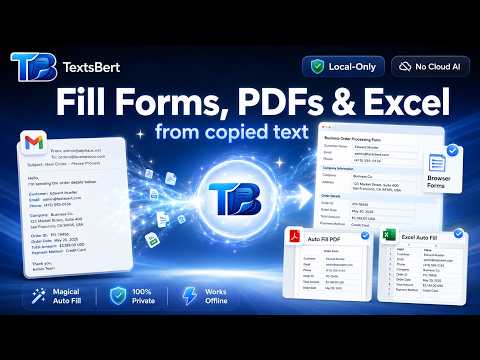
Fast, safe browser autofill plus light PDF tools, snippets, and profiles — runs locally in your browser.

TextsBert helps you fill forms and handle PDF work faster, with privacy-first local processing on your device. It is built for real data-entry workflows: websites, admin portals, checkout forms, account forms, invoices, customer records, confirmations, repeated text, and practical PDF organization tasks. TextsBert turns messy input into usable data and gives you tools to fill, teach, reuse, organize, and export safely. What TextsBert does ✅ Magic Fill (Clipboard → Form) Copy messy text such as emails, addresses, phone numbers, customer details, company details, VAT/IBAN/BIC, dates, order data, and mixed notes. TextsBert maps it into the right fields as intelligently as possible and fills common form elements including inputs, textareas, checkboxes, radios, and supported dropdowns/selects. ✅ Safety-first filling TextsBert is designed to avoid dangerous guessing. If a value is unclear, it prefers to leave the field empty instead of filling the wrong thing. It never auto-submits forms. You stay in control before, during, and after fill actions. ✅ Quick Button / Orb Use the small in-page floating button for faster access without opening the popup. Trigger fill actions, open snippets, access PDF tools, or start teaching directly on the page. ✅ Profiles Save reusable profiles for personal, business, shipping, customer, hotel, or workflow-specific data. Fill repeatedly used forms much faster with profile-based filling. ✅ Teach When a website uses unusual labels, custom field names, or special structure, teach it once and reuse that learning later. TextsBert supports: Teach a Meaning Correct This Fill Teach a Pattern Review Learned Items This is useful for internal systems, admin tools, specialized portals, and repetitive workflows where default mapping is not enough. ✅ Copy-order teaching for difficult pages For pages where text is too ambiguous or the language/layout is hard to parse, TextsBert can learn by copy order. This gives you a deterministic fallback when you want exact control instead of automatic interpretation. ✅ Snippets / text reuse Store reusable text blocks, shortcuts, and templates for replies, signatures, support messages, standard phrases, and repeated business text. Insert snippets quickly and keep common writing tasks consistent. ✅ Selected info on page Capture relevant text directly from the current page, review it, and use it as a source for filling instead of relying only on clipboard text. PDF Tools in the extension ✅ Light PDF tools in the browser TextsBert includes practical local PDF tools such as: Images → PDF Compress PDF Merge PDFs Split PDF Reorder / Remove Pages Rotate Pages Original files are not modified. You export new results. ✅ Batch PDF tools Run supported operations across multiple PDFs in one pass and download ZIP output when available. This is useful for repetitive document-processing jobs. ✅ Images → PDF Create a new PDF from local image files, reorder them, sort them, and export clean PDF output. Useful for receipts, scans, photo-based paperwork, and image bundles. Useful workflow details ✅ Local-first by design Core filling and light PDF handling are designed to run locally on your device. Your original files stay unchanged unless you explicitly export a new result. ✅ Built for sensitive workflows TextsBert is designed for users who care about speed, consistency, and reducing manual errors in forms and documents without sending the core work to third-party cloud processors. ✅ Workspace and team support TextsBert includes workspace-style collaboration features for supported accounts, while keeping the main filling experience local-first. What lives in TextsBert Desktop TextsBert Desktop is the companion app for heavier document workflows. Advanced features such as: Fill & Sign OCR for scanned PDFs and images document editing workspace advanced document handling live in TextsBert Desktop, not in the browser extension. Plans TextsBert offers Free and PRO usage paths. TextsBert is for people who work with forms and documents every day and want one privacy-first tool that can fill forms, learn unusual websites, reuse text, organize PDFs, and work faster with less manual effort.

Details

  • Version
    1.0.8.6
  • Updated
    April 7, 2026
  • Features
    Offers in-app purchases
  • Size
    6.02MiB
  • Languages
    5 languages
  • Developer
    ‪Mohammad Hiza‬‏
    Hauptstraße 282 Herne 44649 DE
    Website
    Email
    admin@textsbert.com
    Phone
    +49 1521 6428516
  • Trader
    This developer has identified itself as a trader per the definition from the European Union and committed to only offer products or services that comply with EU laws.

Privacy

Manage extensions and learn how they're being used in your organization

TextsBert - Data AutoFill and Light PDF Tools has disclosed the following information regarding the collection and usage of your data. More detailed information can be found in the developer's privacy policy.

TextsBert - Data AutoFill and Light PDF Tools handles the following:

Personally identifiable information
Authentication information

This developer declares that your data is

  • Not being sold to third parties, outside of the approved use cases
  • Not being used or transferred for purposes that are unrelated to the item's core functionality
  • Not being used or transferred to determine creditworthiness or for lending purposes

Support

You might also like…

Web to PDF

4.8

Use Web to PDF converter to save a web page as a pdf and download it instantly. Perfect for offline reading and sharing.

WPS PDF - Read, Edit, Fill, Convert, and AI Chat PDF with Ease

4.5

Easy-to-use PDF tools to view, edit, convert, fill, e-sign PDF files, and more in your browser.

SimplePDF - Edit, Sign and Fill PDF

4.7

Edit, sign, and fill PDF without leaving your current tab using SimplePDF - the online editor that respects your privacy

Combine PDF - Merge PDF

5.0

Quickly Combine PDF files, merge multiple PDF documents and unite pages into one PDF with a simple, secure tool

Google apps