


Overview
Right-click any selected text and instantly process it with TextPire tools. Menu auto-updates when new tools go live.
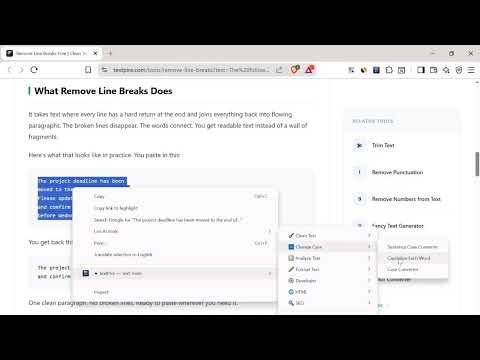
Turn any webpage into your text editing workspace. TextPire gives you instant access to 30+ free text processing tools directly from your right-click menu. Select any text on any webpage, right-click, and choose exactly what you need — no copying, no tab switching, no friction. How it works: Select text → Right-click → Choose a tool → TextPire opens with your text pre-filled and ready to process. What you can do: 🧹 Clean Text Remove line breaks, extra spaces, empty lines, duplicate lines, special characters, URLs, emails, emojis, and HTML tags from any text instantly. 🔤 Change Case Convert to sentence case, capitalize each word, switch between UPPER, lower, and Title Case in one click. 📊 Analyze Text Count words, characters, and sentences. Check readability score, keyword density, and estimated reading time. ⚙️ Developer Tools Format and validate JSON, convert JSON to CSV and back, encode/decode Base64 and URLs. 🌐 HTML Tools Convert Markdown to HTML and process HTML content without leaving the page you're reading. 🔍 SEO Tools Generate SEO slugs and meta descriptions from any selected text in seconds. Why TextPire: ✅ 100% free — no premium tiers, no paywalls ✅ No account required — open and use immediately ✅ Privacy first — your text is never stored or sent to any server ✅ Always up to date — new tools appear automatically as they go live ✅ Works on any webpage — articles, docs, emails, code, anything Menu stays clean: Tools are organized into categories so the right-click menu never feels cluttered. Only the tools that are actually live on TextPire appear — no broken links, no coming soon placeholders. Visit textpire.com to use 450+ text tools directly in your browser.
0 out of 5No ratings
Details
- Version1.1.2
- UpdatedApril 7, 2026
- Size48.39KiB
- LanguagesEnglish
- DeveloperWebsite
Email
abdallahmoboadz@gmail.com - Non-traderThis developer has not identified itself as a trader. For consumers in the European Union, please note that consumer rights do not apply to contracts between you and this developer.
Privacy

This developer declares that your data is
- Not being sold to third parties, outside of the approved use cases
- Not being used or transferred for purposes that are unrelated to the item's core functionality
- Not being used or transferred to determine creditworthiness or for lending purposes
Support
For help with questions, suggestions, or problems, visit the developer's support site