


概述
Copy text from any image, screenshot, PDF, or webpage. Draw a rectangle to capture & extract text instantly. Free browser OCR tool.
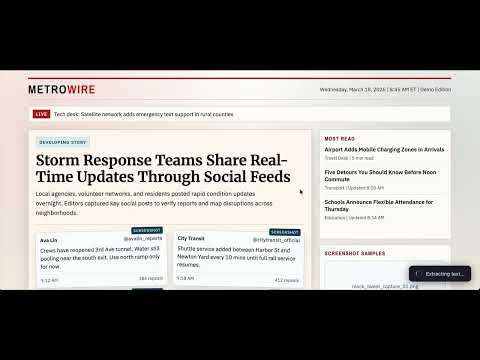
TextLens – OCR Text Extractor | Copy Text from Images, PDFs & Screenshots Turn any image, PDF, or webpage into editable text instantly with TextLens — a fast, privacy-first OCR (Optical Character Recognition) Chrome extension. Simply select any area on your screen and extract text in seconds. EXTRACT TEXT FROM ANYWHERE ON THE WEB Tired of retyping text from images, screenshots, or PDFs? TextLens makes it effortless: Extract text from images on websites Copy text from PDFs and scanned documents Capture text from videos, canvases, and graphics Works on any webpage with a simple selection Just draw a box around the text — TextLens handles the rest. HOW IT WORKS Activate Click the TextLens icon, right-click and select "TextLens", or press: Ctrl + Shift + O (Windows/Linux) / Cmd + Shift + O (Mac) Select Area Draw a rectangle over the text you want to extract Instant OCR TextLens captures and processes the image locally using advanced OCR engines Copy Text View extracted text in a popup and copy it with one click 100% PRIVACY-FIRST OCR Your data stays on your device. No tracking or data collection Perfect for sensitive documents and secure workflows. MULTI-LANGUAGE SUPPORT Extract text in 25+ languages, including: English, Spanish, French, German, Hindi, Chinese, Japanese, Korean, and more. KEY FEATURES Select and extract text from any screen region Right-click context menu integration Keyboard shortcut support One-click copy to clipboard Fast, accurate, and lightweight Works on Chrome (Manifest V3 compatible) Completely free to use USE CASES Students copying notes from PDFs or slides Developers extracting text from UI screenshots Marketers capturing text from ads or creatives Researchers digitizing scanned documents Anyone who wants to avoid manual typing WHY CHOOSE TEXTLENS? Unlike cloud-based OCR tools, TextLens is fast, private, and works anywhere — even on protected pages and dynamic content. INSTALL TEXTLENS TODAY Save time, boost productivity, and extract text from anywhere with ease. Add TextLens – OCR Text Extractor to Chrome now and start copying text in seconds!
5 星(5 星制)3 个评分
详情
隐私权

该开发者已声明,您的数据:
- 不会因未获批准的用途出售给第三方
- 不会为实现与产品核心功能无关的目的而使用或转移
- 不会为确定信用度或放贷目的而使用或转移
支持
若有任何疑问、建议或问题,请访问开发者的支持网站