


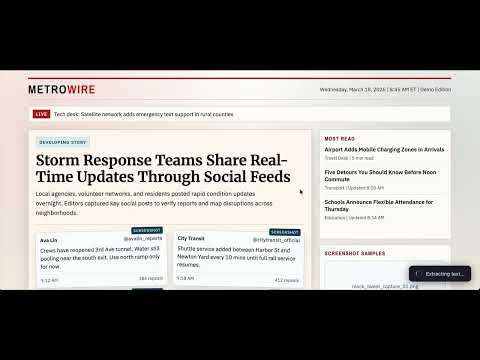
Descripción general
Copy text from any image, screenshot, PDF, or webpage. Draw a rectangle to capture & extract text instantly. Free browser OCR tool.
TextLens – OCR Text Extractor | Copy Text from Images, PDFs & Screenshots Turn any image, PDF, or webpage into editable text instantly with TextLens — a fast, privacy-first OCR (Optical Character Recognition) Chrome extension. Simply select any area on your screen and extract text in seconds. EXTRACT TEXT FROM ANYWHERE ON THE WEB Tired of retyping text from images, screenshots, or PDFs? TextLens makes it effortless: Extract text from images on websites Copy text from PDFs and scanned documents Capture text from videos, canvases, and graphics Works on any webpage with a simple selection Just draw a box around the text — TextLens handles the rest. HOW IT WORKS Activate Click the TextLens icon, right-click and select "TextLens", or press: Ctrl + Shift + O (Windows/Linux) / Cmd + Shift + O (Mac) Select Area Draw a rectangle over the text you want to extract Instant OCR TextLens captures and processes the image locally using advanced OCR engines Copy Text View extracted text in a popup and copy it with one click 100% PRIVACY-FIRST OCR Your data stays on your device. No tracking or data collection Perfect for sensitive documents and secure workflows. MULTI-LANGUAGE SUPPORT Extract text in 25+ languages, including: English, Spanish, French, German, Hindi, Chinese, Japanese, Korean, and more. KEY FEATURES Select and extract text from any screen region Right-click context menu integration Keyboard shortcut support One-click copy to clipboard Fast, accurate, and lightweight Works on Chrome (Manifest V3 compatible) Completely free to use USE CASES Students copying notes from PDFs or slides Developers extracting text from UI screenshots Marketers capturing text from ads or creatives Researchers digitizing scanned documents Anyone who wants to avoid manual typing WHY CHOOSE TEXTLENS? Unlike cloud-based OCR tools, TextLens is fast, private, and works anywhere — even on protected pages and dynamic content. INSTALL TEXTLENS TODAY Save time, boost productivity, and extract text from anywhere with ease. Add TextLens – OCR Text Extractor to Chrome now and start copying text in seconds!
5 de 53 valoraciones
Detalles
- Versión1.0.2
- Actualizado2 de abril de 2026
- Tamaño36.82KiB
- Idiomas19 idiomas
- DesarrolladorAnuj TenaniSitio web
16 Sector 20 Part 1 Huda Sirsa Sirsa, Haryana 125055 INCorreo electrónico
anujtenani@gmail.comTeléfono
+91 95182 12994 - OperadorEste desarrollador se ha identificado como operador según la definición de la Unión Europea y se ha comprometido a ofrecer solo productos o servicios que cumplan las leyes de la UE.
Privacidad

Este desarrollador declara que tus datos:
- No se venden a terceros, excepto en los casos de uso aprobados
- No se usan ni se transfieren para fines no relacionados con la función principal del elemento.
- No se usan ni se transfieren para determinar la situación crediticia ni para ofrecer préstamos.
Ayuda
Si tienes alguna pregunta, sugerencia o problema, visita el sitio de asistencia del desarrollador.