


Overview
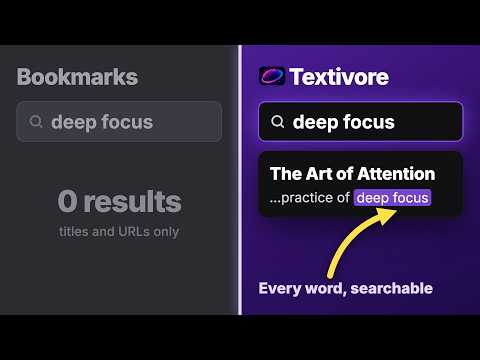
Save articles worth keeping to your reading library: full-text search, tags, and export anytime.
Save articles and web pages to your personal reading list. Textivore extracts the actual content from any page (no ads, no sidebars, no clutter) and keeps it searchable forever. How it works 1. Find something worth reading later 2. Click the Textivore icon (or press Ctrl+Shift+S, Cmd+Shift+S on Mac) 3. Done. It's in your library with full-text search. Right-click on a page to save it from the context menu. What gets extracted - Blog posts and news articles from any site - Medium, Substack, and other publishing platforms - Documentation, tutorials, and long-form writing - Paywalled content you already have access to - Basic support for Reddit threads and X (Twitter) threads Textivore pulls out the content you care about (text, images, code blocks, lists) and drops everything else. Built for people who read a lot If you save more than a few articles a week, you know the problem: bookmarks pile up, tabs stay open for months, and you can never find that one article you read three weeks ago. Textivore fixes that with full-text search across everything you've saved. Your data, your rules - No tracking or analytics on your reading habits - Export your entire library anytime - Privacy policy: https://textivore.com/privacy Works with a free Textivore account at textivore.com.
0 out of 5No ratings
Details
- Version1.3.0
- UpdatedNovember 11, 2026
- Size235KiB
- LanguagesEnglish
- DeveloperYevhenii ViktorovWebsite
Nyvska str, 7 apt. 45 Kyiv, місто Київ 01001 UAEmail
eugeniy.viktorov@gmail.comPhone
+380 99 030 1131 - TraderThis developer has identified itself as a trader per the definition from the European Union and committed to only offer products or services that comply with EU laws.
Privacy

Textivore: Save Articles & Read Later has disclosed the following information regarding the collection and usage of your data. More detailed information can be found in the developer's privacy policy.
Textivore: Save Articles & Read Later handles the following:
This developer declares that your data is
- Not being sold to third parties, outside of the approved use cases
- Not being used or transferred for purposes that are unrelated to the item's core functionality
- Not being used or transferred to determine creditworthiness or for lending purposes
Support
For help with questions, suggestions, or problems, visit the developer's support site