Imagem do logotipo de TextFold

TextFold

Mídia 6 (captura de tela) para TextFold
Miniatura do vídeo do item
Mídia 2 (captura de tela) para TextFold
Mídia 3 (captura de tela) para TextFold
Mídia 4 (captura de tela) para TextFold
Mídia 5 (captura de tela) para TextFold
Mídia 6 (captura de tela) para TextFold
Miniatura do vídeo do item
Mídia 2 (captura de tela) para TextFold
Mídia 3 (captura de tela) para TextFold
Mídia 4 (captura de tela) para TextFold
Mídia 5 (captura de tela) para TextFold
Mídia 6 (captura de tela) para TextFold

Visão geral

Envie a página que você está lendo ao TextFold neste computador, como você a vê, e leia-a em cinco níveis.

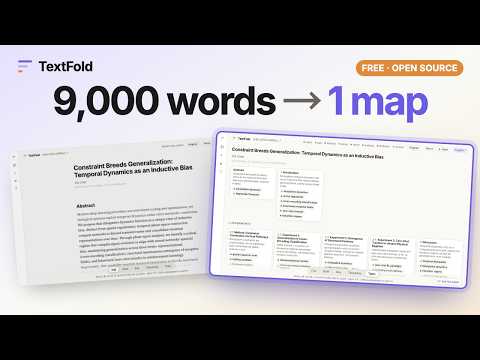
TextFold folds a text into five levels, from a one-screen map to every word. This button sends the page you are reading to TextFold on your computer, as you see it, so that you can read it the same way. What it is for • A long article, a paper on a publisher's site, documentation, a report: send it with one click, read its map first, then open only the parts you need. • The page as your browser shows it: signed in, past a paywall you pay for, drawn by the page's scripts. What you can read, TextFold can read. • The article, not the page around it. Two open-source reading views (Defuddle and Readability) find the article inside your browser, with its headings, figures, formulas, footnotes and references. How it works 1. Install TextFold, the free app for macOS and Windows (https://chenxiachan.github.io/textfold/), and open it once. It connects itself to your browser. Using TextFold from Python instead? Run: python3 -m textfold capture install 2. On any page, click the TextFold button. A ✓ says the page is in your library. When TextFold is running, its reader opens beside the page. 3. Read it at Topic, Takeaway, Key, Brief or Full, in the language you choose. Privacy The extension reads a page only when you click its button, and only in that tab. It hands the page to TextFold on your computer through the browser's native messaging, and to nothing else: no server, no analytics, no tracking. TextFold writes the levels with the AI model you choose in its settings, a model on your computer or a provider you connected with your own key. Privacy policy: https://chenxiachan.github.io/textfold/privacy.html Open source TextFold and this extension are open source under the Apache License 2.0: https://github.com/chenxiachan/textfold

Detalhes

  • Versão
    0.1.0
  • Atualização
    29 de outubro de 2026
  • Tamanho
    360KiB
  • Idiomas
    13 idiomas
  • Desenvolvedor
    Website
    E-mail
    Chatchan92@gmail.com
  • Não negociante
    Esse desenvolvedor não se identificou como comerciante. Caso você seja da União Europeia, observe que os direitos do consumidor não se aplicam a contratos firmados entre você e esse desenvolvedor.

Privacidade

Gerencie extensões e saiba como elas estão sendo usadas na sua organização

TextFold divulgou as informações a seguir sobre a coleta e o uso dos seus dados. Para mais detalhes, consulte estas informações do desenvolvedor: privacy policy.

TextFold processa o seguinte:

Conteúdo do site

O desenvolvedor declara que seus dados

  • Não são vendidos a terceiros, exceto nos casos de uso aprovados
  • Não são usados ou transferidos para fins não relacionados à função principal do item
  • Não são usados ou transferidos para informações de crédito ou empréstimo

Itens relacionados

Certentis – Detector de IA, humanizador e detector de plágio

0,0

Humanize e reescreva texto de IA, confira sinais de IA e plágio. Selecione, clique com o botão direito e o painel lateral abre.

p3n: find the AI in any text

0,0

Select text, right-click, and see whether it reads as AI-written. Rewrite it so it doesn't, without leaving the page.

Wrks AI Browser

0,0

Reads the page you are on and does the clicking and typing for you, driven by the Wrks AI Desk app on your computer.

Hidden Text Scanner

0,0

Reveal text on a page that people can't see but AI tools can read: hidden text, invisible characters and prompt injections.

ReadFollow: Texto para fala e destaque de palavras

0,0

Lê texto em voz alta e destaca cada palavra na página conforme é falada. Funciona em sites e PDFs, offline ou com vozes online.

Quetext: AI Content Detector & Plagiarism Checker

4,8

Check any text for plagiarism and AI-written content. Highlight text on any page, scan text, and get results without switching tabs.

Pyramid Reader

0,0

Read the conclusion first, then open only the levels you need: claims, evidence, the sentence on the page.

Explain AI - Explain anything in its context

4,5

Highlight text on any page, click the soft underline, and get a short explanation that uses the page around it.

Textumi: Detector de IA e Humanizer

5,0

Verifique sinais de escrita por IA em qualquer página e reescreva o texto em um estilo natural e humano que preserva os seus fatos.

Read My Page

0,0

Ouça qualquer página da web com vozes naturais e a palavra falada destacada na própria página.

WebNarrator

0,0

Select text on any page and have it read aloud.

Kavalu - AI Learning Assistant

0,0

Understand what you read, right beside the page.

Certentis – Detector de IA, humanizador e detector de plágio

0,0

Humanize e reescreva texto de IA, confira sinais de IA e plágio. Selecione, clique com o botão direito e o painel lateral abre.

p3n: find the AI in any text

0,0

Select text, right-click, and see whether it reads as AI-written. Rewrite it so it doesn't, without leaving the page.

Wrks AI Browser

0,0

Reads the page you are on and does the clicking and typing for you, driven by the Wrks AI Desk app on your computer.

Hidden Text Scanner

0,0

Reveal text on a page that people can't see but AI tools can read: hidden text, invisible characters and prompt injections.

ReadFollow: Texto para fala e destaque de palavras

0,0

Lê texto em voz alta e destaca cada palavra na página conforme é falada. Funciona em sites e PDFs, offline ou com vozes online.

Quetext: AI Content Detector & Plagiarism Checker

4,8

Check any text for plagiarism and AI-written content. Highlight text on any page, scan text, and get results without switching tabs.

Pyramid Reader

0,0

Read the conclusion first, then open only the levels you need: claims, evidence, the sentence on the page.

Explain AI - Explain anything in its context

4,5

Highlight text on any page, click the soft underline, and get a short explanation that uses the page around it.

Pesquisa
Limpar pesquisa
Fechar pesquisa
Google Apps
Menu principal