Medienelement 6 (Screenshot) für TextFold
Videominiaturansicht des Artikels
Medienelement 2 (Screenshot) für TextFold
Medienelement 3 (Screenshot) für TextFold
Medienelement 4 (Screenshot) für TextFold
Medienelement 5 (Screenshot) für TextFold
Medienelement 6 (Screenshot) für TextFold
Videominiaturansicht des Artikels
Medienelement 2 (Screenshot) für TextFold
Medienelement 3 (Screenshot) für TextFold
Medienelement 4 (Screenshot) für TextFold
Medienelement 5 (Screenshot) für TextFold
Medienelement 6 (Screenshot) für TextFold

Übersicht

Schicke die Seite, die du liest, so wie du sie siehst, an TextFold auf diesem Computer und lies sie in fünf Stufen.

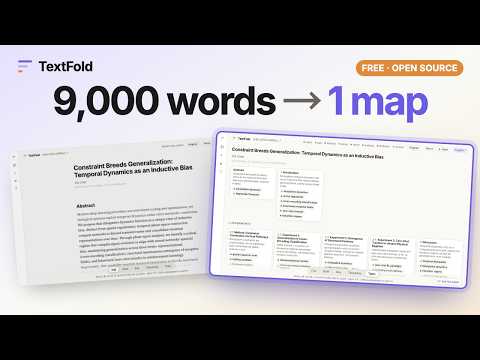
TextFold folds a text into five levels, from a one-screen map to every word. This button sends the page you are reading to TextFold on your computer, as you see it, so that you can read it the same way. What it is for • A long article, a paper on a publisher's site, documentation, a report: send it with one click, read its map first, then open only the parts you need. • The page as your browser shows it: signed in, past a paywall you pay for, drawn by the page's scripts. What you can read, TextFold can read. • The article, not the page around it. Two open-source reading views (Defuddle and Readability) find the article inside your browser, with its headings, figures, formulas, footnotes and references. How it works 1. Install TextFold, the free app for macOS and Windows (https://chenxiachan.github.io/textfold/), and open it once. It connects itself to your browser. Using TextFold from Python instead? Run: python3 -m textfold capture install 2. On any page, click the TextFold button. A ✓ says the page is in your library. When TextFold is running, its reader opens beside the page. 3. Read it at Topic, Takeaway, Key, Brief or Full, in the language you choose. Privacy The extension reads a page only when you click its button, and only in that tab. It hands the page to TextFold on your computer through the browser's native messaging, and to nothing else: no server, no analytics, no tracking. TextFold writes the levels with the AI model you choose in its settings, a model on your computer or a provider you connected with your own key. Privacy policy: https://chenxiachan.github.io/textfold/privacy.html Open source TextFold and this extension are open source under the Apache License 2.0: https://github.com/chenxiachan/textfold

Details

  • Version
    0.1.0
  • Aktualisiert
    29. Oktober 2026
  • Größe
    360KiB
  • Sprachen
    13 Sprachen
  • Entwickler
    Website
    E-Mail
    Chatchan92@gmail.com
  • Kein Händler
    Dieser Entwickler hat sich nicht als Händler deklariert. Für Verbraucher in der Europäischen Union gelten die Verbraucherrechte nicht für Verträge, die zwischen dir und diesem Entwickler geschlossen werden.

Datenschutz

Erweiterungen verwalten und Informationen zur Verwendung in deiner Organisation abrufen

TextFold hat folgende Informationen hinsichtlich der Erhebung und Nutzung deiner Daten offengelegt. Weitere Details findest du im privacy policy des Entwicklers.

TextFold verarbeitet Folgendes:

Websitecontent

Dieser Entwickler erklärt, dass deine Daten

  • nicht an Dritte verkauft werden, außer in den genehmigten Anwendungsfällen
  • nicht für Zwecke genutzt oder übertragen werden, die nichts mit der Hauptfunktionalität des Artikels zu tun haben
  • nicht zur Ermittlung der Kreditwürdigkeit oder für Darlehenszwecke verwendet oder übertragen werden

Ähnliche

Certentis – AI Detector, Humanizer & Plagiatsprüfung

0,0

KI-Texte humanisieren, mit dem KI-Detektor einordnen und auf Plagiate prüfen – per Rechtsklick direkt in der Seitenleiste.

p3n: find the AI in any text

0,0

Select text, right-click, and see whether it reads as AI-written. Rewrite it so it doesn't, without leaving the page.

Wrks AI Browser

0,0

Reads the page you are on and does the clicking and typing for you, driven by the Wrks AI Desk app on your computer.

Hidden Text Scanner

0,0

Reveal text on a page that people can't see but AI tools can read: hidden text, invisible characters and prompt injections.

ReadFollow: Text-zu-Sprache mit Wort-Hervorhebung

0,0

Liest Text vor und hebt jedes gesprochene Wort auf der Seite hervor. Für Webseiten und PDFs, offline oder mit Online-Stimmen.

Quetext: AI Content Detector & Plagiarism Checker

4,8

Check any text for plagiarism and AI-written content. Highlight text on any page, scan text, and get results without switching tabs.

Pyramid Reader

0,0

Read the conclusion first, then open only the levels you need: claims, evidence, the sentence on the page.

Explain AI - Explain anything in its context

4,5

Highlight text on any page, click the soft underline, and get a short explanation that uses the page around it.

Textumi: KI-Detektor & Humanizer

5,0

Prüfe Text auf jeder Seite auf Anzeichen von KI und überarbeite ihn natürlich und menschlich – deine Fakten bleiben erhalten.

Read My Page

0,0

Hören Sie jede Webseite mit natürlichen Stimmen — das gelesene Wort wird auf der Seite markiert.

WebNarrator

0,0

Select text on any page and have it read aloud.

Kavalu - AI Learning Assistant

0,0

Understand what you read, right beside the page.

Certentis – AI Detector, Humanizer & Plagiatsprüfung

0,0

KI-Texte humanisieren, mit dem KI-Detektor einordnen und auf Plagiate prüfen – per Rechtsklick direkt in der Seitenleiste.

p3n: find the AI in any text

0,0

Select text, right-click, and see whether it reads as AI-written. Rewrite it so it doesn't, without leaving the page.

Wrks AI Browser

0,0

Reads the page you are on and does the clicking and typing for you, driven by the Wrks AI Desk app on your computer.

Hidden Text Scanner

0,0

Reveal text on a page that people can't see but AI tools can read: hidden text, invisible characters and prompt injections.

ReadFollow: Text-zu-Sprache mit Wort-Hervorhebung

0,0

Liest Text vor und hebt jedes gesprochene Wort auf der Seite hervor. Für Webseiten und PDFs, offline oder mit Online-Stimmen.

Quetext: AI Content Detector & Plagiarism Checker

4,8

Check any text for plagiarism and AI-written content. Highlight text on any page, scan text, and get results without switching tabs.

Pyramid Reader

0,0

Read the conclusion first, then open only the levels you need: claims, evidence, the sentence on the page.

Explain AI - Explain anything in its context

4,5

Highlight text on any page, click the soft underline, and get a short explanation that uses the page around it.

Suche
Suche löschen
Suche schließen
Google-Apps
Hauptmenü