Item logo image for Text Transformer

Text Transformer

5.0(

1 rating

)
Item media 2 (screenshot) for Text Transformer
Item video thumbnail
Item media 2 (screenshot) for Text Transformer
Item video thumbnail
Item media 2 (screenshot) for Text Transformer

Overview

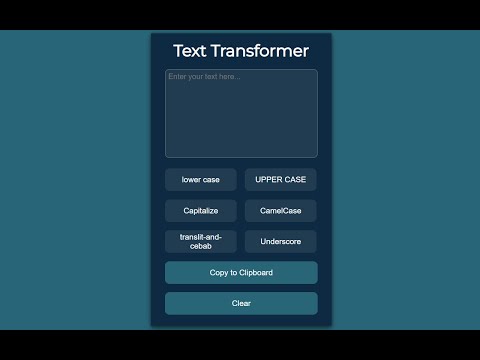
This extension changes the case of the text. Insert the text, click the desired case and copy it to the clipboard.

Text Transformer is a handy Chrome extension that quickly converts text case and performs transliteration. 🔹 Key Features: ✅ Change text case (uppercase, lowercase, title case) ✅ Transliterate text (convert Cyrillic to Latin) ✅ Quick copy to clipboard ✅ Minimalistic and user-friendly interface 🔹 Why Use Text Transformer? ✍ Speeds up text formatting 🚀 Simple to use – no unnecessary features 🔒 Does not require access to your data 🔹 How to Use? 1️⃣ Insert text into the input field 2️⃣ Choose the desired transformation 3️⃣ Click the button to copy the result 📌 Fully local – does not send data over the internet. Install Text Transformer and simplify your text editing today!

Details

  • Version
    1.0
  • Updated
    March 15, 2025
  • Size
    13.63KiB
  • Languages
    English
  • Developer
    Email
    sgt.suhoff@gmail.com
  • Non-trader
    This developer has not identified itself as a trader. For consumers in the European Union, please note that consumer rights do not apply to contracts between you and this developer.

Privacy

The developer has disclosed that it will not collect or use your data.

This developer declares that your data is

  • Not being sold to third parties, outside of the approved use cases
  • Not being used or transferred for purposes that are unrelated to the item's core functionality
  • Not being used or transferred to determine creditworthiness or for lending purposes

Related

TextWidth Converter

5.0

TextWidth Converter quickly converts highlighted text between half-width and full-width characters with a single click.

Plain text converter

0.0

Use this tool to paste without formatting — convert copied content and paste as plain text anywhere with one click.

Free Auto Text Expander

2.8

Create custom keyboard shortcuts to expand and replace text as you type!

TransPlace

0.0

Input box translation replacement & Text selection translation

Russian Transliterator

4.0

Phonetically convert Latin characters to Cyrillic – in the popup or on any page after you click the extension icon.

Simple Search and Replace

3.3

Extension to search and replace text in input and textarea tags

TextBoost-AI

5.0

Right-click in any editable field to rewrite, summarize, or expand text using AI.

Easy Text Change

1.0

Easily edit text on any webpage with a simple right-click.

Convert Case

4.3

Convert text in your browser between UPPER CASE, lower case and more

Unicode Text Converter

0.0

Convert text into Unicode styles.

Change Case

3.0

Change the case of selected text

20Q Text Converter with AI

5.0

Enhance text editing: remove accents, filter characters, replace spaces, substitute strings, adjust text case and more.

TextWidth Converter

5.0

TextWidth Converter quickly converts highlighted text between half-width and full-width characters with a single click.

Plain text converter

0.0

Use this tool to paste without formatting — convert copied content and paste as plain text anywhere with one click.

Free Auto Text Expander

2.8

Create custom keyboard shortcuts to expand and replace text as you type!

TransPlace

0.0

Input box translation replacement & Text selection translation

Russian Transliterator

4.0

Phonetically convert Latin characters to Cyrillic – in the popup or on any page after you click the extension icon.

Simple Search and Replace

3.3

Extension to search and replace text in input and textarea tags

TextBoost-AI

5.0

Right-click in any editable field to rewrite, summarize, or expand text using AI.

Easy Text Change

1.0

Easily edit text on any webpage with a simple right-click.

Google apps