


Prehľad
A text to speech tool with natural sounding voices.
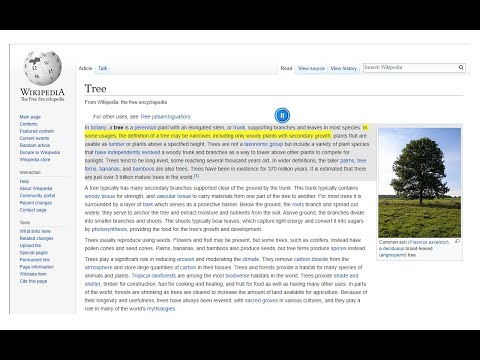
Text to Speech (TTS) is a text-to-speech extension with natural-sounding voices by using two different TTS engines. The 1st engine is the HTML5 native web speech API for speech synthesis. It is active in all modern browsers by default (more info: https://webaudio.github.io/web-speech-api/). The 2nd API is the Kokoro AI engine, which uses a new artificial intelligence method to synthesize text (more info: https://huggingface.co/onnx-community/Kokoro-82M-v1.0-ONNX). Please note that when you choose Kokoro AI, the app needs to download training data (~300MB) for the AI engine. So please be patient while the app is loading. You can use this extension in a standalone interface or within web pages. If you press the toolbar button, the first interface opens up where you can enter the desired text for TTS. On the other hand, within a webpage, once you select a text, a placeholder speaker icon appears. Once you click the speaker icon, the text-to-speech starts. For the highlight feature to work correctly, please select text paragraph by paragraph. Please note that the highlight feature is still in Beta and may not work properly on all websites. There are also a few options related to the in-page text-to-speech, which can be adjusted from the extension settings page. Note 1: For TTS in webpages, the app only uses the Web Speech API. Kokoro AI engine is only available within the standalone interface. Note 2: Kokoro AI engine, once loaded, can work fully offline. Moreover, you can save the output TTS audio as a .wav file to your machine. When text-to-speech is completed, please press the audio icon on the right toolbar. To report Bugs, please visit the addon's homepage (https://mybrowseraddon.com/text-to-speech.html) and fill out the bug report form.
3,1 z 533 hodnotení
Podrobnosti
- Verzia0.2.9
- Aktualizované20. októbra 2025
- Od vývojáraSevina
- Veľkosť5.77MiB
- JazykyEnglish
- Vývojár
E-mail
sevina.lucia@gmail.com - Neobchodný subjektTento vývojár sa neidentifikoval ako obchodník. Upozorňujeme, že práva spotrebiteľov v Európskej únii sa nevzťahujú na zmluvy uzavreté medzi vami a týmto vývojárom.
Ochrana súkromia

Tento vývojár vyhlasuje, že vaše údaje:
- sa nepredávajú tretím stranám mimo schválených prípadov použitia,
- sa nepoužívajú ani neprevádzajú na účely, ktoré nesúvisia so základnou funkciou položky,
- sa nepoužívajú ani neprevádzajú na zisťovanie úverovej bonity ani na účely poskytovania úverov.
Podpora
Ak máte otázky, návrhy alebo problémy, pomoc nájdete na webe podpory vývojára.